


P: Duotone curves incorrectly played back in actions recorded
When an action is recorded in Photoshop CC or CC 2014 the mode change to duotone is always defined as a description of duotone ink and transfer points. Even when loading a duotone preset while recording. We have to go back to Photoshop CS5 to record an action defined as a link to a duotone preset.
The problem is when an action with the description of Duotone transfer points is played back only the first 5 transfer points are used for each curve. All the transfer points past the fifth are set to null, including 100. Also transfer points that are equal, like Value: 50 - Response: 50, are not recorded at all. That is a problem because equal value transfer points like that are used along with other transfer points to set the slope of curves. They can't just be ignored.
I have examples of the correct duotone curves and the results when playing it back from an action. You can see that only the first five transfer points are correct and the rest are set to null, including 100 which is reset to 100. This is easily repeatable. Please contact me for more info. Thank you. 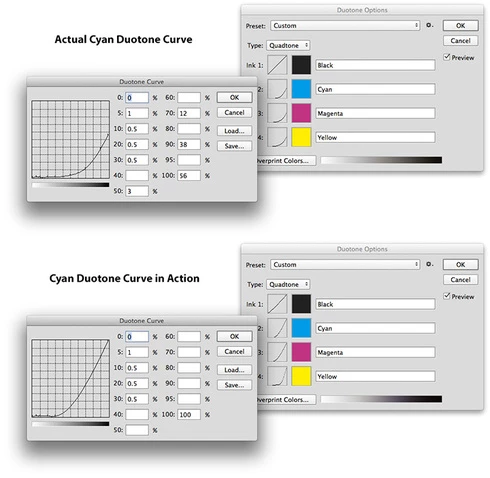
 AdChoices