


Legend
April 29, 2020

P: Duplicating floating layer to new doc flattens the layer

  • April 29, 2020
  • 13 replies
  • 505 views

Create a document with only one layer, not background.
Fill the layer with gray, for example.
Take an eraser and wipe a large blurred hole in the center.
Select from the layer menu: Duplicate layer to new file.

The layer is duplicated flattened and, moreover, it is not correctly flattened.
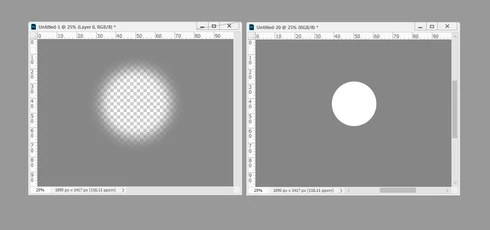


Is this a known issue?

This topic has been closed for replies.

13 replies

Legend
July 15, 2020
This issue was fixed in 21.2.
DavD
Known Participant
May 7, 2020
When I follow your video example, my final image has an inside dissolve effect?  V21.1.2  This is with the Duplicate layer over the original and "Difference" Blend mode applied.
Legend
May 7, 2020
Oops. I take that back. Looks like it was working at least back in CS6. I'll see if I can track it down to a specific release. 
Legend
May 7, 2020
That's weird. I can reproduce it but it looks like a long-standing behavior with an easy workaround. I can log it but it falls into the category of "Doctor it hurts when I do 'x'..." so it would be pretty low priority to tackle.
r-binAuthor
Legend
May 6, 2020
UP
r-binAuthor
Legend
May 1, 2020
If steps for reproduction are not clear, here is a video

https://yadi.sk/i/Xq4cmbLxTysipA

r-binAuthor
Legend
April 30, 2020
This behavior breaks the script for clearing metadata in a saved file.

Duplicate a document with a merge into a new document.
Duplicate a layer from this file to a new document. Saving a file without garbage in metadata and others.


c.pfaffenbichler
Community Expert
Community Expert
April 30, 2020
With a Layer behind the duplicated Layer: 

With the duplicated Layer as the lowermost Layer: 
c.pfaffenbichler
Community Expert
Community Expert
April 30, 2020
It seems the flattening only happens if the duplicated Layer is the lowermost one! 
c.pfaffenbichler
Community Expert
Community Expert
April 30, 2020
Your description seems accurate, the color is irrelevant, though. (see screenshots)