


Legend
April 29, 2020

P: Duplicating floating layer to new doc flattens the layer

  • April 29, 2020
  • 13 replies
  • 513 views

Create a document with only one layer, not background.
Fill the layer with gray, for example.
Take an eraser and wipe a large blurred hole in the center.
Select from the layer menu: Duplicate layer to new file.

The layer is duplicated flattened and, moreover, it is not correctly flattened.
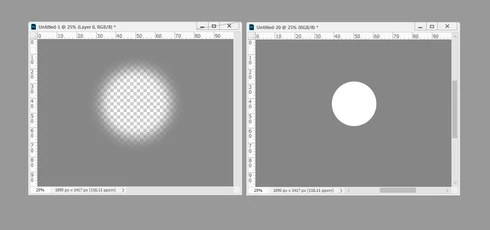


Is this a known issue?

This topic has been closed for replies.

13 replies

Participating Frequently
April 30, 2020
I got the same results you did—then I tested it again only this time I added a transparent layer to the original and it worked fine:

Example 1:


Example 2:


So it looks like you have to have 2 layers in order duplicate your gray layer to a new file.
David Mohr
Participating Frequently
April 30, 2020
Hey Christoph and r-bin,
Maybe I'm reading this bug incorrectly, because I'm NOT seeing a problem on Mac 21.1.2.  Let me try to explicitly layout the steps:

1) launch PS and create a new, default-sized document
2) change the Background layer to a regular layer, but you still have a single-layer document
3) fill this single layer with gray
4) erase a hole in the layer
5) click Select > Duplicate Layer and then under Document choose "new" with any file name

I'm seeing two identical single layer files.  And when I copy one onto the other and set the layers as difference, I'm not seeing any issues.  What did I do differently?
Thanks,David
c.pfaffenbichler
Community Expert
Community Expert
April 30, 2020
I can reproduce that, the New File is flattened. (21.1.2 on macOS 10.15.3)
This is irrelevant to me personally but I appreciate that the result seems unexpected and unintended.