


Participant
July 30, 2021

P: Error opening smart object in a cloud document

  • July 30, 2021
  • 10 replies
  • 14093 views

Hi guys!


After the last update I can't open and edit the contents inside a smart object, but this is only happening with a cloud document, when I use a local .psd file it works normally. I know it is possible to convert the object to layers, however this isn't helpful when there is a lot of links or scale and others distortions.


Does anyone know how can fix this still working with cloud files?


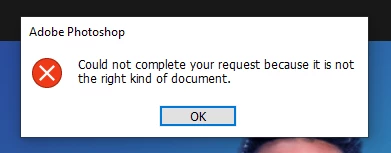
The message that appears is this one: "Could not complete your request because it is not the right kind of document."
 

{Edited title - PS-70456}

10 replies

Mohit Goyal
Community Manager
Community Manager
October 26, 2021

Hi all,


We're happy to announce the MAX 2021 release of Photoshop 23.0. This update includes the fix for this issue. To see the list of all fixed issues, click here


To update Photoshop to 23.0, click "Update" in the Creative Cloud desktop app next to Photoshop. More detailed instructions for updating


Let us know if the update resolves the problem for those affected and share your feedback with us.


Thanks,

Mohit

Nicolauspaus
Participant
September 14, 2021

already update to 25.5 still get issue

Mohit Goyal
Community Manager
Community Manager
September 14, 2021

Hi all,


We're happy to announce the release of Photoshop 22.5.1 which includes the fix for this issue. Check the list of other fixed issues here


To update Photoshop to 22.5.1, click "Update" in the Creative Cloud desktop app next to Photoshop. More detailed instructions for updating


Please feel free to share your feedback with us.

Thanks,

Mohit

Participant
September 9, 2021

When I double click on icon of Smart object, it often (in 80% cases) claims that it's "not the right kind of document". Still the content is available if i convert it to layers. But its so inconvenient and time consuming. Please fix the bug!


D Fosse
Community Expert
Community Expert
September 9, 2021

Check file associtions in the operating system. PSB must be set to open in Photoshop.

Legend
August 27, 2021

Thanks for the report. Engineering is investigating this issue.

Participant
August 23, 2021

Helloe everyone,


I've search as well as I can but cannot find an answer to my problem, so I apologize in advance if someone else already posted this before.


I've been having some trouble for a while with smart objects when saving to the cloud.

While working on the computer and saving files locally there's no problem with smart objects, but when saving to the cloud, closing the file and opening again (usually) results in this error when trying to open the smart object and replacing the contents:

The thing is, I can get it "fixed" if I turn the smart object into a smart object again...but then I end up having multiple smart object inside of smart objects, because every time I save the file, the same thing happens again and again.


I was told once by Adobe support that the problem was that my HDD was faulty and that's what had causing the problem, but this is happening on a brand new computer, and I've tested it on other computers as well (All in Windows)


¿Does anyone know what might be happening?

Thanks in advance for any help


Participant
August 26, 2021

v 22.4.2 is working for me, I'm staying there until this bug gets fied 🙂

Participant
August 11, 2021

I just uninstalled photoshop and reinstalled and older version of photoshop before the 22 update - the  21.2.10 version and the smart object feature is working again. Works as a temporary fix until it gets sorted on the update hopefully!

Participant
August 22, 2021

thank you so much, this hopefully will save me! i rely a lot on smart objects and I was going nuts!!

Participant
August 11, 2021

Getting the same error, I have 100s of mockups with smart objects that I can use - really hoping there is a fix for this!

Participant
August 3, 2021

Same to me. Please fix it, I can't use my mockups 😞 

Participant
July 31, 2021

I'm getting the same error. But if I save the PSD to my local drive and reopen it, smart object works fine.

Participant
August 2, 2021

The same happens too when you save a local file to cloud, the smart object stops working.