Inspiring
February 23, 2022

P: Export as 8-bit PNG issue

  • February 23, 2022
  • 65 replies
  • 14927 views

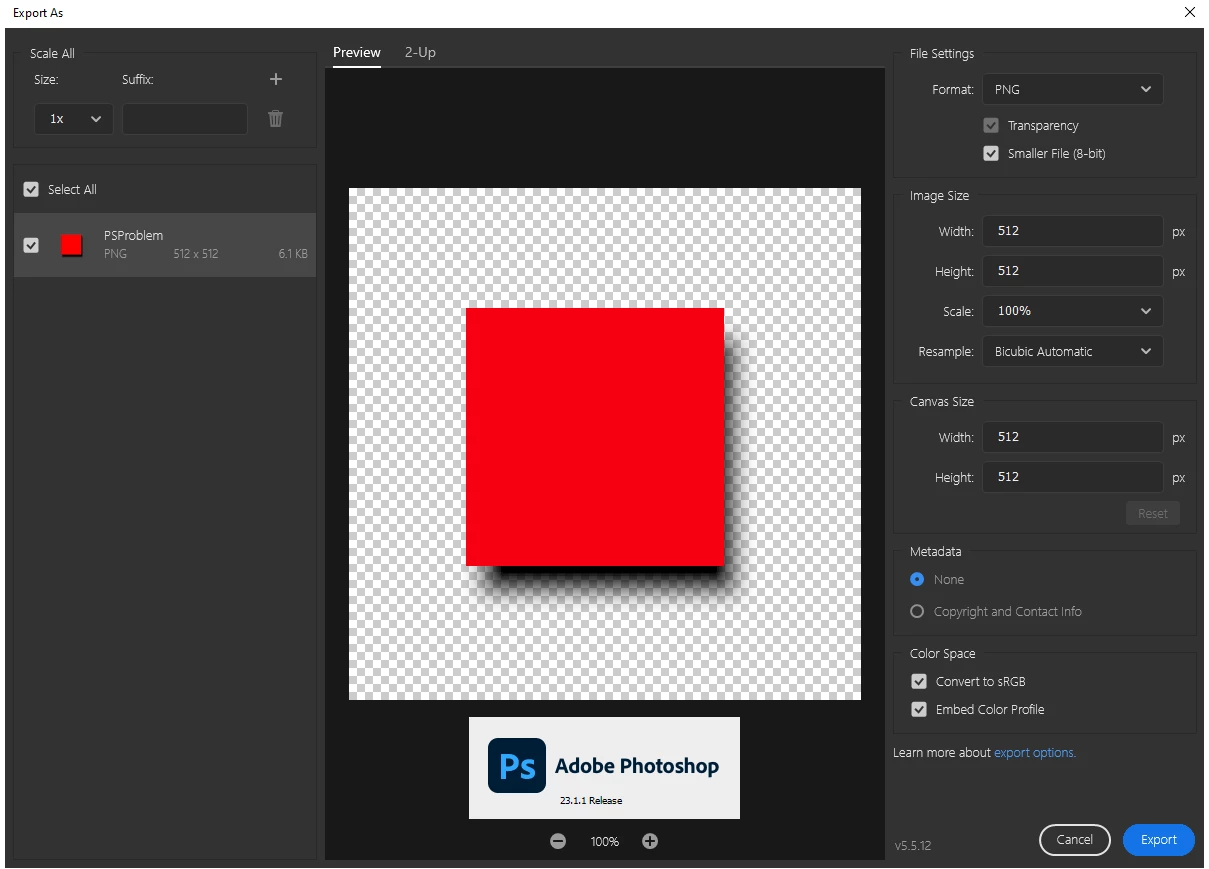
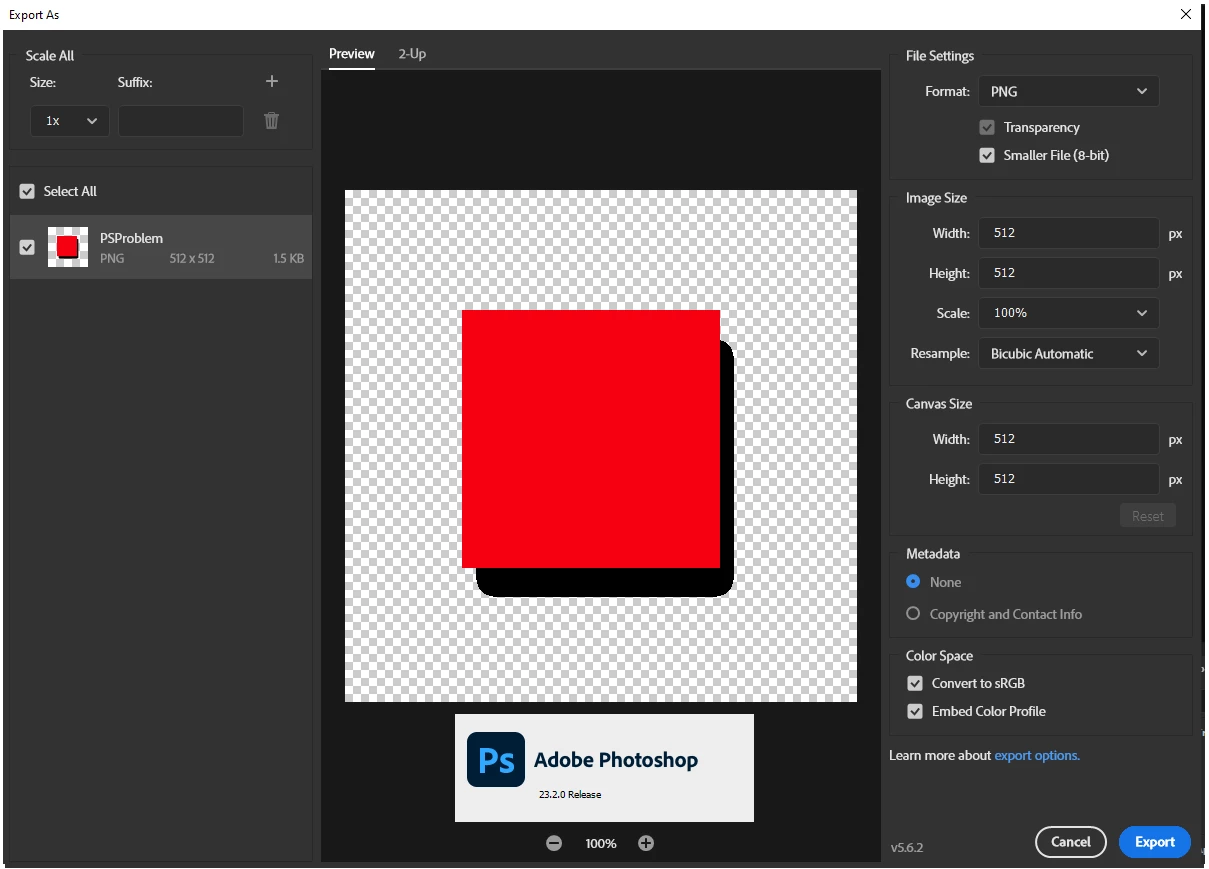
When using the export as dialog the 8-bit (smaller file) is no longer functioning first screen shot is the Export as dialog in PS 23.1.1 Second is same file and same dialog in 23.2.0

65 replies

Participant
July 18, 2022

I too, spent 30 mins looking for a solution to this sudden issue of Photoshop messing up the PNG8 exports.  Another vote to fix this and restore back to how it was.  Re-opening these exported PNG8's back into Photoshop should never have been a consideration and now something very critical to web developers everywhere is now broken.  Life was so much easier/better with Fireworks, which still produced better exports (without the expensive monthly subscription).

Participating Frequently
July 13, 2022

@SecretSecret I do not know if one can put it more precise than you have done.


I also Do not get the point of those who say that the removal of the function is normal and that we are stupid or incompitent for not enjoying it.


It took me a while to figure out what happened, how to look for it and how to fix it. So I spend about 30-40 minutes looking for a solution. The problem is that I am not getting paid by Adobe to be a Beta user.

Participating Frequently
July 12, 2022

Firstly, thanks to @BrettN for engaging with this conversation. It's far better than being ignored by Adobe. I'm sure we all can agree we really appreciate you responding.

Let me make another argument using terms that a developer like yourself should understand.

I'm sure you're familiar with SOLID Principles, and in particular the "Open–closed principle", which states that "software entities should be open for extension, but closed for modification". Think of your users' workflows as being APIs interfacing with PhotoShop.

Adobe has modified an entity instead of extending it. It doesn't matter if this was a "mistake" -- SOLID does not have exceptions for mistakes. That's the whole point.

The bottom line is that this feature falls within the official PNG specification (as has been pointed out several times already), is essential for millions of web developers and game designers, and has been part of our workflows for the best part of a decade.

Whether it was a mistake or not, is irrelevant, our workflows have been disrupted.

BrettN
Community Manager
Community Manager
July 12, 2022

This capability would have first appeared in Photoshop when Export As was added to Photoshop, which was indeed years ago. Our intention was for "Smaller File" to do the exact same thing as "PNG-8" (with "Transparency" on) in Save for Web. With Export As, we weren't making changes to address feature requests for more Fireworks-like operations, we were building a UI for Generator, which offers fewer controls and is a bit of a black box in terms of file handling. We didn't know PNG-8s were coming out different since we weren't looking for it. If it takes a 3rd-party tool to verify a characteristic, we didn't put it there deliberately and it is not supported. We also didn't know this setting had been picked up by a particular community of users as a necessary workflow. The first users who found this would have had to do so accidentally. But once they knew of it, the information spread from user to user, such as through the forum posts. 


I agree that we should be adding more options to support features like this in Export As. However, our first priority is to make sure outcomes match what we planned: even if unexpected behavior is beneficial, it is ultimately undesirable. 

ethan.starkweather
Participating Frequently
July 7, 2022

@rayek.elfin Thank you for taking the time to write up that fantastic summary of the present state of this discussion. It's comprehensive and fair-minded.


While I sympathize with Adobe's principle that an app should be able to open any given file that it can output, there are plenty of formats that are suitable for final delivery and deployment, that aren't suitable for reopening and editing. And I can't say that an indexed color file of any type is particularly useful for editing in most cases without first converting to RGB anyway.


It's also worth noting a major exception to this principle that springs to mind: the PDF. A PDF exported from InDesign can't be reopened by InDesign, and users (tend to) understand this limitation and adapt their workflows accordingly. Indeed, in that case the limitation is desirable because it encourages best practices.

rayek.elfin
Legend
July 7, 2022

@Jeff Arola 

quote

What some users believe to be 8 bit png alpha Semi transparency in the old Export As

was in reality just png-32 as explained by BrettN. It was a mistake in the coding.

I did some testing, and this does not seem to be true, actually.

Here a fully transparent 24bit + 8bit alpha version:

When I save with these settings in PS 2022:


The result is a 32bits per pixel version:


When the same file is exported with "Smaller File (8-bit)":


The result is an 8bit version with full transparency:


If the developers' assertion were true that the earlier Photoshop releases were merely exporting 32bit (24bit + 8bit alpha) PNG files, it would show up like this (done in Color Quantizer with forced RGB):


Which, as far as I can tell, entirely disproves that PS2022 exports a 32bit version instead of a 8bit version with full transparency.


The ONLY justification why it was decided to artificially limit the new PNG export is for one reason:


In the larger context, while the PNG spec supports Alpha in Index, Photoshop does not.

[...]

if you open such a file in Photoshop, it is not able to maintain this structure and simply converts it to an RGB file. 

[...]

But full support for Alpha Indexed PNGs in Photoshop is a larger consideration than just Export As and involves the larger development organization.

[..]

This capability appearing in Export As was accidental added when developing the tool using newer APIs. We did not purposely add this as a feature. When we discovered that files you create with specific settings were not reopening in Photoshop with those same settings (Index files opening as RGB files), we corrected the behavior to what we indended, which is to match what Save for Web does. 


Simply stated, because Photoshop opens these 8bit fully transparent PNG files as RGB files instead of the 'proper' indexed image mode they thought it best to avoid confusing users (side note: no rational thinking user ever flagged this as an issue - quite the opposite! Everyone loved the new modernized PNG export!) and to degrade the export in order to ensure that indexed files generated in Photoshop are always opened in indexed image mode.


I will leave it to you, the reader, to decide whether you agree with the rationale behind this and making the lives of every web developer/frontend designer/game developer just that bit harder and more frustrating. 🙂


Jeff Arola
Community Expert
Community Expert
July 6, 2022

Photoshop has never supported 8 bit png with alpha Semi transparency

(Semi-transparency like Adobe Fireworks can do with 8 bit pngs)


Photoshop does support 8 bit png with transparency, buts it's only 8 bit Indexed Transparency

meaning the edges are hard, not semi transparent, same as what Save For Web has always had

that was introduced in photoshop 5.5


What some users believe to be 8 bit png alpha Semi transparency in the old Export As

was in reality just png-32 as explained by BrettN. It was a mistake in the coding.


Test it for yourself and post examples to show that it's 8 bit with Semi alpha transparency.

Participating Frequently
July 6, 2022

@BrettN This feature has been in Photoshop for years. I have been a web developer for 20+ years. Believe it or not, it was added when Export was upgraded from the old interface (that can still be seen in "Save for Web (Legacy)"). Before then people complained that Adobe Fireworks supported PNG-8 transparency (remember that?), and they wanted it in Photoshop, too. Eventually, mercifully, we got it.

Think I might be wrong? Here's a question 2011 discussing this, and an answer from 2015, when this feature was finally added to PhotoShop:

https://superuser.com/questions/284931/is-there-any-way-to-save-a-png-8-file-with-alpha-transparency-in-photoshop


This wasn't a recent "mistake" that was accidentally turned on, it's been in place for years -- since at least 2015. The support for indexed alpha transparency is the sole reason that PNGs overtook GIFs in the web world, because otherwise their specs are the same.


This change is seriously affecting web developers across the world, especially those who work in HTML5 adverts where every byte counts.

Known Participant
June 14, 2022

I've created an idea thread about this as recommended by @BrettN, though I focused more around re-adding the old version of the function as a new non-legacy option rather than adding the transparency capabilities to actual Index PNGs, since that is all I need.
I did mention that though, and said that I believe both should be available, but that they should go ahead and readd the existing function to export settings too.

https://community.adobe.com/t5/photoshop-ecosystem-ideas/restore-old-png-8-export-transparency-function-as-a-new-option/idi-p/13004208#M14838

BrettN
Community Manager
Community Manager
June 13, 2022

@SecretSecret I am on the development team that works on Export As within Photoshop, but I am not the decision maker, I'm just reporting on the information I have regarding the matter. In the larger context, while the PNG spec supports Alpha in Index, Photoshop does not. You cannot create such files through other means such as Save As PNG or the older Save for Web. Further, if you open such a file in Photoshop, it is not able to maintain this structure and simply converts it to an RGB file. 


This capability appearing in Export As was accidental added when developing the tool using newer APIs. We did not purposely add this as a feature. When we discovered that files you create with specific settings were not reopening in Photoshop with those same settings (Index files opening as RGB files), we corrected the behavior to what we indended, which is to match what Save for Web does. 


Export As is under current developement and we are planning on adding new features to it, such as additional transparency controls. But full support for Alpha Indexed PNGs in Photoshop is a larger consideration than just Export As and involves the larger development organization. It would likely be helpful to make sure a secondary post exists requesting the ability to open, edit, and save such files from Photoshop. This way upvoting can happen there as well to make sure more of the org is aware everyone's interest in this feature so we can have a comprehensive feature set around this particular file spec.