Inspiring
February 23, 2022

P: Export as 8-bit PNG issue

  • February 23, 2022
  • 65 replies
  • 14927 views

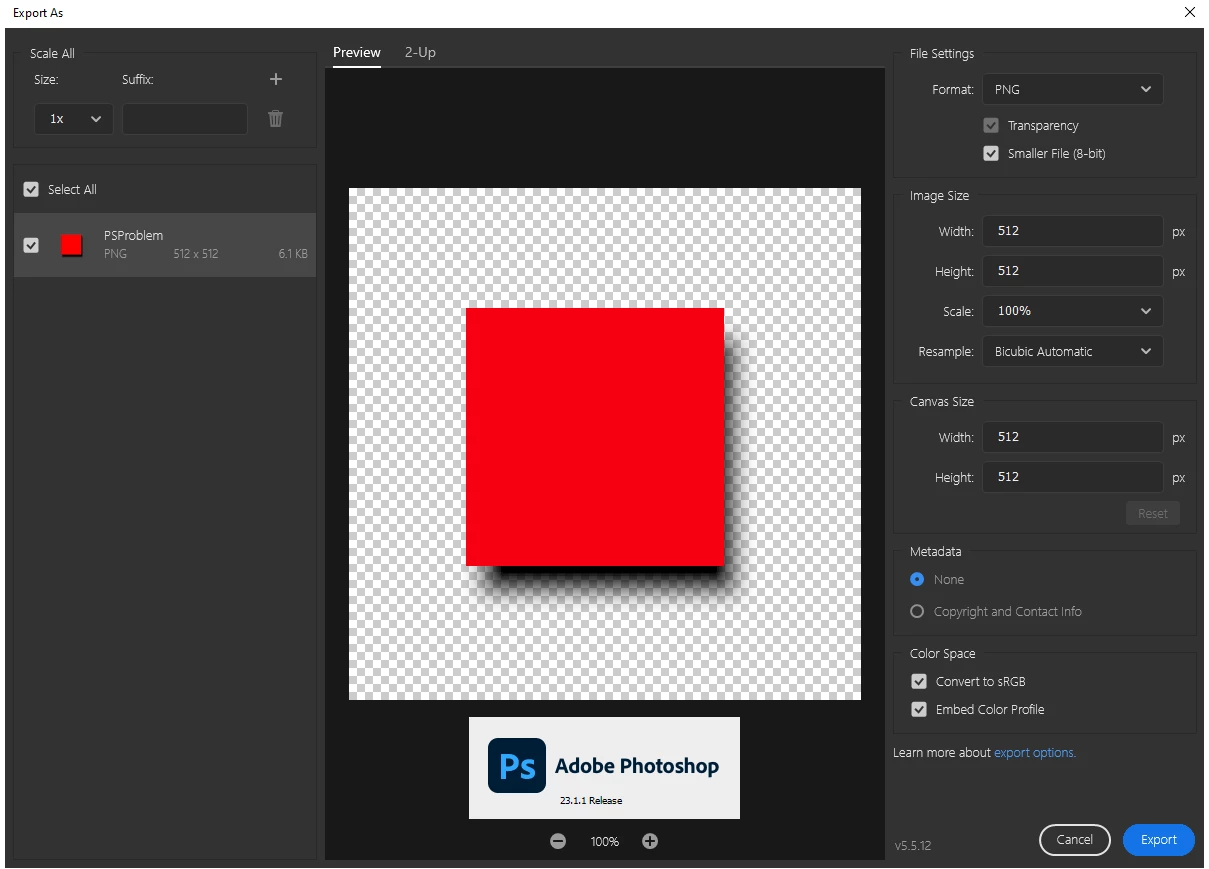
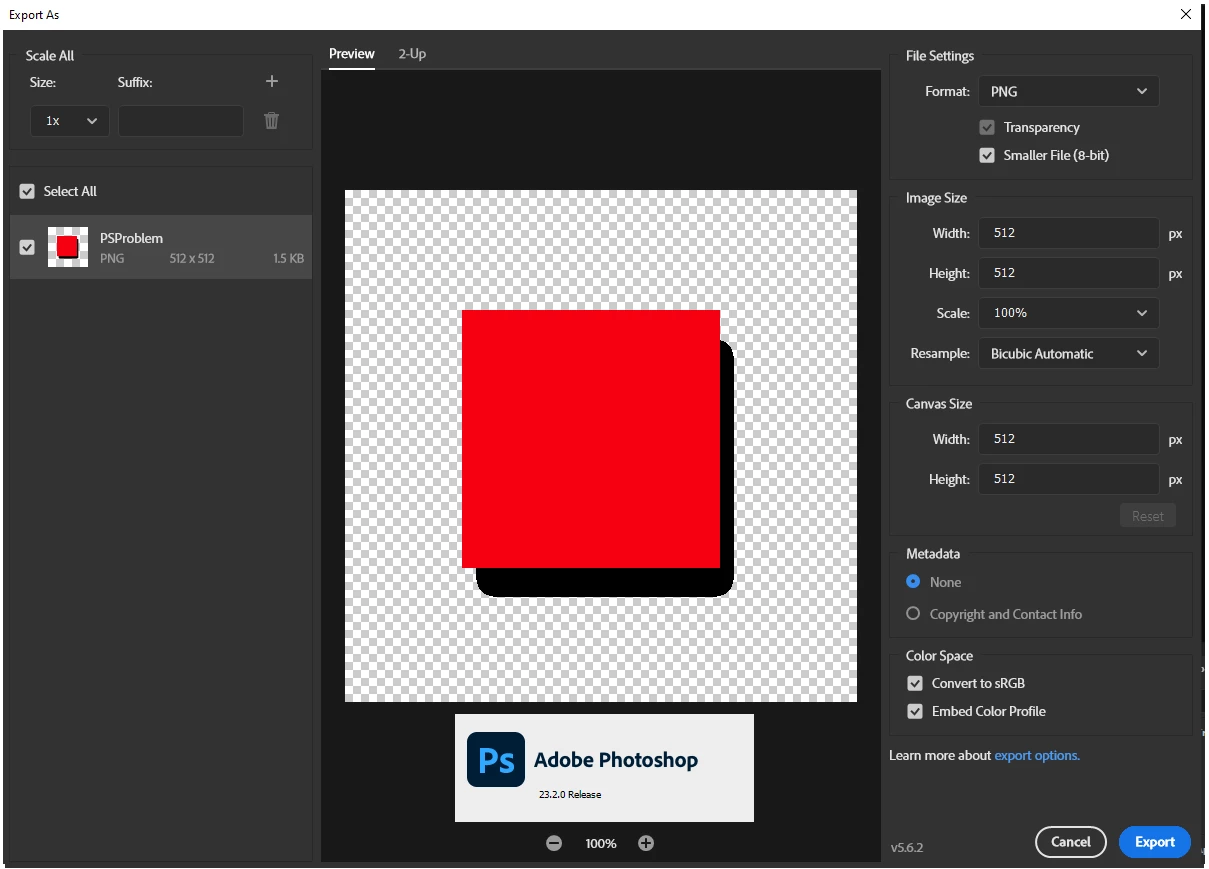
When using the export as dialog the 8-bit (smaller file) is no longer functioning first screen shot is the Export as dialog in PS 23.1.1 Second is same file and same dialog in 23.2.0

65 replies

Participating Frequently
June 13, 2022

More reading: http://www.libpng.org/pub/png/book/chapter08.html#png.ch08.div.5.2

quote
The PNG spec forbids the use of a full alpha channel with palette-based images, but it does allow ``cheap alpha'' via the transparency chunk, tRNS.

By comparison, GIF supports only binary transparency, wherein a single palette color is marked as completely transparent, while all others are fully opaque.


I hope you can appreciate the frustration of those of us who pay an expensive subscription only for our software to suddenly stop functioning correctly. We have deadlines and frustrated users to deal with ourselves.


The simple semantically perfect solution is to add a checkbox stating "Alpha transparency" (and please leave it checked by default!).

Participating Frequently
June 13, 2022

Maddening to read this thread. It's bogged down in semantics. Put simply: The PNG format does support alpha transparencies with any bit depth. 


You might argue this makes files not "true" 1-bit, 2-bit, 4-bit, 8-bit, etc. but that is entirely semantics. The end user does not care what you label these files, they simply want indexed color with alpha transparency.


The bottom line is that the PNG file format allows for alpha transparencies and Photoshop has long supported this feature!

Participating Frequently
June 13, 2022

@BrettN So it seems you're the one responsible for introducing this bug? PNG-8 files have always supported alpha transparency. You seem to think the GIF spec and PNG-8 spec are technically the same, but they are not.


The support for alpha transparency in PNG-8 files is used everywhere on the internet. It's absolutely essential for small, high fidelity images. (I bet we'd find examples on Adobe.com.) I have to say that it's concerning that someone in charge of implementing the industry standard software doesn't understand this! 😞


Please can this bug be fixed once and for all.


If you need help understanding how different image formats work, here's a guide: https://stackoverflow.com/a/7752936/199700

DanielBlazquez
Inspiring
June 10, 2022

Same problem here. They downgrade this feature.

Please bring back the export of 8-bit PNGs with semi-transparent alpha as it was before. Thank you.

Jay Riether
Participating Frequently
May 8, 2022

Landy2005, I wholeheartedly agree they need to get this "Legacy" option working in the M1-native version.  I only use a fraction of Photoshop's capabilities, but I'm sure there's probably a host of other areas the M1-native version needs updating.

Participant
May 7, 2022

Ok, as I understand previous disscussions, many commentators also believe that the previous behavior of the option was more desirable and did not raise questions.

In my case I also get best results (smaller file with shadows) in old (buggy) version.


As I see option "Legacy Export As" can return old behavior, but I use Photoshop in native M1 mode and want to see this option here.


Alternative suggestion - make both options available in the export dialog.

Jay Riether
Participating Frequently
May 6, 2022

Landy20005, take a moment to read through thethread of this conversation.  An easy work-around is here, and hopefully Adobe will make things right.

Participating Frequently
May 2, 2022

Hi there,


In my case I downgraded to 23.1. version of Photoshop and everything started working as before.


I would suggest trying that if you haven't already.


Best,
Alex

Jay Riether
Participating Frequently
April 29, 2022

chrisn50837302, if you read through this thread, you'll find the solution.  Essentially you need to change your preferences to legacy settings for now.  But it's more complicated if you're using an M1 Mac.  The answers are all here in the thread.

D Fosse
Community Expert
Community Expert
April 28, 2022

OK, got it, my bad. I didn't look closely enough. Still, indexed color has its own limitations in the 256 color palette. Don't mistake "8 bit" PNGs for 8 bits per channel, it actually means 8 bits total.


If you have hard size requirements but still need a certain resolution, it seems jpeg is the way to go (as Per suggests).