Inspiring
February 23, 2022

P: Export as 8-bit PNG issue

  • February 23, 2022
  • 65 replies
  • 14927 views

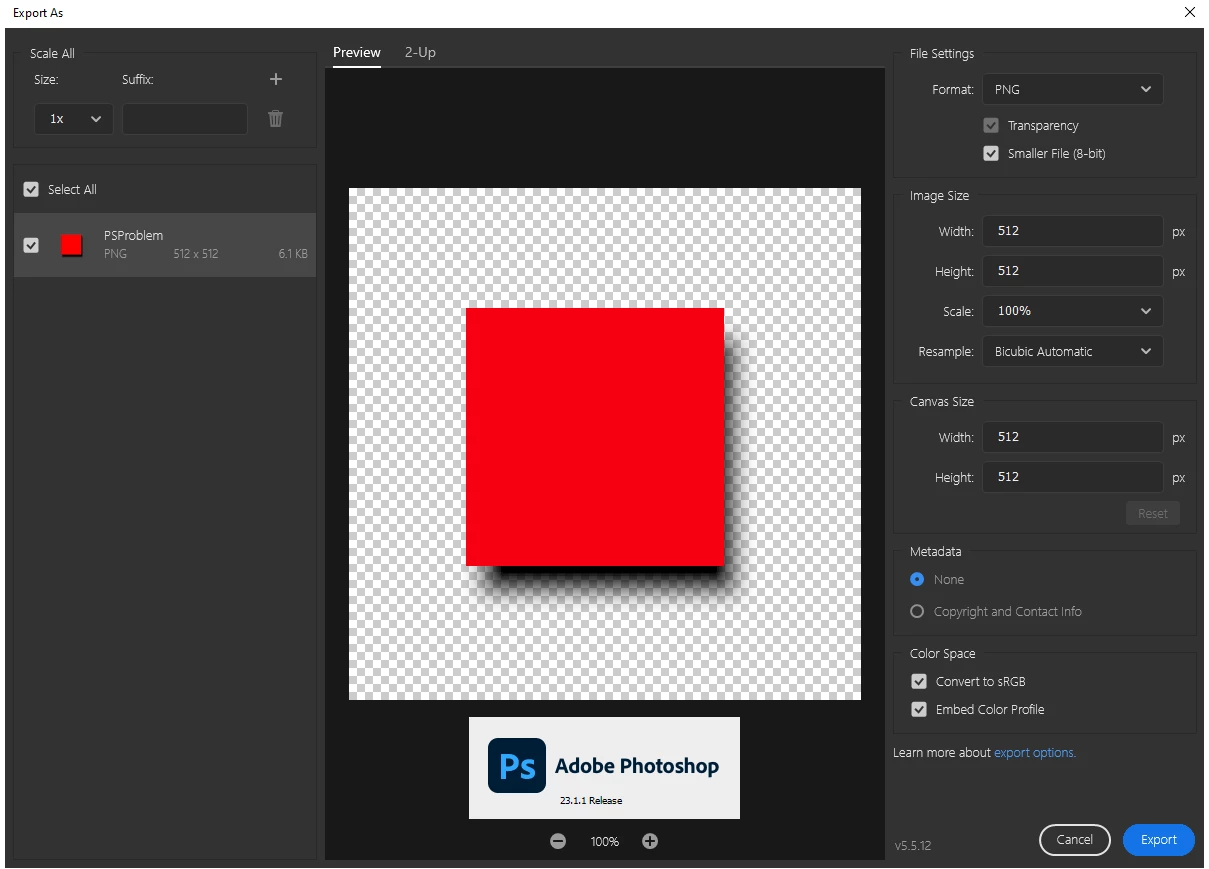
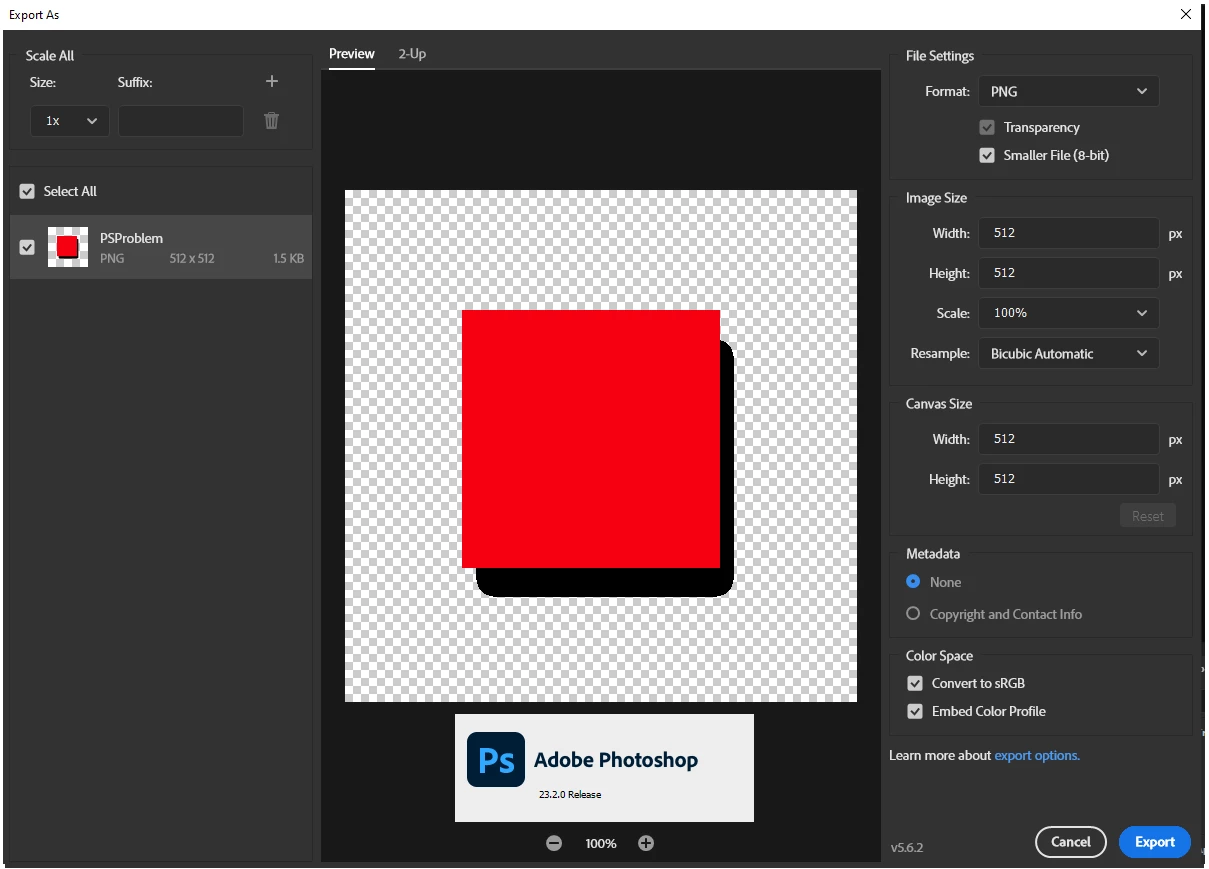
When using the export as dialog the 8-bit (smaller file) is no longer functioning first screen shot is the Export as dialog in PS 23.1.1 Second is same file and same dialog in 23.2.0

65 replies

Jay Riether
Participating Frequently
April 12, 2022

I have confirmed that the MacOS 23.3 update does not address this issue.  And the M1 native mode still needs to be dumbed down to using Rosetta emulation to gain access to the Legacy Export mode.

Jay Riether
Participating Frequently
April 2, 2022

@defaultkac7l92ac9ov This issue has essentially been solved for the moment, but is not entirely case closed.  In order to get the old behaviour back on the Windows machine go to Preferences > Export and check the checkbox "Use Legacy Export As".  Everything returns to normal.


On your M1 Mac, you need to make sure Photoshop is running in emulated mode before you can see the "Use Legacy Export As" option in preferences.  To do so, locate the Photoshop Application in your application folder, select it, and go to File > Get Info.  In the Get Info window, mark the checkbox "Open Using Rosetta" and close the Get Info window.  You may need to restart Photoshop if its already running.  Then you should see the option in Preferences > Export  to use the legacy save as option.


FWIW, Adobe switched the default Save As option at some point too and  I was frustrated at having to always flatten my photoshop files before saving a JPEG.  Alas, Preferences > File Handling > Enable Legacy Save As came to the rescue and now everything is back to normal.


Now we just have to hope Adobe adds the Legacy Export As function to the M1 native version so we don't have to run in emulated mode.

Jay Riether
Participating Frequently
March 31, 2022

Alas, @ethan.starkweather , if I'm spending the money on an Adobe subscription and then Adobe forces me out for a critical step to some outside process that I COULD do with Adobe in the past...I start to question if Adobe really has their users' needs at heart.

ethan.starkweather
Participating Frequently
March 27, 2022

@Jay Riether, no worries.

At least you get a cool M1 Mac out of the deal. 🙂


By the way, in case that Rosetta workflow is a hassle, I've also had success with some of the browser-based PNG compression tools like tinypng.com. I just tested it, and its results on my test graphic are comparable to Photoshop's Legacy "Export As".

Participating Frequently
April 1, 2022

Hi BrettN


- - "In my case dithered egdes were exporting with shart endes." Sorry, meant to say that dithered edges (shades on objects) were exported with sharp edges... - -


23.1. works fine on both computers that I have, an older Windows machine and an M1 Mac.


The 23.2.2. exports .png files that have shadows with transparent background in 8-bit reduced mode with a sharp edge and no signs of shadows are present (object >> effects >> drop shadows), hope I make more sence here now 🙂


I noticed that 23.1. files a a bit bigger in comparison to 23.2.2., meaning that something is up with the export process that possibly does not include shadows or effects in general? Could that be a problem?


Screenshots; I do not want to install a newer version on my Windows machine and do not want to install 23.2.2. back onto my M1 Mac to make all the necessary screenshots, I have no time for that, sorry... 😞


P.S. irrelevant to the issue but very relevant in general. About 3 years ago I purchased a €3200 computer to work with Adobe Suite. It worked fine in the beginning but after a year of constant updates applications refused to work with the video card in my computer. First was Premier, then Illustrator, everything else started to lag dramatically. If there was a fixed version installed like Adobe Suite 6, 7, 8... for example, I would still have used my older computer untill now. I had to get a new computer just to continue working. I am now reluctant to update at all. It seems to me that Adobe bumps up specks for hardware with every single update there is and maybe something will stop working in a new update.


I am also seriously considering switching to Affinity even at the cost of stress associated to the learning curve and the time it would take. Considering that I was using Adobe since the highschool this is a big step.


Do not consider this to be a hate message, I am neither happy nor angry, just sharing my experience with someone from the team, maybe I can make a difference this way. I tried leaving some inquiries elsewhere but havent gotten a reply.


Best,
Alex

Jay Riether
Participating Frequently
March 26, 2022

@ethan.starkweather I apologize...a little quick sleuthing and I discovered that the legacy Export As... option is NOT available to Photoshop running in native M1 mode on the latest Macs.  Once I dumb it down to run in the emulated Rosetta mode, that option appears.  So it's a kinda double-whammy for us M1'ers if we need to get that fuctionality back.  But at least there's a way.

I also have to say I completely agree with your comment about removing something useful.  This is clearly useful to a number of people.  Even if Adobe feels this was a bug they needed to fix, please, please, please formalize the old functionality in a way that preserves it for those "in the know" that have been relying on this "bug" for all these years.  Gimme the Legacy option natively on an M1 Mac!

Jay Riether
Participating Frequently
March 26, 2022

@ethan.starkweather if you can find the "Use legacy Export As.." option in MY Preferences > Export dialog box in Photoshop 23.2.2, you get a gold star!

ethan.starkweather
Participating Frequently
March 25, 2022

@Jay Riether 100% agree. It seems a bizarre rationale to change the behavior of the that export module to be less useful because it was never intended to be that useful. Like, if the thing the Photoshop team is concerned about is that the feature is called "Smaller File (8-bit)" but asserts that 8-bit PNG doesn't support alpha values (which @rayek.elfin challenges fairly convincingly), then just don't call the feature "8-bit".


By the way, @Jay Riether, the "Use Legacy 'Export As'" checkbox is in Preferences > Export > Options in Ps 23.2.2.


I'll also note that Illustrator's "PNG 8" output module in its "Export for Screens" dialogue outputs indexed PNG with alpha values in the desired "legacy" way. I hope this doesn't prompt the team to switch the way that works as well.


Finally, as has been mentioned, Fireworks has/had allowed for alpha values in its "PNG 8" output module for decades. This was the tool I used to create these smaller indexed PNGs with alpha up until Photoshop introuduced the Export As dialogue. And in my recent tests, it seems that Photoshop's Legacy "Export As" outperforms Firefox in both appearance and file size, so it would be a real shame if that useful feature was removed.

Jay Riether
Participating Frequently
March 25, 2022

I've read the entire discussion and I'm in the same boat...much prefer the previous "unsupported" way it was working giving me the transparancy with the smaller file size.  I'm corssing my fingers your research leads to a restoration of the old behaviour...especially since in 23.2.2 there is no "Use Legacy Export As..." checkbox.  😞

BrettN
Community Manager
Community Manager
March 10, 2022

Thanks for the additional reading material. What I'm seeing indicates that the PNG spec essentially allows the file to contain two color tables for index files. One is the standard color definitions (PLTE chunk) and the second for alpha (tRNS chunk) (though it seems to be neither a true palette nor a channel). And while Fireworks did have support for this, Photoshop does not. I'll have to do some internal research to see if this is a limitation of our PNG integration (through the APIs we work with) or if it was simply never implemented (probably due to the support that Fireworks had since it specialized in this type of work). 

rayek.elfin
Legend
March 8, 2022

@BrettN While PNG doesn't directly support indexed images with an alpha channel, the format DOES allow for adding additional colours to the colour table with alpha values in those colours. 

http://www.libpng.org/pub/png/spec/1.2/PNG-Chunks.html#C.tRNS

paragraph 3


Images written as 1,2,4, or 8 bit indexed with full transparency still read as indexed by supporting software, such as browsers. Or Fireworks. Or optimization tools such as Color Quantizer.


In short, there is no reason not to include this option, because it does result in smaller file sizes, in my opinion. And browsers have no issues with it either. It should be possible in Photoshop to save indexed PNG files with this full transparency option. I mean, Fireworks and other web image optimization tools have supported this for over two decades now.