



Released
P: Export As dialog exporting images with hidden clipping layers
I encountered this bug while exporting some project files with the Export As dialog. It's seems so easy to encounter, I don't know how I avoided it for so long.
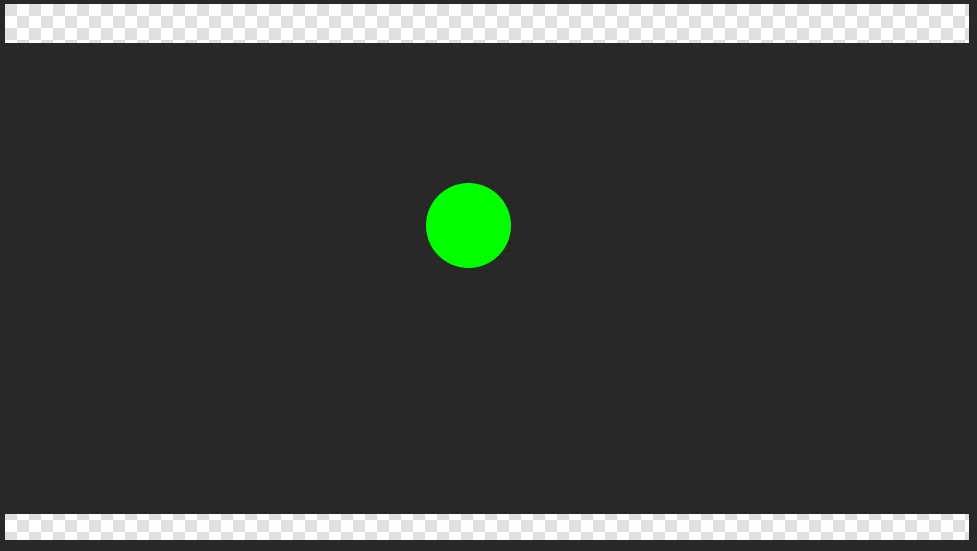
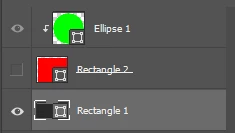
If I have a new Photoshop document and have anything on layer 1, and layer 3 clipped to layer 2 and layer 2 is hidden, then when trying to use Export As, layer 3 is fully visible.
What the output looks like.
What the layers look like
Is anyone else able to recreate this issue? It's kind of annoying.
Below are some of my system specs, though this happened on another machine with similar specs as well.
Adobe Photoshop Version: 22.4.0 20210512.r.195 5b318a5 x64
Number of Launches: 71
Operating System: Windows 10 64-bit
Version: 10 or greater 10.0.19041.928
System architecture: Intel CPU Family:6, Model:12, Stepping:1 with MMX, SSE Integer, SSE FP, SSE2, SSE3, SSE4.1, SSE4.2, AVX, AVX2, HyperThreading
Physical processor count: 4
Logical processor count: 8
Processor speed: 1805 MHz
Built-in memory: 16110 MB
Free memory: 10316 MB
Memory available to Photoshop: 11864 MB
Memory used by Photoshop: 70 %
Number of Launches: 71
Operating System: Windows 10 64-bit
Version: 10 or greater 10.0.19041.928
System architecture: Intel CPU Family:6, Model:12, Stepping:1 with MMX, SSE Integer, SSE FP, SSE2, SSE3, SSE4.1, SSE4.2, AVX, AVX2, HyperThreading
Physical processor count: 4
Logical processor count: 8
Processor speed: 1805 MHz
Built-in memory: 16110 MB
Free memory: 10316 MB
Memory available to Photoshop: 11864 MB
Memory used by Photoshop: 70 %
 AdChoices