


Participating Frequently
March 18, 2020

P: Export As image quality significantly lower than old Save for Web

  • March 18, 2020
  • 15 replies
  • 6155 views

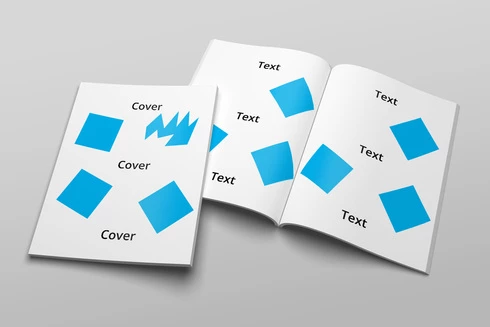
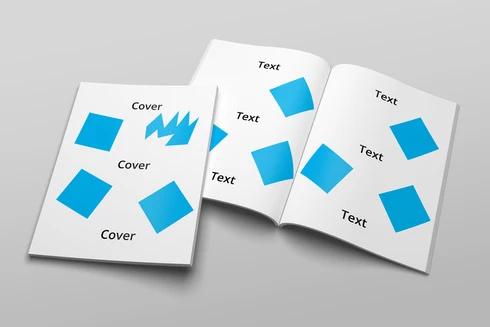
Downscaling an image using Export As produces blurry and stepped images. Save for Web produces clean and smooth images. This is using the latest version 21.1.1 on Windows. This image was 4500x3000, I've downscaled it to 1500x1000 in both Export As and Save for Web.

Just look at the attached images and see how the word "Cover" looks so much worse in Export As when compared to Save for Web.
This topic has been closed for replies.

15 replies

Legend
March 23, 2020
Could you share the original file you're using to export from for the eng team to investigate?
Legend
March 20, 2020
Just to add to this (because I don't know if a shared library might be involved) but there is a bug in Bridge where Extendscript bitmapData.resize() sometimes rounds incorrectly. An exact 5:4 file sometimes resizes to 1000x799 pixels, for example. It was reported sometime back to the Bridge team. I ran into it during development of my JPEG MiniExport script for Bridge. I haven't seen it with the new Bridge Export feature.
Todd Shaner
Legend
March 20, 2020
I'm seeing something strange. When I use Export As with a 5616 x 3744 exact 3:2 aspect ratio the Image Size changes to 1502 x 1000 when entering either W or H value first. Also the Export As JPEG file appears slightly sharper than the Save for Web JPEG using the same settings except it is 1500 x 1000, which is opposite what the OP is seeing.


Participating Frequently
March 19, 2020
I've tried them all and none seem to do any  appreciable change to the image. Maybe the Preserve Details is a touch better, but we're talking about a little touch really, it doesn't solve the issue at all.
Legend
March 18, 2020
Hi Louis, in Export As, what setting do you have for "Resample" under Image Size?