


Wabber_HM
Inspiring
January 16, 2019

P: Export As preview is blurry at certain zoom levels

  • January 16, 2019
  • 3 replies
  • 286 views

Here are some screenshots showing what I mean. In the previous version of Photoshop, the preview quality was much better.

Below is what this design looks like at 100% scale in the Export As dialog.
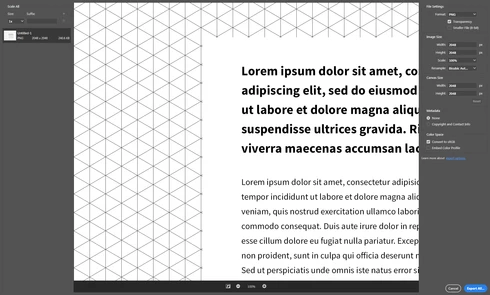


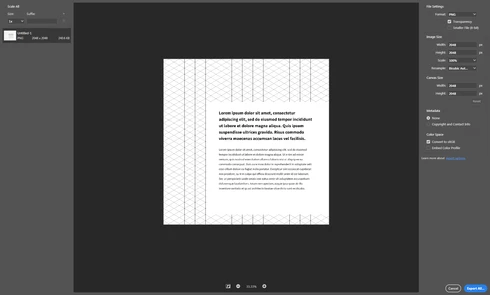
And below is what it looks like at 33.33%. I know odd percentages like that don't normally look good, but this demonstrates the issue more than it would at 50%. The preview is notably pixelated as seen by the loss of pattern detail, but it's also blurry on top of that.


Note: This conversation was created from a reply on: Photoshop: Export As has browser right-click and drag and drop behavior.

This topic has been closed for replies.

3 replies

Legend
November 15, 2019
This issue should be fixed in the current version, Photoshop 2020 v21.x or later. Let us know if you're still having trouble.
Known Participant
January 16, 2019
Thank you Mr. Tranberry. I am planning on having my Laptop looked at (again) as I am still having issues with the version of Photoshop that I am using and want to make sure it isn't me. I won't list all my issues here again, for now, but I can't 'work. What I have done is allocated a stand alone drive with more than enough space as a scratch disk and all that has done is stopped PS from giving me the message that I was running out of room for the scratch disk. I have written before that I know, for sure, that these comments and the surveys are read, they really are. So, if you want to get noticed one has to get themselves involved, which I will. Good Luck! 
Legend
January 16, 2019
I've asked engineering to take a look. Thanks!