


Joy_vincent
Participant
March 14, 2016

P: Export As - rotated shapes give unexpected results

  • March 14, 2016
  • 8 replies
  • 432 views

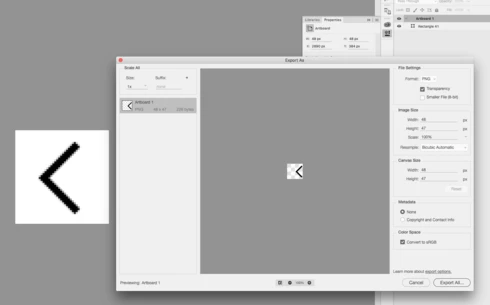
Bug when exporting rotated shapes from an artboard. 

Multiple errors occured:
- shape moved to the right
- pixels get cut off in bottom right corner
- artboard size changed from 48x48 to 48x47
This topic has been closed for replies.

8 replies

Legend
June 21, 2016
chad.rolfs
Community Manager
Community Manager
April 20, 2016
This issue will be fixed in our next release.
chad.rolfs
Community Manager
Community Manager
March 14, 2016
Ah, nice workaround!
Joy_vincent
Participant
March 14, 2016
Thanks, I'm currently putting a vector mask over the artboard (using the dimensions of the artboard) which seems to solve all the issues
chad.rolfs
Community Manager
Community Manager
March 14, 2016
We're looking into this.  Thank you for reporting it!  One workaround to the shifting problem is to select "Merge Shape Components" from the options bar with the Path Selection Tool active, however that still doesn't help with the clipping or incorrect output dimensions.  Oddly enough, the only correct output format is SVG (after you merge shape components).  Working on it...
chad.rolfs
Community Manager
Community Manager
March 14, 2016
Thank you for the file!  I can reproduce the issues you're seeing.
Joy_vincent
Participant
March 14, 2016
Thanks for the quick reply.

I just updated to the latest version, still have all 3 problems.

Here's the file:
https://dl.dropboxusercontent.com/u/2188387/Icon.psb.zip
Legend
March 14, 2016
I believe we have an issue logged for the output being trimmed by a pixel: https://github.com/adobe-photoshop/generator-assets/issues/394

We're not able to repro the shifting to the right with a rotated shape. 

Make sure you have all the updates installed: https://helpx.adobe.com/photoshop/kb/uptodate.html

If you can still repro with the current version can you post a sample file that exhibits the issue? (Creative Cloud or Dropbox link)