

Participant
December 13, 2021

P: File size is not shown when saving as jpg on Windows 11

  • December 13, 2021
  • 6 replies
  • 431 views

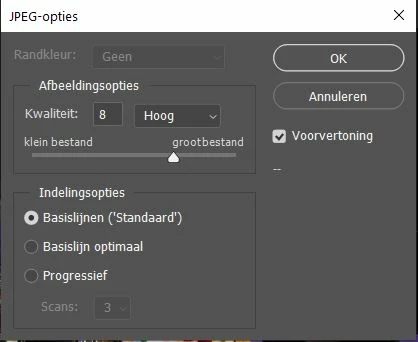
The menu that pops up while saving a jpg file doesn't show the file size anymore in PS 2022. Now it shows only two dots in stead of the file size. Does anyone know how to fix this?

This topic has been closed for replies.

6 replies

Legend
January 23, 2022

Update to 21.1.1

zzzdcline@yahoo.com
Participant
January 23, 2022

Here's another example.

Karin98A5Author
Participant
December 14, 2021

Problem solved! Last night an update for PS, Bridge and CR showed up and after installing these, I could use the renewed programs without problems: I could save my files again! 

Legend
December 13, 2021

Does it happen with all files? (small vs large, etc)

Karin98A5Author
Participant
December 13, 2021
Hi Jeffrey,

Did it all...uninstalled and reinstalled with help from Adobe support, but
it didn't change anything.
In the old version there were no problems like this. So I started using
this one again...

Kind regards,
Karin.
Legend
December 13, 2021

It's working fine here on Window 10 and macOS 10.15.x.


Is there anything special about the location you're saving?


If you restore your preferences using this manual method does it work correctly?
https://helpx.adobe.com/photoshop/using/preferences.html#Manually
If that doesn't solve it, you can quit Photoshop and put the Settings folder back.