


P: Generate Image Assets doesn't honor document's ppi anymore
In Photoshop CC 2017 when I create document and set in Image Size its Resolution to 150 Pixels/Inch and I generate image assets all generated images also have 150 ppi.
In Photoshop CC 2018 when I open the same PSD file and generate Image Assets, all newly created files loose source project's ppi, and are saved as 72 ppi.
In my everydays work I heavy rely on generated images ppi, and because of that, for me Photoshop CC 2018 is unusable.
Some screenshots.
Source PSD. Resolution set to to 150 ppi: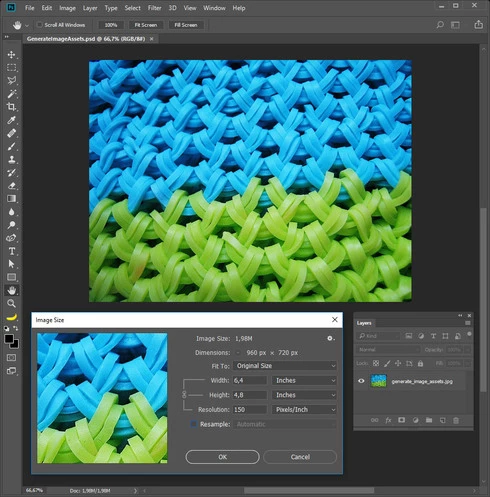
JPEG generated in Photoshop CC 2017. Still 150 ppi as it should be: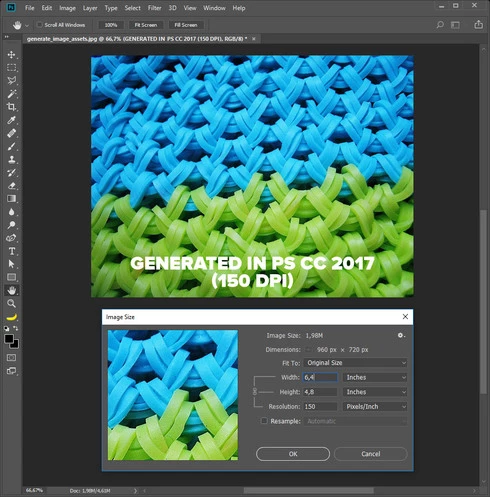
JPEG generated in Photoshop CC 2018 from the same source PSD file.
Assets generator changed ppi to 72 by itself: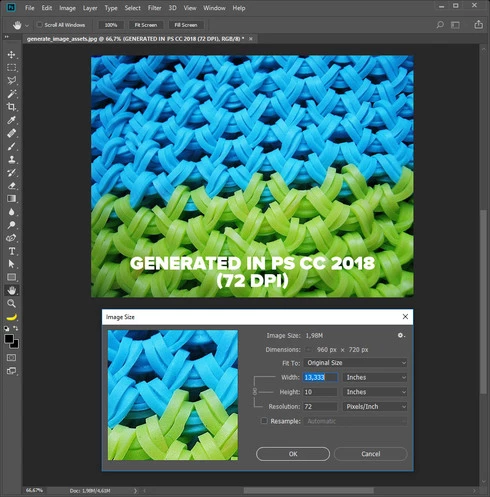
Please, change it the way it was in CC 2017 when I can determine what ppi of generated images I want it to be.
 AdChoices