


P: Generator can't export nested groups or grouped layers with "zeroBoundsError"
Photoshop CC 2015.5 Fist off, I'm glad to hear that there were improvements made to the built in Generator. I'm sure they are wonderful. Unfortunately, I do not get to benefit from them because the majority of the layers I have named with the Asset Generator syntax now refuse to export.
I have a photoshop file with several artboards. They are the same size and represent different screens in a user flow. I did this so we can leverage the device preview and artboards-to-pdf features.
Each artboard is named with generator syntax to produce a "screen preview". Each artboard also contains layer groups named with generator syntax. Some of these groups are nested within other groups in a heirarchy because the screens can get pretty complex.
In this screenshot, only previews/Preview_Transition01.png is exported. Transition_Curtain_Logo.png and others fail...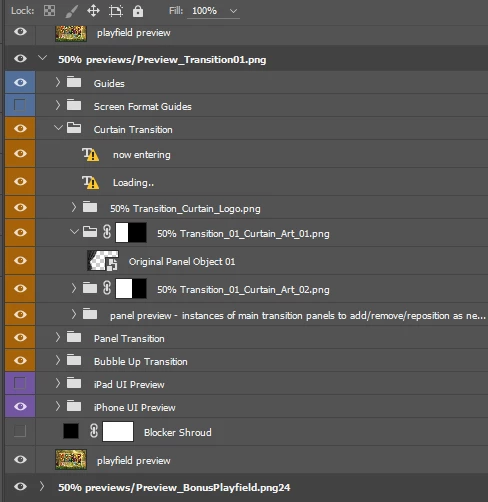
These all exported nicely in CC 2015.1. After the update to 2015.5, only the artboard previews and an occasional top level group are being exported. Any child groups/layers fail or are frustratingly inconsistent.
The generator logs indicate that the layers start to render, but then get an error and fail:
[info:generator-assets 10:48:17.039 C:\Program Files\Adobe\Adobe Photoshop CC 2015.5\Required\Plug-Ins\Generator\assets.generate\lib\rendermanager.js:157:30] RenderManager active
[info:generator-assets 10:48:17.060 C:\Program Files\Adobe\Adobe Photoshop CC 2015.5\Required\Plug-Ins\Generator\assets.generate\lib\rendermanager.js:178:26] Rendering: Transition_01_Bubble_Art_01.png (7;1)
[error:generator-assets 10:48:17.313 C:\Program Files\Adobe\Adobe Photoshop CC 2015.5\Required\Plug-Ins\Generator\assets.generate\lib\assetmanager.js:449:34] Render failed: Transition_01_Bubble_Art_01.png { [Error: Refusing to render pixmap with zero bounds.] zeroBoundsError: true }
If I look at the JSON extracted from a call to the generator API to get the document and layer information, I can see that all failing layers return with valid bounds:
//...
{
"id": 680,
"index": 676,
"type": "layerSection",
"name": "50% ThemeStore_Art-04.png",
"bounds": {
"top": 0,
"left": -2048,
"bottom": 6048,
"right": 9174
},
"visible": true,
"clipped": false,
"blendOptions": {
"mode": "passThrough"
},
"generatorSettings": false,
//...
A bit of experimentation reveals that:
- Most of the problems are resolved by removing *all* artboards and having all contents in a single traditional canvas.
- If I move the named layer groups outside of the artboard, they will export correctly... sometimes.
- If I add layer masks on *every* layer and group in the tree path I want to export, it seems to work sometimes.
- If I keep the export layers/groups nested only one folder deep, it seems to work sometimes.
 AdChoices