


Known Participant
January 30, 2017

P: Generator SVG export doesn't support boolean shape operators

  • January 30, 2017
  • 8 replies
  • 132 views

This seems to be a regression in the new SVGOMG export module.

Here's the source file. Each shape is made out of two rectangles with varying boolean modes (add, subtract, exclude, intersect).
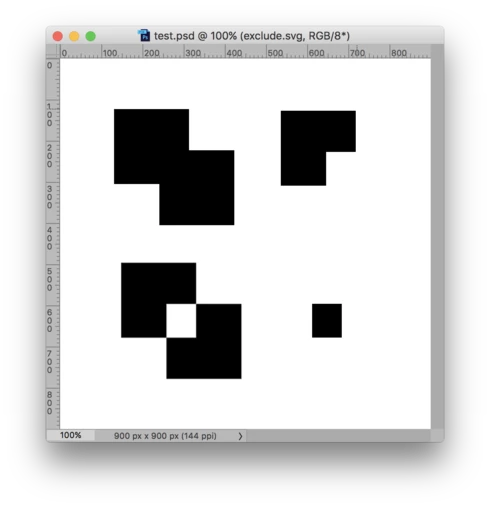


This is what Generator exports by default:
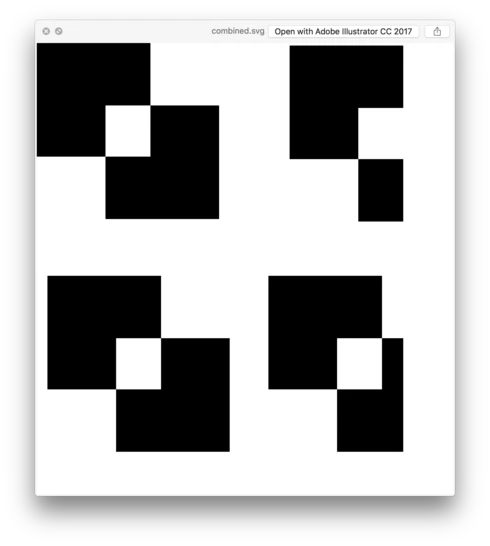

Setting "svgomg-enabled": false in the Generator config produces the correct output:
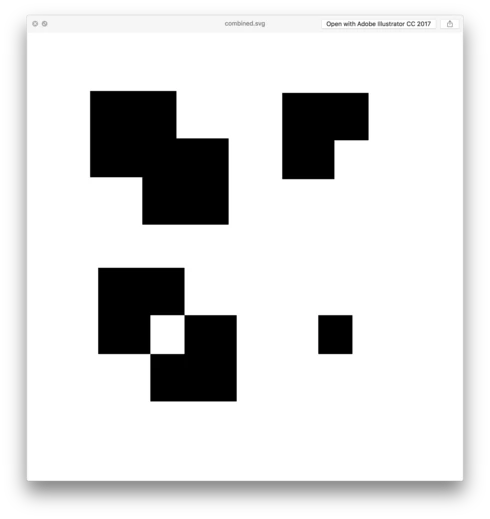

I realize that merging the shapes fixes the output, but that is not an acceptable solution.

8 replies

Known Participant
February 1, 2017
Thanks, that's good to know for small projects.
tom attix
Adobe Employee
Adobe Employee
February 1, 2017
There is a (sort of) work around. Use Copy SVG from the layer's contextual menu. This copies the SVG code of the current layer to the clipboard, where it can be pasted to your SVG text file. I realize this isn't quite as convenient and I'm a little mystified as to why they don't use the same code, but that's where we're at at the moment. The second image is the Chrome rendering of the Copy SVG code.
Inspiring
February 1, 2017
I have also this problem often... so I usually merge paths of shape into one path.
Known Participant
February 1, 2017
FWIW this is not a recent regression, it's been around for at least 6-9 months.
Known Participant
February 1, 2017
Legend
February 1, 2017
Would you mind posting your source file?
Known Participant
February 1, 2017
Yeah, same in Chrome.

And yeah, this was not an issue before SVGOMG.
tom attix
Adobe Employee
Adobe Employee
February 1, 2017
Philip-
Does it look the same when you open the .svg file in Chrome (not all SVG parsers are created equal). Also, you say regression, do you mean it used to work differently?

Thanks
-Tom Attix