


Participant
January 31, 2023

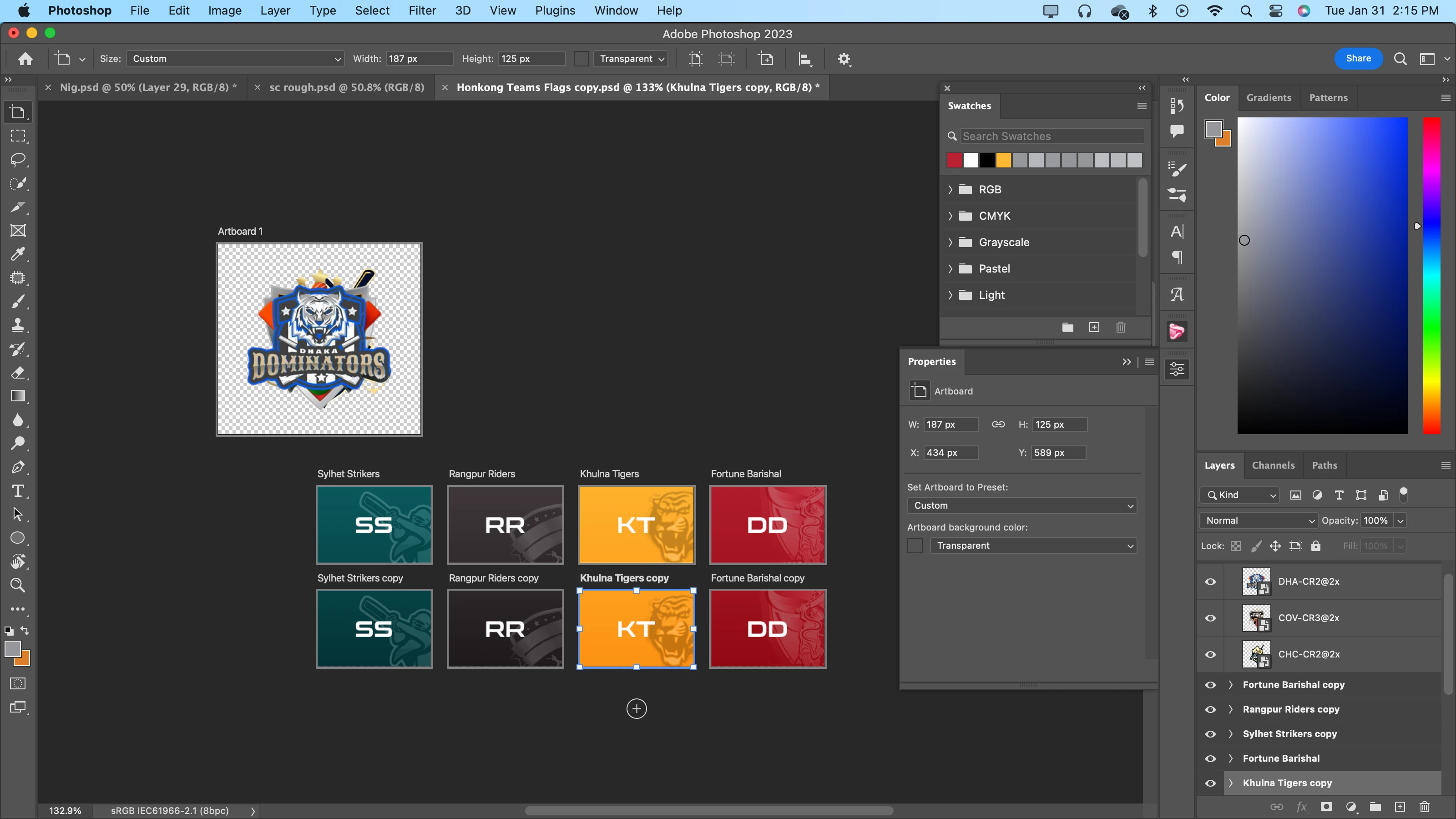
P: Gradient and color gets changed after artboard duplication

  • January 31, 2023
  • 9 replies
  • 2531 views

Hello Adobe Tech Team,


When I duplicate artboard consisting of a solid color adjusment layer and a gradient adjustment layer,

the color and the gradient position gets changed. 


Please help me out with this issue as soon as possible.


Thank You


9 replies

Participant
April 24, 2024

This issue is still happening, I tried duplicating the artboard and the colors will get darker, it only happens on gradient layer, one way I try to move around it, is by rasterizing the affected layer.

davescm
Community Expert
Community Expert
February 6, 2023

If your work is held up due to this issue then you could use the workaround I described earlier in the thread.


Dave

Participant
February 6, 2023

Hello @CShubert , Its been a week, my work is pending due to this issue even after providing the file, this is very disappointing. Please look into this ASAP.

PECourtejoie
Community Expert
Community Expert
January 31, 2023

@CShubert watch the thread linked by Dave, there are some relevant JIRA # and threads to attach

https://community.adobe.com/t5/photoshop-ecosystem-bugs/p-gradient-fill-and-artboards/idi-p/9362789

CShubert
Community Manager
Community Manager
January 31, 2023

Thank you @YASHSHETTY will pass this on to the team to look into.


Thank you,

Cory

davescm
Community Expert
Community Expert
January 31, 2023

Hi

This is not a new issue and occured because the gradient in a gradient fill layer applied across all artboards. So when you added a new artboard (e.g. by duplicating) then the gradient start and finish points were changed.


It was supposedly fixed in 2022 but it does look like that old issue is back in the current version - I can confirm it in v 24.1.1 on Windows 11 v 22H2


A workaround, discussed in this old thread https://community.adobe.com/t5/photoshop-ecosystem-bugs/p-gradient-fill-and-artboards/idi-p/9362789 is to contain the gradient in a smart object with a solid pixel layer. Now when you copy the group the smart object constrains the gradient and you get an exact duplicate.


Dave


Simmer1
Community Expert
Community Expert
January 31, 2023

It could be your Layer Mask.


Try duplicating the file so you have your Layered version safe then stamp the Layers ontop by pressing Shift+Option+Cmd+d to plut the artwork on one Layer on top.


See if the colour change then?

Participant
January 31, 2023

Hello @Simmer1,

Thank you for checking my post.

I have attached screen recording with this reply, please check it and you will get to know what exactly the issue is.


https://drive.google.com/file/d/1kvvMRpWMCbAeBWTi_GQ2-BfGRgIAGsAH/view?usp=sharing

Simmer1
Community Expert
Community Expert
January 31, 2023

Hi,


It could be just the angle your screen is at, the colour tends to get a little darker the lower down you go.


Try moving the artwork to the middle of the screen and see if that does not work.