


Participating Frequently
November 16, 2019

P: Greyed out files/folders macOS

  • November 16, 2019
  • 6 replies
  • 575 views

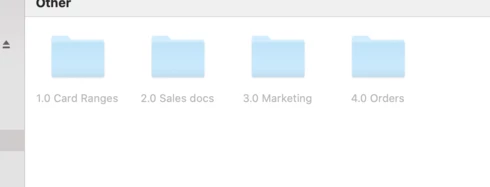
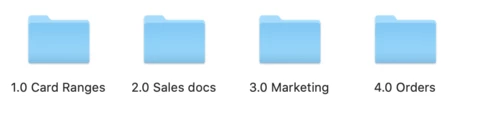
Hello, I wonder whether someone can help.  I upgraded to CC2020 the day it was released, and I am finding that when I navigate to place a file from within PS or AI, the files are grey out out.  They are actually accessible if I click on them, and I have found that if I right click, the files revert to normal, but it is annoying.  I have added a photo of how this looks, and how it should look - it is probably just a setting somewhere, but I am stumped.   Thanks for your help...Emma


6 replies

Inspiring
August 10, 2021

I have the same issue. The files are on an external drive and are greyed out. They cannot be selected at all and at no time do they return to normal. 

Inspiring
March 24, 2021

Same problem here. Illustrator have the same issue. Sometimes the files and folders switch form grayed out to normal after some seconds, sometime only a half of them are grayed out.

If I switch to another folder and then switch back (without close the dialog), all files and folders are shown as normal. But after closing the dialog and re-open it, they are grayed out again.

Very annoying.

Inspiring
December 21, 2020

I have the same problem - all files and folders greyed out??

Inspiring
February 28, 2020
Same issue today trying to open files through PS. They are greyed out, but still selectable, and change after selecting.
Inspiring
December 17, 2019
Hello, same problem here on both local and external disks. Any fix yet? Thanks
Legend
November 18, 2019
Are these files on your local disk or on an external disk or server?