


Inspiring
June 18, 2020

P: Grid is drawing too thick when zoomed out

  • June 18, 2020
  • 70 replies
  • 2381 views

The new grid in 21.1. Oh my God. I can't stand it. Whose idea was it to make the grid be a compulsory 2px thickness?

It looks actually very nice in zoomed-in mode:
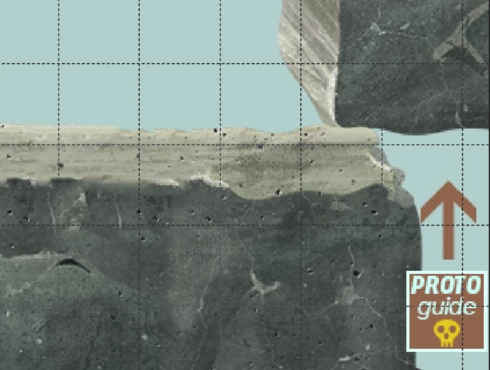


But it's just horrible when you zoom out. What used to be a feather-thin lattice of lines has become a solid 2px-thick mess that overwhelms everything else. When you use use lots of artboards like me (and therefore need to frequently navigate around in zoomed-out mode) it becomes quite problematic. 

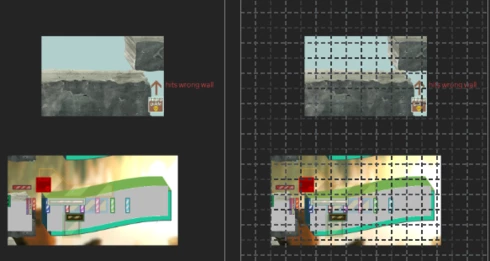
Here's the same portion of a document with the new grid and without. Even though it's zoomed out, you can clearly make out the content of it when there's no grid. But once you show the new grid, you can barely see anything but the thick gridlines. Some of the smaller shapes that are easily visible on the left are now hard to make out, as are the translucent ones; the text is much harder to read too. Plus the whole thing is just straining on your eyes.

The old grid didn't have these problems. Dammit, Adobe, this reminds me of the shift+transform debacle. Why fix things that aren't broken, when there are already plenty of things that are broken but remain unfixed year after year? These updates are exasperating sometimes.  


I can't find any setting anywhere to revert to a more sensible 1-px grid, but I'm just really really hoping that I've missed it somehow. If not, please, for the love of God, let us choose a 1px version in the settings!

This topic has been closed for replies.

70 replies

Legend
October 20, 2020

Can you please install Photoshop 22.0 which was released this AM? It should address this issue.

Legend
October 2, 2020

Yep. Engineers have been working on this. We'll update the thread when an update/fix is released.

Earth Oliver
Legend
October 1, 2020

Adobe Max is usually when they release the next big version, so hopefully the grid fix is included with that in a few weeks... 

Participating Frequently
October 1, 2020

21.2.4.  Problem still not solved. Ok when I don't use sublines. With sublines I can't even zoom and not usable. How much longer do we have to wait?

Elisei Kulikovsky
Known Participant
September 12, 2020
The same, the bug is still here. Developers, see our pain, fix it finally!
Inspiring
September 9, 2020
Photoshop version 21.2.3 just came out. Grid is still not fixed and performance is still poor. ☹
Inspiring
September 4, 2020
I have just installed version 21.2.2 of Photoshop. Grid and performance are still terrible.
Participating Frequently
August 30, 2020
It was my mistake one week ago. It is still nor working with 21.2.2.  😞
Inspiring
August 29, 2020
As the previous poster said, this was not solved with 21.2.1 or 21.2.2; grid issue still persists. Screenshot attached.
Earth Oliver
Legend
August 21, 2020
Just a heads-up guys, this issue is being actively tracked and worked on... hopefully a fix is released soon!