


Known Participant
October 18, 2017

P: Healing and Spot Healing Brush Lag

  • October 18, 2017
  • 282 respuestas
  • 7290 visualizaciones

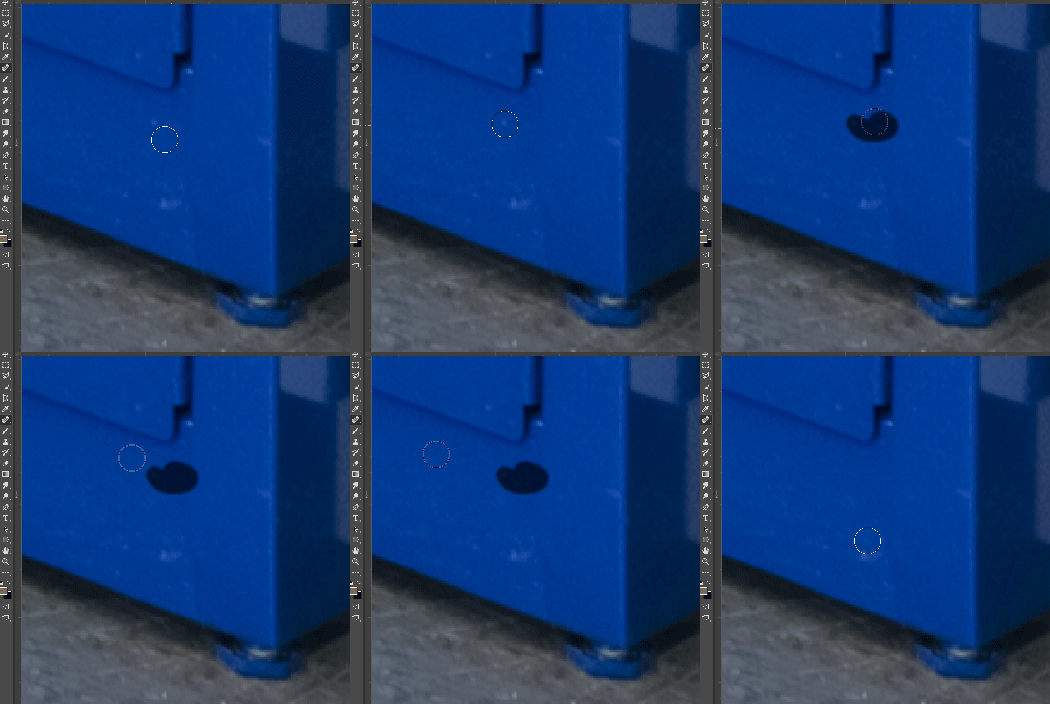
In most recent 2018 update, healing and spot healing brush have become much less responsive, sometimes taking multiple seconds after completion of stroke to affect the image.

Late 2016 Macbook, up to date OS and Software

I've done the regular things like turning off OpenCL and changing other performance options... no change.
GIF framerate is sped up 2x 
 

Este tema ha sido cerrado para respuestas.

282 respuestas

Inspiring
March 6, 2018
I'm experiencing the same 'lag' issue, for the first time ever. However I'm still using PS CS6, and have had nothing to do with PS CC 2018. The lag with the spot healing brush began after upgrading my MacPro (with 20 GB ram) from OS 10.7.5 (Mountain Lion) to OS 10.11.6 (El Capitan). I use a Wacom Intuos 4 tablet.

Given all the comments on this thread blaming PS CC 2018, your thoughts would be very welcome.
Is there a fix for the problem?

Thanks,
Bob
Hannah Nicollet
Community Manager
Community Manager
January 25, 2018
That's awesome to hear, Beth. Thanks for the update!

~Hannah
Inspiring
January 25, 2018
Hannah, 

I got an PS CC 2018 update notification yesterday for version 19.1 and...so far, it seems to be helping my sluggish/lagging issues w/o having to upgrade to High Sierra. I haven't done a lot of brush work, but even basic zooming and showing/hiding layers doesn't take forever to display. Just so you know! 

Thanks,
Beth
Inspiring
January 25, 2018
Ah...Okay. So, I have 10.12.6. I have a brand new computer, I don't remember updating it to this version...maybe I did, maybe Apple did it on it's own. Overall my computer seems to be okay, but Photoshop was lagging really bad for me too. But, the computer's performance over all was not as fast as I expected for getting a new computer. (24 GB RAM, 3.4 GHz Intel Core i5 iMac. But PS was dragging the worst! It wasn't even usable. So...I am having the exact same problem as you Scott. Turning off GPU Acceleration has helped me too. 

SO, Try this!!...just today...Adobe came out with PS CC 19.1 (it was 19.0.1), it said it had bug fixes including for high resolution monitors. So, I tried it...I installed it, turned GPU Acceleration back on and it *seems* to be working better. I am not doing anything intense, but I do have big files open and I am not getting the same slowness (i.e. zoom in & out slowness, turning on and off layers isn't as bad), it is much better. So, I'd recommend trying PS CC 19.1. See if that helps! 
Earth Oliver
Legend
January 25, 2018
It might just be the OS indexing your startup drive. Sometimes that process can mess with overall system responsiveness.
bellevue scott
Inspiring
January 25, 2018
Looks like it wasn't High Sierra. It was their security update, 10.12.6. But it did it overnight, and I never allow automatic updates, so I'm not sure what they did. I'm still trying to figure it out. But wow. Anyway, turning GPU acceleration off in PS fixes the issue but then filters and my actions take longer. I feel bad for Adobe having to put with Apple's nonsense. 
Inspiring
January 25, 2018
Damn, sorry to hear that Scott!! That sooo sucks! 

Thanks for the warning...I will continue to hold off, or at least try to! I don't get how High Sierra updated itself! 
bellevue scott
Inspiring
January 25, 2018
My main Apple machine updated itself last night without my permission to High Sierra. It's a Mac Pro with 1TB flash and 2 64GB GPUs. It's started lagging on everything in PS. But it's also lagging on other things. Turned off the GPU and it stopped lagging. I'll be giving Apple a call tomorrow and will likely be much less polite than I am here. They just f*#ed up a $10,000 graphics machine that I count on greatly. The lag is enormous. Hope this helps you, although it doesn't help me at all. 
Hannah Nicollet
Community Manager
Community Manager
January 24, 2018
separate issue

Please reference the new conversation here: Photoshop: Please add customizable number of control points to Transform Warp
bellevue scott
Inspiring
January 24, 2018

I don't know the reason Adobe hasn't implemented this. I've often wondered about that one myself. At a minimum it would be nice if Adobe could acknowledge the request and perhaps state why they haven't done it. But I've worked in SW, at the biggest of them, and I know what triage lists look like. It could be that it's low on the list. It could be that for some reason it's a difficult request to enable for reasons that we might not expect. It could be that it breaks something. But yes, if it's something a lot of people have requested then it would be nice to have more communication from Adobe as to why. 

That's why I'm appreciating the efforts I see Adobe putting forth lately, from this forum to the surveys I got after we wall went over the latest Lightroom changes. Transparency goes a long ways ....