


Inspiring
January 24, 2018

P: Histogram behaviors are different from prior versions

  • January 24, 2018
  • 104 replies
  • 3328 views

I am experiencing problems with the histogram in 19.1.0. I am a mid-career fine art photographer by profession, and have been a PS user since Version 2. I am also a member of the Authors Guild, and write on photography for various publications. I have been purposely hanging back at PS 2015.5.1, as it has served me well. Yesterday, I decided enough, is enough, and installed 19.1.0.

This first histogram is at Cache Level 1 for the file values of a 36Kx24K pixel 16-bit grayscale file.
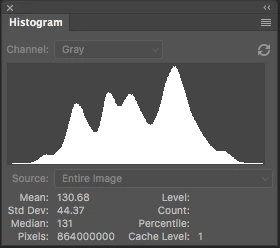
 

Please notice how there are "tails" (lines) out each side of the main body of data, indicating that there are small levels of data almost to the limits of range. For me, it is important to know about these tails exist so that I do not end up creating a clipped condition when applying a curve function. We use S-curve limiters to compact the tails without clipping.

Here is the exact same file at Cache Level 1 for the same 36Kx24K pixel 16-bit grayscale file, but this time in 19.1.0.
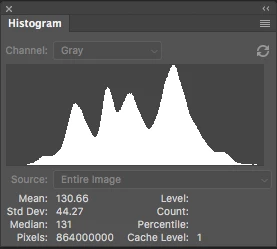
 

Please notice how there is no tail indicating data extending to the left, and rather a botched one going to the right. This is not helpful! You will also notice that the Mean and Standard Deviation values differ.

Further, it use to be nice to be able to take the cursor and scan across the histogram with a display of level and count showing up for whatever was under he cursor. This seems to have gone away in 2015.5, and is even worse in 19.1.0.

Thanks for your help.

Pete

This topic has been closed for replies.

104 replies

Pete_Myers
Known Participant
May 17, 2021

@Nikunj_Muglani

Nikunji, I am so grateful to you and the team at Adobe for addressing this issue. I have downloaded 22.4 for Mac and delighted to report that the histograms are working properly once again. It has already contributed positively to my image-making, and I feel once again that I have the full benefits of PhotoShop.

Similarly, the intercept line in the Curves function is always working great.

However, I must sadly report a bug. When the Curves function is up and running, and I got to refresh the histogram while experimenting with the Curve, it will not update properly. I have to press the refresh button on the histogram as many as a dozen times before the histogram will finish and display. This did not occur previously, so I would assume that the 22.4 update of the histogram function has fixes the data tails issue, but introduced a new bug. My apologies.

Never the less, I am delighted that the tails in the histogram data now show properly. It is a great relief! My sincere thanks.

Pete Myers

Santa Fe

Todd Shaner
Legend
May 13, 2021

PS update 22.4 appears to have fixed the Histogram issue discussed here, but appears to have introduced another issue. With grayscale images the Curves panel is now reversed from 0-100 to 100-0 as shown below. RGB images are correct and show L to R as 0-100.

I may have some other issue on my system so would someone else please verify on their system. I'm on Windows 10.

nikunj.m
Legend
May 13, 2021

Hi,


We're happy to announce the release of Photoshop 22.4 which should include the fix for this issue. To update Photoshop to the latest version, you can check: https://helpx.adobe.com/creative-cloud/help/creative-cloud-updates.html


For information on other issues fixed with this update, please check: https://helpx.adobe.com/photoshop/kb/fixed-issues.html


Regards,

Nikunj

Pete_Myers
Known Participant
December 18, 2020

Oh, and I should have added---the Levels Adjustment function histogram needs to be fixed too.

Pete_Myers
Known Participant
December 18, 2020

Hi Jeffrey:

Thanks for checking in.

Yes, both the histogram issues and separately, the interception line in Curves issue are unresolved. Again, I am on 22.0.1. I did not see any bug fix notes to indicate that either of these issues was addressed in 22.1. Do I need to upgrade to check?

It seems from your note that the interception line issue is in engineering to be resolved---which is GREAT! Bravo. Really appreciate it.

But how do we get the histogram issue fixed? There is an obvious difference in the histogram used in Curves or in RGB COLORS histogram, then in a channel or in monochrome. The former being correct, the later not.

Pete

Legend
December 18, 2020
Legend
December 18, 2020

I see that engineering made some changes to try and address this in 22.0.1 or later. Are you still seeing a problem?

Legend
December 18, 2020
Pete_Myers
Known Participant
December 18, 2020

And just to understand, the tails in the histogram data are a logical OR function. If there is even one pixel in an entire image at a given level, there should be an indication of that on the base-line of the histogram. That is how the histogram has worked the entire life of PhotoShop until recent versions.

As it is now, some one has decided that if that single pixel is outside the statistical relevance of the histogram data, then it will not show. The problem with this logic is that there can be long tails hidden that when ignored representing significant amounts of energy in the photo, resulting in either white or black clipping and holes in the photo.

Pete_Myers
Known Participant
December 18, 2020

Examples: let us start out with a 6Kx4K monochrome file, 16-bits that has significant data tails, then construct and RGB file by pasting the monochrome file into each channel.

First, let us try a Curves Function of this file. Please note two issues; first, the Intersection Line is not showing despite it having been selected. Second, carefully note the extended tails of the histogram data (which is correct here, not in the histograms).

Now, let us try using the Levels Control. Please note how the tails of the histogram data have disappeared.

Now, let us do a proper histogram on the RGB file. This first version uses the COLORS setting on the histogram, and as can be seen if you look carefully, the tails of the data are displaying properly. Hard to see, but a very thin line of green shows the tails on both sides of the data.

OK, so now let us select only the Green Channel from the same RGB file (remember, all channels have exactly the same monochrome image). As can be seen, the tails of the data have once again disappeared. Poof! Gone!

The final example is just doing a straight-up histogram on the monochrome base image that was used to construct the RGB file. What it shows is that the monochrome histogram does NOT display the tails. Since most of my work is monochrome, this is the histogram that is most important to my work. I used the RGB examples above for the reason that most people work in RGB, and the COLORS setting does work properly, while the rest not.

The last time all of the histograms worked properly with the functions was in 2015.5. I have shared this information repeatedly with Adobe over multiple versions of PS, and it has not been resolved.

Please Adobe, these are fundamental tools in PhotoShop. For advanced users, these are the essence of our work. The interception line and histogram issues need to be resolved!