


Inspiring
January 24, 2018

P: Histogram behaviors are different from prior versions

  • January 24, 2018
  • 104 replies
  • 3328 views

I am experiencing problems with the histogram in 19.1.0. I am a mid-career fine art photographer by profession, and have been a PS user since Version 2. I am also a member of the Authors Guild, and write on photography for various publications. I have been purposely hanging back at PS 2015.5.1, as it has served me well. Yesterday, I decided enough, is enough, and installed 19.1.0.

This first histogram is at Cache Level 1 for the file values of a 36Kx24K pixel 16-bit grayscale file.
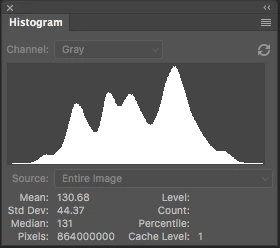
 

Please notice how there are "tails" (lines) out each side of the main body of data, indicating that there are small levels of data almost to the limits of range. For me, it is important to know about these tails exist so that I do not end up creating a clipped condition when applying a curve function. We use S-curve limiters to compact the tails without clipping.

Here is the exact same file at Cache Level 1 for the same 36Kx24K pixel 16-bit grayscale file, but this time in 19.1.0.
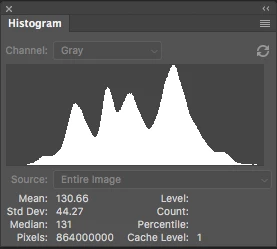
 

Please notice how there is no tail indicating data extending to the left, and rather a botched one going to the right. This is not helpful! You will also notice that the Mean and Standard Deviation values differ.

Further, it use to be nice to be able to take the cursor and scan across the histogram with a display of level and count showing up for whatever was under he cursor. This seems to have gone away in 2015.5, and is even worse in 19.1.0.

Thanks for your help.

Pete

This topic has been closed for replies.

104 replies

Pete_Myers
Known Participant
December 17, 2020

My post seems to have gotten lost in the weeds. Can any one outside of Adobe confirm the histogram issues?

JFA seems to have confirmed the Curves Function intercept line is not working, nor has it worked through multiple versions.

Pete

Pete_Myers
Known Participant
December 13, 2020

Grateful to you for your confirmation. That helps a lot.

Pete

Jeff Arola
Community Expert
Community Expert
December 13, 2020

Yes and in photoshop 22.1 the curves intersection lines don't show at all even though

Intersection Line is enabled in the Curves Display Options. I think versions 20 and 21 were broken as well.

Pete_Myers
Known Participant
December 12, 2020

Dear Adobe Support:

Problems first appeared following 2015.5 in regard to the Curves function and Histogram, and I have reported it continuously since 2018---still not fixed. These are fundamental functions of PhotoShop, so would consider them a priority for repair.

Running 22.0.1 on a MacPro 2019 with 96GB RAM, AMD Radeon Pro 580x, and Cataltina 10.15.7. I have been using PhotoShop since Version 2.

First, the easy one; the intercept line does not work in the CURVES function, and hasn't done so for a long time. It is an important part of the tool.

Second, the histogram is still screwed up. As I posted previously, it does not show the tails of the data properly, which is an OR function. The only time it works correctly is when viewing the histogram as "colors" in RGB---not in the selected channels, RGB composite or in monochrome.

I am still astonished that you folks cannot see this problem on your end, nor has it been fixed in YEARS. Every time I bring it up, I get severe push back by the moderator and the company. I have a long history in writing for a wide spectrum of photo publications, and it would seem to me to be enough credibility to take this issue seriously. Why is it not fixed?

Pete

Inspiring
May 17, 2020
I'm not blaming everything on the coder.  Often the task is ill defined in the first place.  That part of the whole process needs to have it's methods reviewed to see that they don't cause problems.  That has to be on going just as the Advocates.
There is one thing I have found that some coders do is that they rewrite from scratch rather than debug of even understand previous code.  This makes it very possible to introduce differences especially if the functionality is not well documented.  Something like the histogram could well have suffered from this.
In the end it is up to management at all levels to realize that there need to be checks at all levels to ensure this type of problem doesn't get into production.  How many things like this are lurking where they are not directly visible?

RONC 
Earth Oliver
Legend
May 17, 2020
I'm jealous!
Inspiring
May 16, 2020
I meant to add more on how the tools should be tested.  There should be a suite of images that are tested for before/after of a modified tool.  These should include a number of synthetic images where the answer is known much like the one I supplied but probably with more blobs.  I have since modified it to include zero and maximum values. Then the decision whether the tool is good is up to a group of "Devil's Advocates" who are not coders but very experienced users and they have final say if the tool becomes part of Photoshop.  They would not only validate the tool but its interaction with other tools in PS.  They might have more and different synthetics to use to evaluate the tool.  They can not be overridden by the coder admins.  They answer to a GM or higher.
They are an additional cost but they would have caught what we are seeing when it happened.  It also would have found so many of the problems that have occured in PS, LR, and ACR of the last while.  The coders have to have deadlines not for release of the product but for the evaluation process.
A major point it these tools must e tested against knowns not just whatever the coder has on hand for fixing a problem.  Many of the knowns would be developed by the Advocates and shared with the coding staff.  They must be documented for either coder or Advocate to use to evaluate tools and other things.  Tools should have a history of maintenance including what evaluations were performed, by who, and when.

With push to release code, the coder can't win unless they have their tools and advice from the advocates.

The money lost by Adobe clients because PS, LR..... is never mentioned but it really hurts many of your smaller ones.

Sorry for the lecture but I don't perceive Adobe as a standard in quality that it once was.  You might pass this further up and I'm willing to discuss as there many companies that do things as I stated.  They probably have a different name for the Advocates.  I think "Client Advocates" is a good title and should appear in all stages of the development, sales, and use of a product.

"Deadlines are the biggest enemy of quality."

RONC
Todd Shaner
Legend
May 16, 2020
Ron, Pete did mention this in the original post above. "You will also notice that the Mean and Standard Deviation values differ."


He also states, "Further, it use to be nice to be able to take the cursor and scan across the histogram with a display of level and count showing up for whatever was under he cursor. This seems to have gone away in 2015.5, and is even worse in 19.1.0.


It's clear something was changed that's causing it.
Inspiring
May 16, 2020
Jeff/Todd,

Another oddity as I looked at the very first displays that Pete presented.  The computation of the Histogram is different as the Std Dev is not the same.  I'm assuming the same file was used as input.  Then in the display, the number of pixels in a bin scaling of the Histogram is different not only on the tails but across the entire function.  This is why the tails fall off the bottom.  Seems that the computation of the display was also changed and not handled correctly.

This is the PS2015vs2019 image compare:


The peak to trough distance is very significantly different.  I don't have either version installed to run a synthetic file test so someone in Adobe must do that for making corrections to PS2020.

RONC
Inspiring
May 12, 2020
Todd,
I did the same test on my grayscale to sRGB image and it has small differences between the output and the desaturated version.  The conversion tool is buggy.  The errors are mostly in the green channel.
RONC