


Inspiring
January 24, 2018

P: Histogram behaviors are different from prior versions

  • January 24, 2018
  • 104 replies
  • 3328 views

I am experiencing problems with the histogram in 19.1.0. I am a mid-career fine art photographer by profession, and have been a PS user since Version 2. I am also a member of the Authors Guild, and write on photography for various publications. I have been purposely hanging back at PS 2015.5.1, as it has served me well. Yesterday, I decided enough, is enough, and installed 19.1.0.

This first histogram is at Cache Level 1 for the file values of a 36Kx24K pixel 16-bit grayscale file.
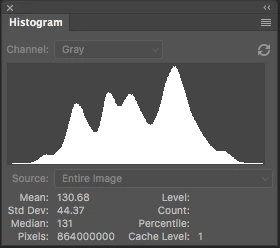
 

Please notice how there are "tails" (lines) out each side of the main body of data, indicating that there are small levels of data almost to the limits of range. For me, it is important to know about these tails exist so that I do not end up creating a clipped condition when applying a curve function. We use S-curve limiters to compact the tails without clipping.

Here is the exact same file at Cache Level 1 for the same 36Kx24K pixel 16-bit grayscale file, but this time in 19.1.0.
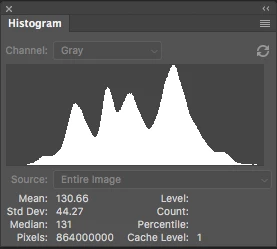
 

Please notice how there is no tail indicating data extending to the left, and rather a botched one going to the right. This is not helpful! You will also notice that the Mean and Standard Deviation values differ.

Further, it use to be nice to be able to take the cursor and scan across the histogram with a display of level and count showing up for whatever was under he cursor. This seems to have gone away in 2015.5, and is even worse in 19.1.0.

Thanks for your help.

Pete

This topic has been closed for replies.

104 replies

Inspiring
May 4, 2020


I have been using PhotoShop since Version 2.

For a while I froze at 2015.5 because that was the last version of PhotoShop in which the Histogram function displayed the data "tails" properly, as it had since the beginning of PhotoShop. Basically, it is a logical OR function that shows just above the baseline that there is greater then one pixel of data at a particular level. To demonstrate, the histogram in the Curves function does show like this, even in the current version.

But I finally rolled forward to PhotoShop 2020 only to find that the Histogram function is still not fixed! At least there should be a user option button that enables "show tails".

Then in 2020, if you have the Histogram function up and open the Curves function, the moment you do something on Curves, the histogram DISAPPEARS from the desktop. Boom! Gone. So you can't use the precision of the Histogram function in supporting Curves without constantly re-opening it.

And as per my post the other day, the Intersection Line in the Curves function does not show even when user select ON. It just doesn't work. This has been confirmed by another user.

This is basic stuff! These functions have worked properly since the beginning of time, and for the advanced PhotoShop user are extremely vital in use. How is it that these problems are still not fixed?????????!!!!!!! The Histogram and Curves functions are as basic as breathing in PS.

Pete
Inspiring
February 1, 2018
Hi Tom:

NO, that is the exact same image opened up in 2015.1, then again in the current version. Gray Gamma 2.2. I very carefully have checked the color management and calibrations are exactly the same for each. Try it yourself.I think you will be able to confirm it too.
That is why there is a bug. There should also be an OR function that show any value greater then Zero at a level has a minimum display of at least 1 on the scale so that the data tails can be seen. This is a HUGE issue. We need to be able to see the data tails at a level of 1 for anything other then zero.
Also, before 2015, the cursor would should what ever level it was over, and the statistics for that level. That was the most useful. I am not sure what is going on now, but it doesnt help the tool At least there should be a menu that allows the user to configure statistics as per all the previous versions. Pete
tom attix
Adobe Employee
Adobe Employee
January 24, 2018
Pete-
Something looks a little weird. The 2 histograms have different Means and Standard Deviations, which would imply that they aren't quite the same image. Any chance the color profile is different in the second screen shot?

-Tom Attix
alanterra
Inspiring
January 24, 2018
Hi Pete

I myself am rather confused about histograms in Photoshop, since they often don't seem to display the actual histogram, and often it seems that the histogram under a curves layer is different than the histogram displayed in the histogram panel. Perhaps someone who has looked into this more can comment.

But, in case this helps, you are aware of that you can use the option key (at least it's option on Macintosh) when you move the terminal point of a curve adjustment, and Photoshop will show you exactly which pixels (and, even better, which color channels) are bumping into 0 or 255? I find this to be tremendously useful, and I now just use the histogram to make a general assessment of a photo, and not to analyze which pixels are near or at clipping.