
Inspiring
November 5, 2017

P: How do I see just the Brush Tip Preview?

  • November 5, 2017
  • 45 replies
  • 1436 views

The brush preview in PS 2018 has changed so now it shows a dragged preview of the brush. I have many a custom brush that are meant to be singularly clicked, not dragged, like stencils. I cannot see which brushes are which anymore, because of this new preview and cannot find a way to change it back. 

PLEASE FIX THIS WITH AN UPDATE ADOBE, IT WAS FINE THE WAY IT WAS.
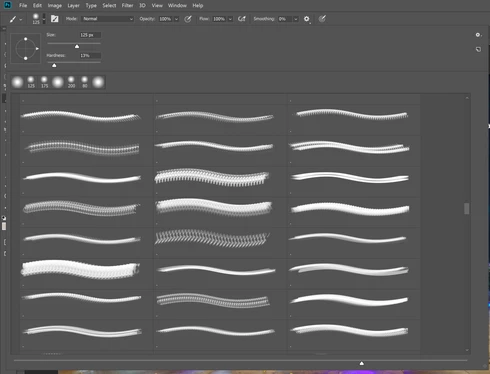
As you can see, there is NO WAY for me to tell which brush I am using.

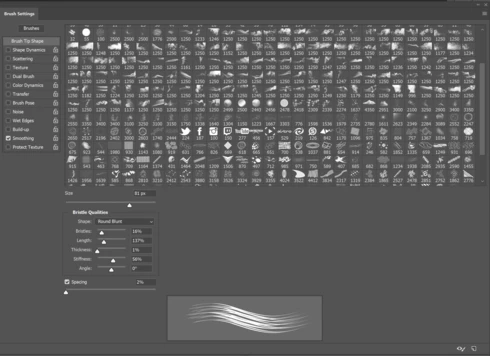
The only work around is to go into the detailed brush settings but this is hassle for me when I need to quickly choose a brush. 
45 replies

Inspiring
April 12, 2019

Adobe need to fix this!!! So annoying! 

Inspiring
January 12, 2019
Thanks a lot! 
Inspiring
August 26, 2018
> all I want to see is the brush tips - in my opinion this is a change too far - please can I get my old style brush pallet back?  >

You have the option to see just the brush tips. Open the panel menu, make sure brush name and brush stroke are unchecked, uncheck Show Additional Info and you've got exactly what you want. Heck, you can even uncheck Show Recent Presets if you want the real old way of viewing the Brushes panel. Don't create any sets/groups, drag any that fall into sets out on their own, and you can have the old panel that doesn't help you organize anything or know what type of brush/tool you are selecting when you select a brush tip.

It's all customizable by you for you.
Inspiring
August 25, 2018
The brushes worked so well before - all I want to see is the brush tips - in my opinion this is a change too far - please can I get my old style brush pallet back? 
Hannah Nicollet
Community Manager
Community Manager
April 25, 2018
Happy to help, Josh! Thanks for letting me know 😄

Hannah
Inspiring
April 25, 2018
Hannah, you are the first one to understand this question & have the answer I needed, thank you!!!
Hannah Nicollet
Community Manager
Community Manager
January 18, 2018
htown what version of Photoshop are you running? I'm asking because that's the default view of the brush presets for the current version, so if you're not seeing it I'm wondering if you need to update?

You should see the folders when you go to Window > Brushes. If the folders are collapsed you should see them at the top of the list.

Launch the Creative Cloud desktop app and then next to Photoshop in your app list does it say "Update" like this?


After that, follow these screenshots:


https://helpx.adobe.com/photoshop/kb/uptodate.html

Also another update will be coming shortly, so stay tuned for it.

Regards,
Hannah
Inspiring
January 18, 2018
Melissa, How did you get your folders (Groups) to show up at the top of the list?
Hannah Nicollet
Community Manager
Community Manager
January 18, 2018
Hi htown,

Password is blueMoon

Thanks,
Hannah
Inspiring
January 18, 2018
What is the password for the video. It will not let me view.