


fkwok
Known Participant
December 28, 2021

P: Hue / Saturation Adj. Layer Behaves Differently in Ps v23.x

  • December 28, 2021
  • 7 replies
  • 7029 views

In Photoshop 23.x (2022) for Windows, when adding a Hue/Saturation adjustment layer and a particular hue is targeted with the hand tool, moving the Hue slider does NOT cause the bottom-most gradient to reflect the different, modified choice of Hue. (i.e., the upper gradient reflects the hand tool's choice; the bottom, the newly chosen value.)
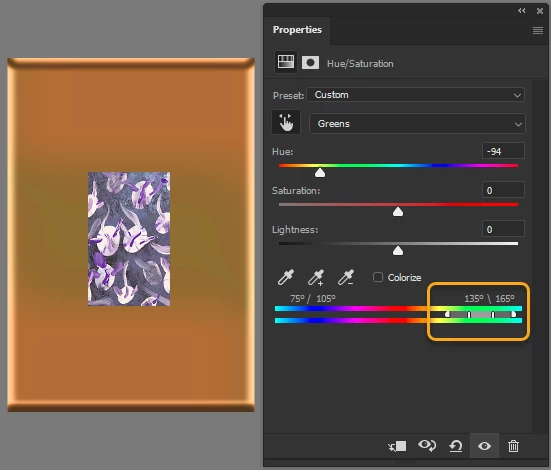
Photoshop version 23.1.0 - no change in bottom gradient


This is DIFFERENT behavior from version 22.5.x and previous versions. I'm posting this again because an Adobe employee did not seem to understand what I was describing in a previoud post.
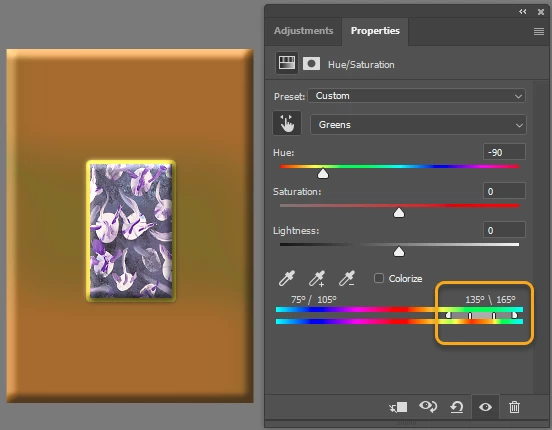
 

Photoshop version 22.5.1 - modified gradient, as expected

This topic has been closed for replies.

7 replies

Mohit Goyal
Community Manager
Community Manager
February 17, 2022

Hi all,  


We're happy to announce the release of Photoshop 23.2. This update includes the fix for this issue. To see the list of all fixed issues, click here


To update Photoshop to 23.2, click "Update" in the Creative Cloud desktop app next to Photoshop. More detailed instructions for updating  


Let us know if the update resolves the problem for those affected and share your feedback with us.  


Thanks,

Mohit

Participant
February 16, 2022

The bars at the bottom no longer move. I can however adjust the sliders. MacOS Monterey 12.1 on iMac 2019 and Macbook Pro M1 2020

TheDigitalDog
Inspiring
February 16, 2022

I can move them, same OS but not M1. I recall seeing a post here the other day where an Adobe team member said he reported this to engineering. Might be an M1 specific bug.

Author “Color Management for Photographers" & "Photoshop CC Color Management/pluralsight"
fkwok
fkwokAuthor
Known Participant
February 15, 2022

Thank you. It's now working as expected in v23.2.

Known Participant
February 9, 2022

While teaching today a student using the same version of Photoshop but in Mac OS 11.5.2 did not have this problem. As stated earlier I am in OS 10.15.07.  I have never had this problem until the past couple of weeks after updating Photoshop.

Known Participant
February 9, 2022

I'm using 23.1.1 Photoshop, Mac OS10.15.7.

When using a hue saturation adjustment layer and looking at the properties window The flat color wheel bars below the eyedroppers no longer change to reflect the changes made with the sliders. In the past the bottom bar always showed the changed color under the original color as you made changes to the Hue.


The feature still works in Image>Adjustments but not in Adjustment Layers. It is very useful when teaching this adjustment. Please fix.

Legend
January 7, 2022

I see what you're describing now. Thanks for the additional details. I'll have the engineers take a look.

fkwok
fkwokAuthor
Known Participant
December 28, 2021

In Photoshop 23.1 (2022) for Windows, after adding a Hue/Saturation adjustment layer and a particular hue is targeted with the hand tool, modifying the Hue slider is NOT reflected in the bottom-most Hue ramp.

mglush
Community Expert
Community Expert
December 28, 2021

Hi,

Could you show us a screenshot of your window with the panels open so we can see an example of what you are seeing?

Michelle