
Participating Frequently
November 1, 2017

P: Image changes don't show on screen or in navigator

  • November 1, 2017
  • 63 replies
  • 1088 views

Issue: Various edits made to the current document do not refresh the screen preview or the navigator panel until the canvas is clicked again, or a keyboard shortcut is invoked. This includes such interactions as showing and hiding a layer, entering quickmask mode, making a lasso selection, and using the Undo command.

After trying numerous fixes, I eventually narrowed it down to a single preference which is causing the problem for me. The issue seems to be caused by disabling the "Start" Workspace in Preferences > GeneralI fixed the problem by re-enabling the "Start" Workspace. As soon as I re-enable it and restart, the issue goes away. I can reliably reproduce the issue by again disabling the option.

Note: This issue began for me a couple weeks ago using CC 2017 18.1.1, and is still occurring after updating to CC 2018 19.0. I am on Mac OS X 10.11.6.
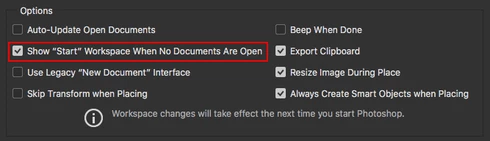


See the video below for a comparison of the normal with the default setting ("Start" Workspace Enabled), and then with the option disabled.


A similar issue for Photoshop CC 2017 is discussed here with no resolution: https://feedback.photoshop.com/photoshop_family/topics/problem-photoshop-cc2017-the-edited-image-isn...

This topic has been closed for replies.

63 replies

Inspiring
December 3, 2018
Ok, so I found this post due to having this same issue today with 20.0.1. I tried out switching some settings, turning the gpu off which would be the closest explanation maybe since it's a rather old GTX Titan of the first generation. I should add I'm on a Windows installation too, so it is not specifically an OS X problem either.

After having messed around with the settings to no avail i downgraded to 20.0.0 and that actually worked correctly.

Clearly it is some kind of memory issue that keeps coming back in certain releases.
Hannah Nicollet
Community Manager
Community Manager
May 20, 2018
This issue occurs with older versions of RightFont. So you should be able to update to the current version of Photoshop, 19.1.4.

To resolve it, update RightFont to version 4.9 or later: https://rightfontapp.com/downloads/4.9/rightfont.zip

Thanks,
Hannah
Inspiring
May 19, 2018
Has the problem with Photoshop CC 2018 been resolved (where changes don't show up on the screen)? I downgraded to 19.1.2 when I encountered this problem. But, I'd like to update if the issue has been fixed.
Inspiring
March 23, 2018
I've updated to 4.8 and so far the issues seem to have fixed. Thanks!
Legend
March 23, 2018
RightFont has updated to 4.9: rightfont.zip
Participating Frequently
March 19, 2018
Is there a difference between the debug version and the release version?
Legend
March 19, 2018
Are you using the release version of 4.7? or the Debug version: https://rightfontapp.com/downloads/4.7/rightfont_debug.zip

[Edit: Nevermind, I see it says you're using the debug version) Thanks for letting the RightFont folks know.

Edit: Use right font 4.8 or later: https://helpx.adobe.com/photoshop/kb/document-does-not-update-rightfont-macos.html
Participating Frequently
March 19, 2018
I hate to say this, but suddenly this afternoon, I started to have the same problem with Photoshop. When I turned off RightFont, the problem disappeard. 😞

I've sent an email to the developers of RightFont. 
Participating Frequently
March 18, 2018
I have installed the debugged RightFont update, upgraded back to Photoshop 2018 v 19.1.2 and, so far things seem to be working properly. Fingers crossed.  (I'm outtacontext up above. I don't know how I'm logging in with two different accounts.) 
Legend
March 16, 2018
Thanks. I was going to update the thread late yesterday. Our engineers have been working with them - and the debug version was a new wrinkle I didn't have prior.