
Participating Frequently
November 1, 2017

P: Image changes don't show on screen or in navigator

  • November 1, 2017
  • 63 replies
  • 1094 views

Issue: Various edits made to the current document do not refresh the screen preview or the navigator panel until the canvas is clicked again, or a keyboard shortcut is invoked. This includes such interactions as showing and hiding a layer, entering quickmask mode, making a lasso selection, and using the Undo command.

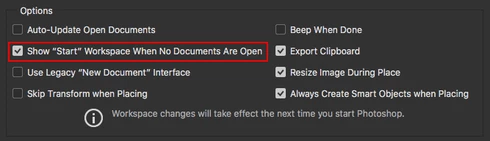
After trying numerous fixes, I eventually narrowed it down to a single preference which is causing the problem for me. The issue seems to be caused by disabling the "Start" Workspace in Preferences > GeneralI fixed the problem by re-enabling the "Start" Workspace. As soon as I re-enable it and restart, the issue goes away. I can reliably reproduce the issue by again disabling the option.

Note: This issue began for me a couple weeks ago using CC 2017 18.1.1, and is still occurring after updating to CC 2018 19.0. I am on Mac OS X 10.11.6.


See the video below for a comparison of the normal with the default setting ("Start" Workspace Enabled), and then with the option disabled.


A similar issue for Photoshop CC 2017 is discussed here with no resolution: https://feedback.photoshop.com/photoshop_family/topics/problem-photoshop-cc2017-the-edited-image-isn...

This topic has been closed for replies.

63 replies

Inspiring
March 1, 2018

I'm having the same kinds of issues. When making any sort of change to any of my images, there is at best a lag, at worst, nothing happens at all. I cannot select pixels. Only half of my filters and actions produce any sort of result. I can copy a layer, but when I do, the layer preview in the layers panel appears blank, even if the copy is successfully made.   

Yesterday after some experimenting, I realized I can (sometimes) see my work if I add a new layer, then click into that new layer. As soon as I click the new layer the last edit I made appears. It's a temporary (and frustrating) workaround, but obviously, unacceptable for the long-term.

I'm on a iMac (Retina 5K,  late 2015) with 1TB Fusion Drive available - running High Sierra version 10.13.3.

I have deleted all Photoshop preference files, uninstalled the app, reinstalled it and restarted the computer, checked and unchecked "Use Graphics Processor," and "Show Start Workspace When No Documents Are Open" - nothing seems to solve any of the problems. 

I just upgraded to Photoshop CC from Photohshop 6 and am finding it (at least this version) to be absolutely unusable.
Inspiring
February 26, 2018
I am having the exact same issue.
Please fix this Adobe.
Participating Frequently
February 21, 2018
Yes, Adobe folks, at least a comment would be nice ... No answer for the last two weeks.
Or maybe the Great cloud business ideas keeps you too busy to assist people like us??
Participating Frequently
February 19, 2018
So, Adobe people, what's happening with this issue? Thx.
Participating Frequently
February 13, 2018
Completely agree with you: this is a bug of version 19.1.0 Adobe should fix as soon as possible. The fact that 19.0.0 does work shows that the updated version 19.1.0 is buggy. Full stop.
All new features of 19.1.0 are not available for us.
Participating Frequently
February 13, 2018
Yes, and 19.0 works (as long as you implement the startup workboard). But, that doesn't solve the problem with 19.1. 
Participating Frequently
February 13, 2018
Have you ever tried to uninstall Photoshop 19.1.0 and then reinstall the previous version 19.0.0 (accessible via Adobe's Creative Cloud desktop panel)? This has helped in my case.
Inspiring
February 13, 2018


When making any sort of change to an image, from overlaying a gradient, to resizing a box shape, to editing the levels, etc. Photoshop will not immediately reflect the new action done to the image.

It will appear exactly as it did before I made the change UNTIL I either zoom in/out or make another change (in which case it shows the prior change, but not the new one until I do the same thing again - rinse/repeat).

This does not happen every time I open Photoshop, sometimes it works fine and sometimes it decides to do it. If I quit Photoshop and reopen, it does not fix the problem. If I restart the computer, it may fix it or it may decide to do it that time as well.

This is a very very annoying bug that seems to plague me fairly often in Photoshop ever since CC 2018 (which has been very buggy overall).

\\
I have deleted all Photoshop preference files, uninstalled the app, reinstalled it and restarted the computer. Does not prevent it from happening.

Photoshop 19.1
Mac osX 10.13.2
iMac 5k
Participating Frequently
February 13, 2018
Nope, almost impossible. It's a Retina iMac (ultimo 2014) with AMD Radeon R9 M295X 4 GB which is a very good and fast graphics card. Besides, why should it work flawlessly with Photoshop 19.0.0 but not with 19.1.0 ... ?

Just glimpsed through Adobe's system requirements for Photoshop CC 19.x versions with macOS (see: https://helpx.adobe.com/photoshop/system-requirements.html). No requirement my graphics card would not meet.
Inspiring
February 12, 2018
Same problem here with 19.1.0 but with 10.12.6 on a MacBook Pro 2012. 

Layers do never refresh (only after zooming in & out), changing the visibility of the eyes' icons of the layer palette does not refresh the screen (once again, only after zooming in & out), selections are invisible, layer thumbs take almost a minute to update and so on. Disabling GPU assistance did not help.

After uninstalling Photoshop 19.1.0 and re-installing 19.0.0 everything was okay. So there must be something wrong with 19.1.0. I'll now stay with 19.0.0 and won't update until the bug will be fixed.

But, no problem with 19.1.0 on a MacBook Pro 2016 13' with Intel Iris 540.

Something wrong with old graphic card ?