
Participating Frequently
November 1, 2017

P: Image changes don't show on screen or in navigator

  • November 1, 2017
  • 63 replies
  • 1088 views

Issue: Various edits made to the current document do not refresh the screen preview or the navigator panel until the canvas is clicked again, or a keyboard shortcut is invoked. This includes such interactions as showing and hiding a layer, entering quickmask mode, making a lasso selection, and using the Undo command.

After trying numerous fixes, I eventually narrowed it down to a single preference which is causing the problem for me. The issue seems to be caused by disabling the "Start" Workspace in Preferences > GeneralI fixed the problem by re-enabling the "Start" Workspace. As soon as I re-enable it and restart, the issue goes away. I can reliably reproduce the issue by again disabling the option.

Note: This issue began for me a couple weeks ago using CC 2017 18.1.1, and is still occurring after updating to CC 2018 19.0. I am on Mac OS X 10.11.6.
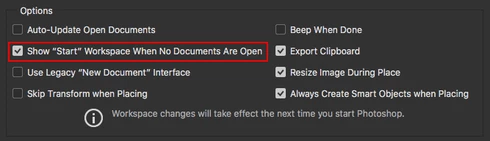


See the video below for a comparison of the normal with the default setting ("Start" Workspace Enabled), and then with the option disabled.


A similar issue for Photoshop CC 2017 is discussed here with no resolution: https://feedback.photoshop.com/photoshop_family/topics/problem-photoshop-cc2017-the-edited-image-isn...

This topic has been closed for replies.

63 replies

Inspiring
March 16, 2018
I contacted the developers of RightFont and they said they fixed the issue with this debugged version. I haven't tried it yet. But, here's the link they gave me: 
https://rightfontapp.com/downloads/4.7/rightfont_debug.zip

Let me know if it works.
Inspiring
March 16, 2018
Updated Rightfont but problem still persists
Participant
March 16, 2018
I have RightFont as well, actually. I won't be updating as it requires a paid upgrade.
Inspiring
March 16, 2018
Yep, I have RightFont but I won't be updating as I'd need to pay for a new version.
Inspiring
March 15, 2018
I do too - looks like you have to buy a new license if you're upgrading from 3 to 4, FYI
Inspiring
March 15, 2018
I have it too... I will investigate the update...
Inspiring
March 15, 2018
I actually do have RightFont... and that might have been when the problems started actually.

I've downloaded the latest version of both PS and Right Font.
Will see what happens.
Legend
March 15, 2018
Are any of you on macOS using RightFont? If so, try updating to the latest version: https://helpx.adobe.com/photoshop/kb/document-does-not-update-rightfont-macos.html
Inspiring
March 14, 2018
I've been having this exact issue for the last year or so. Very annoying. Drives me up a wall every time I encounter it -- its entirely random too. Sometimes when I restart Photoshop it happens and sometimes it doesn't.
Pete.Green
Community Manager
March 14, 2018
Hi all, 

Sorry for the trouble with Photoshop not updating as you make changes. 
This is a bug we're still investigating, but we would love your help!

To help, download, extract, then install the following OSXCompatibility plug-in which will help provide info to debug this one.
  1. Get the plug-inhttps://adobe.ly/2pfPWFF
  2. Extract the .zip file. (contents OSXCompatibility.plugin)
  3. Place the OSXCompatibility.plugin file in Applications/Photoshop CC 2018/Plug-ins
  4. Start (restart) Photoshop and work around for a few minutes after reproducing the bug on your end.
This plug-in will output a photoshop_debug_output.txt file to your desktop as you work that measures Photoshop idle time.  
After a short while, please upload this photoshop_debug_output.txt file to this thread and I'll pass it onto the engineering team investigating this bug.

Hopefully this helps shed light on when and why this behavior is occurring. 

As you upload the text file, if you can please comment if you're using a Wacom tablet, and which driver you have currently installed, that would also be quite helpful.
Regards,
Pete