


Inspiring
December 13, 2020

P: Image disappears when window is extra-wide spanning multiple monitors (macOS Big Sur)

  • December 13, 2020
  • 7 replies
  • 815 views

This is Photoshop 22.1.0, on macOS Big Sur 11.0.1, on a MacBook Pro (15-inch, 2016) with Radeon Pro 460 4 GB / Intel HD Graphics 530 1536 MB.


If I resize a Photoshop window across multiple monitors, at a certain point most of the image disappears. Then if I keep making the window bigger, I see two copies of the right edge of the image, with a big gap in between.


Here's a screenshot showing what happens as I increase the size of the Photoshop window across two 2560x1600 monitors.
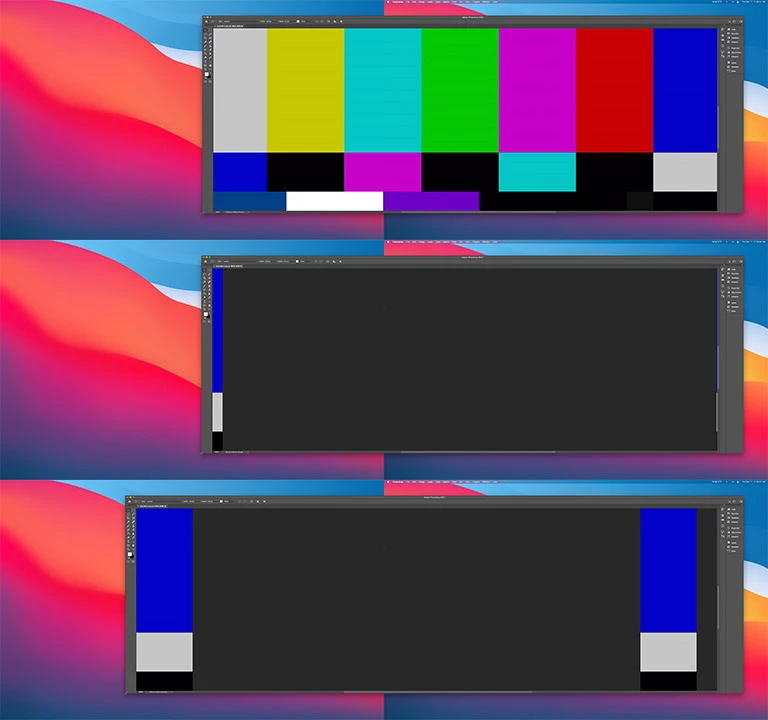


For what it's worth, the bug seems to depend on the size of the image area: if I expand panels to take up more horizontal space, I can make the window wider before the image cuts out. The maximum width before the image cuts out also seems to depend on the horizontal monitor resolution: if the monitors are rotated from landscape to portrait mode, where it's more common to size windows across multiple monitors, the image cuts out at a narrower width.


This seems to be pretty easy to reproduce. I can see this bug when using multiple external monitors, or with only one external monitor and the built-in display, and it can happen whether or not the external monitor is in high-DPI mode.


I don't know what version of Photoshop this started in happening in, as I just upgraded from an old non-cloud version of Creative Suite.


Disabling "Use Graphics Processor" in Photoshop > Preferences > Performance does work around this.

This topic has been closed for replies.

7 replies

Participant
November 8, 2023

Having a similar issue - 14" MacBook Pro was running PhotoShop fine (latest version of Bug Sur) while coonected to my large screen monitor but I disconnected to take MacBook to work and suddenly my images didn't show.  Main window is just black but I could see my iamges in the small preview window.  Tried resizing the whole window but I still don't see my image in the main window.

Inspiring
January 10, 2021

Thanks. Now that I realize I can use the Creative Cloud app to install slightly older versions of Photoshop, I can also confirm that I do not see this issue in 21.2.4, but it does exist in 22.0 and up.

Inspiring
January 8, 2021

hm, I reacted on Paul Debra. My problem has nothing to do with the merged reactions. I do not use Big Sur (do not dare to opdate), and the problem remains when using only one monitor.

Inspiring
January 4, 2021

It looks similar to my problem. I Use an Imac 2017, (OS 10.15.7 Catalina) in combination with Photoshop 22.1.0. I can see my images in navigator and on an second monitor.  But it's useless fot profsesional use.

Legend
December 18, 2020

I've asked engineering to take a look. Thanks.

Participant
December 13, 2020

Update: the problem of the image not being displayed is related to the size of the Photoshop window. Apparently I had recently used Photoshop on the large monitor, and then started it on the Macbook screen, resulting in the Photoshop window being larger than the screen size. Once I resized (downsized) the window to fit on the screen the image suddenly appeared. So it looks like the problem is not really about internal versus external screen but about having a Photoshop window that fits on the screen or not.

Participant
December 13, 2020

Everything was working fine until 22.0.1 but now that Photoshop 22.1.0 has appeared when I open an image in Photoshop it does not appear on the screen of my Macbook Pro (2020 model, with Mac OS Catalina 10.15.7). I can blindly perform operations (like running actions and saving images) but I cannot see what I am doing. The "title" of the image appears but not the image itself.

When I hook up an external monitor (and then close the lid of the Macbook) the image does appear on the monitor as normal.

I did a restart, and then started Photoshop and no other programs, just to ensure there is no interference between applications.

Please fix asap as I do not always use an external monitor and especially when traveling I need to use Photoshop just on the Macbook with its own screen.

Thanks.