

Charismatic_yogiB82A
Known Participant
November 13, 2016

P: Image shifted on second monitor

  • November 13, 2016
  • 26 replies
  • 1208 views

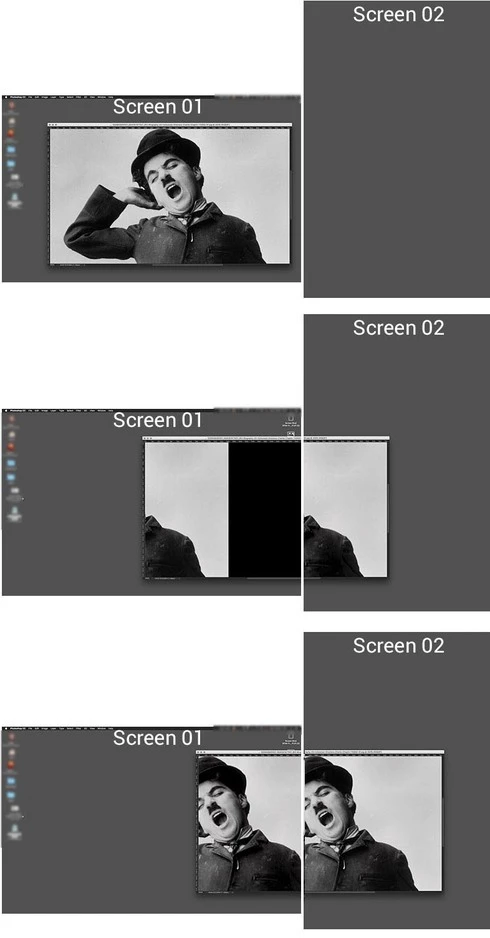
since the CC 2017 update, when i move an image even only slightly to my second monitor it gets shifted. see example images below. it shows only the part of the images wich is on the second monitor, the rest is black. if i move the image deeper in the second monitor, it shows tow equal parts of the images on both monitors.

i still have the previous version of photoshop installed an made a test there. this is definitely not happening there.

please advise or remove the bug. otherwise the second monitor is not working properly.

many thanks!
This topic has been closed for replies.

26 replies

Inspiring
January 18, 2017
Here is a very short screen grab video showing the problem. I drag the PS document window to the left towards my secondary monitor. The PS window turns black when it hits the edge of my primary monitor. This did not happen with PS CC 2015 and earlier versions.
Participating Frequently
January 18, 2017
Hi...answer being yes...since I have cc2017...last update...black magic...??? whats that..??been using photoshop for about the last 15 years...never had a problem...oooops
Charismatic_yogiB82A
Known Participant
January 18, 2017
and you have this issue only with the cc2017? probably it is related to the black image issue?
Participating Frequently
January 18, 2017
Ok...me again...just did a few tries using each screen mode using the Photoshop Menue bar-VIEW-SCREEN MODE..if I use this path & not the F KEY as a short cut all works well...for me it seems to be the problem using the short cut way..F KEY for different screen modes...mmmm
Participating Frequently
January 18, 2017
hi...I think I have to go into more detail here with my problem....okay..my IMac & Eizo are calibrated separately using..Spyder3 pro..up to date..never had a problem until about a month ago...shifting Bridge from the imac to the Eizo...no problem...colors remain good as in Lightroom...

Ok..main window for Photoshop is iMac..open a photo on the iMac...all good...open a photo on the Eizo...all good...screen mode being standard..F key to bring to full screen with menu bar ...all good...press again to bring the photo back to Standard mode & then the photo colors are more saturated/on the Eizo...then the saturated colors stay..which ever screen mode I am in...

Then I have to close the photo & re-open the photo in Photoshop...time consuming...when I re-open on either the iMac or the Eizo all is well until I go from,with the F key from full screen back to standard...& back again to full screen etc..
I can drag the photo to my Imac screen & all is well again.
+
never had a problem with the black stuff...

once again...have been using photoshop for many years & never had this problem before...strange ...???
Charismatic_yogiB82A
Known Participant
January 18, 2017
hi ron,

but do you have also the black image issue?

i had also the color change issue, but it was related to different color profile and not a photoshop bug.
it should happen in adobe bridge too.
and it happened only after i let the mouse button when moving to the second screen.
while dragging the colours were the same as on the first monitor.

now i have two equal monitors and i don't have the color change issue anymore.

hope that helps.
Participating Frequently
January 18, 2017
hi Charles...what happens with me is as the photo gets transported/shifted to the second monitor/Eizo..the colors become more saturated when I put the photo to full screen using the F key..a real pain
Charismatic_yogiB82A
Known Participant
January 18, 2017
hi charles,

yes, it is the same here.
but please click "me too" on top of the site, so they can see that thee are more people having the problem.

thanks!
Inspiring
January 18, 2017
I have a similar problem, but instead of shifting the whole document window turns black whenever the PS document window touches even the edge of the primary monitor.
Participating Frequently
January 12, 2017
i have the same problem on my external monitor with PScc 2017..funny thing is that lightroom is ok on my 2nd monitor...what is the problem & how to solve it..???