
Inspiring
August 16, 2012

P: Incorrect bahavior of Warp Transformation of Smart Object when distorted past a certain degree

  • August 16, 2012
  • 29 replies
  • 2676 views

I believe there is a bug within the Photoshop CS6 Warp Transformation when working with Smart Objects.
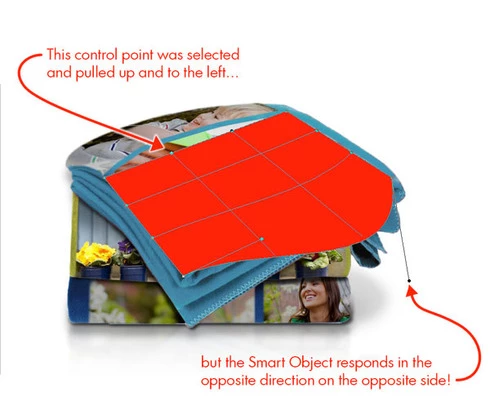
In trying to warp a smart object to conform to an upward facing, slightly curved surface, the warp control handles/points respond incorrectly in reverse; moving one on the lower left outwards warps the image outwards on the upper right. All control point movements result in this backwards behavior.
This topic has been closed for replies.

29 replies

Legend
September 17, 2016
Not yet. I've migrated the bug from our old bug system to our current system to get fresh eyes on it.
c.pfaffenbichler
Community Expert
Community Expert
September 17, 2016
Has this issue been resolved? 
And would the fix only affect Smart Objects created (or warped) since the pertinent update? 
Because I found an old file that contains a Smart Object instance which shows the problem but I have failed in trying to create a new Smart Object that is affected. 
c.pfaffenbichler
Community Expert
Community Expert
February 4, 2016
Do you know whether there has been any progress regarding this issue? 
Inspiring
August 6, 2015
No, it doesn't fix this issue - but it fixes a lot of other issues that should make it easier to figure this one out.
Inspiring
August 6, 2015
Hi Chris. Thanks for the reply. I updated, and my version now shows as 20150722. At first I thought this fixed the issue, as a quick test did not reproduce, but subsequent tests all show the issue.

The example file below, posted by earth oliver, definitely shows the issue.

Try earth oliver's file first, and then try your own reproduction in a new document. Try these steps: Create a rastor rectangle, convert to smart object, rotate in any direction over 180 degrees (don't use the command, just click the corner and rotate), then do a distort on each of the four corners, and then try a warp.

That process reproduces the issue nearly every single time for me.
Inspiring
August 5, 2015
Go install the 2015.0.1 update.
Earth Oliver
Legend
August 5, 2015
Here's a PSD made with the latest CC15 which has the issue... just do a transform/warp.

https://dl.dropboxusercontent.com/u/3...
Earth Oliver
Legend
August 5, 2015
I've been seeing this issue come up lately as well.
Inspiring
August 5, 2015
I'm experiencing this right now with recently updated CC. Along with a whole host of other new bugs that I've never had before... Very frustrating and disappointing.

Version 20150529.r.88 x64
c.pfaffenbichler
Community Expert
Community Expert
June 22, 2015
Bummer.
It admittedly rarely affects my work but it seems like it should get some attention simply for looking like a really strange failure.