



alanterra
Inspiring
October 21, 2017

P: Interprets colors differently than Photoshop 2017

  • October 21, 2017
  • 34 replies
  • 1241 views

[Edited: No one has commented on, or perhaps even read, my post below, which means that I can still edit it. So I changed the title from the more sanguine "Photoshop CC 2018 interprets Vibrance/Saturation layer differently than CC 2017."

I think that this bug is a complete show-stopper. If Photoshop 2018 changes the colors, and the effect of flattening, compared to Photoshop 2017 and earlier versions, then I can't use it. And I find it surprising that others can use it, at least on images that were edited with earlier versions.

Perhaps I am being overly shrill — I would love it if someone would check out and confirm or deny that this is a widespread bug.

My original post follows.]

I installed Photoshop CC 2018 (Macintosh, Sierra v. 10.12.6) and I find that the colors displayed in a file are different than they are in Photoshop CC 2017. This makes it impossible for me to use Photoshop CC 2018.

I have a test file with two layers — an image and a Vibrance/Saturation layer. The file is in 8-bit Pro Photo. I have one color sampler in it (set to 5 x 5 in both versions of the program). If I turn on the Vibrance/Saturation layer, the colors are much less saturated in PS CC 2018 than in PS CC 2017. There are also small differences in hue. The following table shows the differences seen:
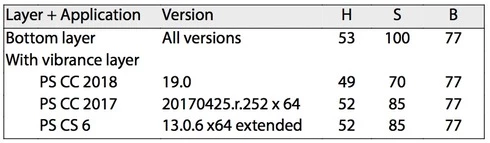
This difference can also be seen visually, and if you show out-of-gamut (CMYK gamut) colors the areas shown are different between the two programs. And, if you flatten this image, the values shown in the two versions of the Photoshop above are "baked into" the file — which means that the difference I am seeing is not a difference in reporting HSB values, but is a difference in interpreting a Vibrance/Saturation layer.

The file, and versions flattened in PS CC 2017 and PS CC 2018 can be found at https://www.dropbox.com/sh/35yds87iocpglup/AAAd-QVKoztY2HDxonkgxXQca?dl=0

It would be great if someone else could test this bug report and see if it can be replicated on other machines.

This topic has been closed for replies.

34 replies

alanterra
alanterraAuthor
Inspiring
October 27, 2017
Hi Domnita

So, I uninstalled PS CC 2017 including its preferences, and then reinstalled it over night, and now it is showing the same values as PS CC 2018 (not the values I got in PS CC 2017 yesterday).

But the strange thing is, if I copy yesterday's preferences (from a Time Machine backup) back into the ~/Library/Preferences/Adobe Photoshop CC 2017 Settings folder, it still continues to show the PS CC 2018 values, not the values it was showing yesterday.

Don't ask me why, but I also have a copy of PS CS 6, and it is showing the values that PS CC 2017 did yesterday.

So, in summary, PS CC 2018, always, and PS CC 2017, today, show a Saturation of 66, while PS CS 6, always, and PS CC 2017, yesterday and before, show a Saturation of 85.

There are other tests I can run, but they will take some time, and, since bad luck is autocorrelated, my AT&T internet service has slowed to a crawl, so deleting and reinstalling software is taking hours when it should take minutes.

I'd love to hear what you find out, if you can figure this out better. Right now my guess is that there is an obscure setting, not in the "Adobe Photoshop CC 2017 Settings" folder, that is causing this difference. (And, I deleted the few plug-ins I had installed, just in case, and that made no difference).
Earth Oliver
Legend
October 27, 2017
Check your Color Settings and make sure neither CC is converting without asking...
Earth Oliver
Legend
October 27, 2017
The files are identical for me in 2017 and 2018. Are you all sure that you're not converting to another profile without asking when you open ProPhoto?

Inspiring
October 27, 2017
> photos of flowers, and in general, as I edit them, they get more and more saturated.>

You're only human. Working with photos is like eating chilies. You build up a tolerance for an excess of color and contrast.

I don't know what they do. Visually, there isn't enough difference in the flower you show that most people not using numbers would be all that likely to pick it up, but what engineers might do is beyond me, though I assume to test is likely more rigorous than a visual perusal. After seeing your file, I wondered why mine didn't demonstrate it. We're missing a piece to this puzzle.

I have other issues now that I've given up on resolving my problems with Bridge—way too much uninstalling, clearing prefs, reinstalling for my liking—but it's about time I did that with PS to make sure I'm working with a good clean copy. If my results with this change after I clean it up again tomorrow, I'll report back. I'll also try with other files just to see if it isn't all over the map.
Participating Frequently
October 27, 2017
Hi Alan, I've been looking into this case today. The color sampler stayed constantly different between PS 2017 and PS 2018, regardless the Halide on/off state. I had made sure to align the color policies across the two versions, since your file has an embedded profile, still the numbers continued to be different. But right now I un-installed/re-installed PS 2018, and I get similar values, to my dismay. Just wanted to add this extra-detail to the already confusing story. Thank you, we'll talk more tomorrow.
Legend
October 27, 2017
Yeah. I'm confused now, too. I'll revisit this with engineering in the AM with a fresh brain.
alanterra
alanterraAuthor
Inspiring
October 27, 2017
To follow up, I am completely confused. I just confirmed, I get 85% for PS 2017. If you look at Cristin's screenshots, she gets different values, 66% for PS 2017, and 93% for PS 2018.
alanterra
alanterraAuthor
Inspiring
October 27, 2017
I did restart PS.

What you are showing me here is that on your machine, PS 2017 is now showing the same values as PS 2018 (the same values I get for PS 2018). So somehow, you have changed PS 2017.

I get Saturation 85% for PS 2017, and 66% for PS 2018, you (here) get 66% for both.

Or was I supposed to disable Halide for PS 2017?

A
alanterra
alanterraAuthor
Inspiring
October 27, 2017
Yes, I did restart Photoshop, I'm sure I did. But I'll try again (sometime later) — it is scary how many times I have made stupid mistakes like that.
Legend
October 27, 2017
When I disabled Halide, I now get something that matches:


Did you restart Photoshop after adding the tilde to the file name?