



ReneDamkot
Inspiring
March 23, 2023

P: Layer clips to nothing in layers palette

  • March 23, 2023
  • 5 replies
  • 428 views

If I Option drag a clipped layer to the bottom of the layer palette (to duplicate it), I get this:
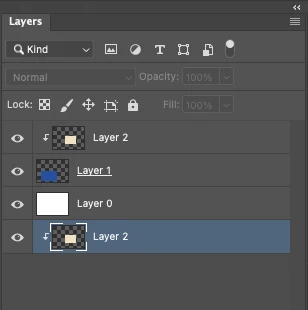


I cannot unclip it, since ther's nothing it's clipped to. Also I cannot change blend modes (you can see they are greyed out).

If I cmd+click on the "new layer" icon, I get a new empty layer at the bottom, and "layer 2" is now clipped to that and all is 'normal' again (second screenshot is after I restarted PS, and made the document again. So it shoud be pretty repeatable).
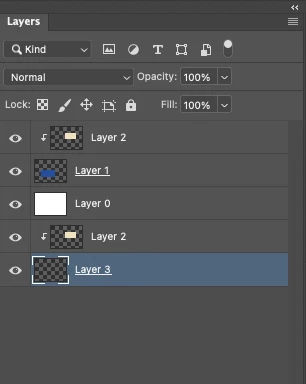


MacStudio, OSX 12.6.1; PS 24.2.0

This topic has been closed for replies.

5 replies

ReneDamkot
Inspiring
July 8, 2024

Looks like the bug is still (again?) there in PS 2024 (25.6.0)


PECourtejoie
Community Expert
Community Expert
March 31, 2023

Thank you @ReneDamkot for discovering yet another reproducible bug!
You know how to rattle things the good way, and you know that I invited you where this superpower would be useful...

(I know, production environment...)

CShubert
Community Manager
Community Manager
March 31, 2023

Will pass this on to the team to look into.


Jeff Arola
Community Expert
Community Expert
March 23, 2023

Does the same on Windows 10 22H2 in both Photoshop 2023 (ps ver 24.3) and Photoshop 2022 (ps ver 23.5.5)

Kevin Stohlmeyer
Community Expert
Community Expert
March 23, 2023

Hi @ReneDamkot I've been able to replicate this as well - definitely a bug. v24.3 Ventura 13.2.1 M1 MBP.

For now I'd avoid holding the Option key when dragging clipped layers.