


Participating Frequently
August 2, 2024

P: Layer of Pixels On Left Side of Canvas When Pasting from Alt+Print Screen to Photoshop

  • August 2, 2024
  • 9 replies
  • 1580 views

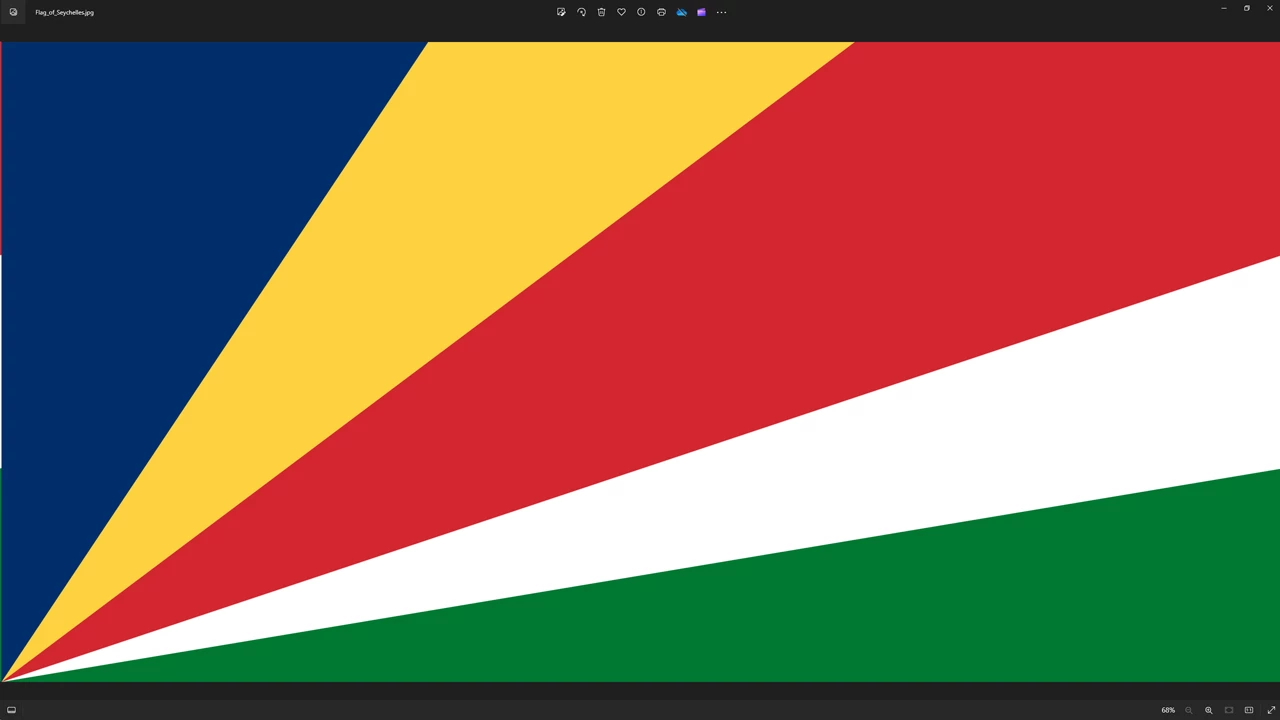
This is a weird one to explain, when pasting to photoshop using an Alt+Print Screen screen capture, I am having the issue of photoshop taking a layer of pixels from the right side of the copy and putting it on the left of the canvas. This does not happen when pasting to other programs (I tried Paint and Pixlr on web)

This issue just started for me,  I am running the latest version, 25.11, which I just reinstalled to try and fix the problem. I am running on Windows 10 Home, 64. Here is an image of the Flag of Seychelles to hopefully show what is happening. It's a little touch to see in this image upload, but your can see the red, white, and green to the left of the blue. 

If you need any more information, just ask. 
This topic has been closed for replies.

9 replies

ThioJoe
Community Expert
Community Expert
September 10, 2024

This appears fixed in the new stable release of 25.12 today 👍

Participant
August 14, 2024

Hi, I just wanted to say that I tried the beta 25.12 and this bug appears to be fixed in it. Thanks.

Sameer K
Community Manager
Community Manager
August 13, 2024

Hey All! Thanks for the details & the tag.


The team is aware of this, and a fix for it is included & available with Photoshop (beta) 25.12 20240812.

Please feel free to try it and let us know how it goes.


Thanks!
Sameer K

(Use '@mention' to tag me when you reply)

Dramenon
Inspiring
August 13, 2024

I can't speak on dates but we have a regular interval for beta releases you can see 

🙂

/end of line/
Participant
August 13, 2024

Thanks. Any idea how long before that beta is pushed as an update?

Dramenon
Inspiring
August 13, 2024

Thank you for reporting.
This looks to be fixed, not reproducible, in current internal (Beta) builds. 

/end of line/
Participant
August 13, 2024

I also tried the steps to removed the old preferences but it didn't fix the issue. I haven't tried the beta. (I don't know how)

Participant
August 10, 2024

I can confirm this is a bug in the newest update because it is now happening to me also and I do this a lot.
1. alt + print screen (screenshot current window)
2. new photoshop document (automatically sizes to clipboard size ie: 1920x1200)
3. control v to paste from clipbaord
4. the result is the image from the clipboard with 3 pixels from the right added to the left side of the image

in photoshop zoomed in after control + v (paste)


Participant
August 13, 2024

I have justed noticed the same today! As a game developer I often take a screenshot of my full-screen game and then paste it into photoshop, and I noticed the image is shifted 3 pixels to the right and those pixels from the right are copied onto the left and moved up 1 pixel! It's very strange.

Participating Frequently
August 13, 2024

@Sameer K Just to keep you looped in.

Sameer K
Community Manager
Community Manager
August 2, 2024

Hey, @7512706. Welcome to the Photoshop Community. I'll move this post to Photoshop discussions. I'll need more info to help you figure this out. Please share the system info from Photoshop Help > System info > Copy and paste into a text document > upload and attach here. 


I've tried to recreate this on my machine, but I couldn't. Please add a video of your workflow. Does this happen with documents of all sizes? What troubleshooting have you tried?


Ensure there are no stale preferences in your Photoshop. Go to the location of the preference folder below and rename it to backup.

  • Windows 10/11: Users/[user name]/AppData/Roaming/Adobe/Adobe Photoshop [version]/Adobe Photoshop [version] Settings
  • You can press Press the Windows key > Enter 'Run' > Enter %APPDATA%\Adobe
  • Rename the Adobe Photoshop folder by adding a .old at the end. (Adobe Photoshop 2024 > Rename > Adobe Photoshop 2024. old), you can later restore these preferences if needed.(https://adobe.ly/4860qM9)
  • Restart the computer.

These changes will give a fresh start to Photoshop as a fresh install. Let me know how it goes.

Thanks!

Sameer K

(Use '@mention' to tag me when you reply)

Participating Frequently
August 2, 2024

This happens with documents of all sizes that I have tried. 


I have only tried uninstalling photoshop and reinstalling it from the Creative Cloud app, with restarts in between. I will try your suggestions here and report back. 

Participating Frequently
August 2, 2024

No luck with the preference folder suggestion.