


Participant
July 1, 2015

P: Layer order reverses when creating a layer from a layer effect on a group

  • July 1, 2015
  • 11 replies
  • 483 views

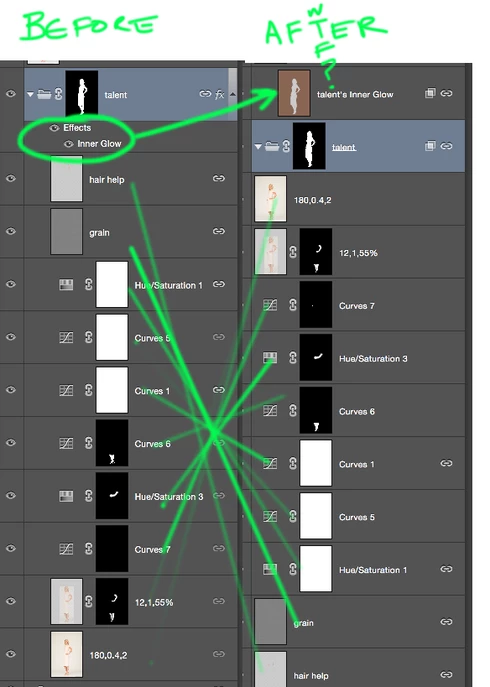
In CC 15, when creating a layer from a layer effect applied to a group, the layer is created as in previous versions, but all the layers inside that group are moved out of group and their order is revered. Hilarious!
This topic has been closed for replies.

11 replies

Participant
August 10, 2015
It is indeed. Thank you Jeffrey.
Legend
August 4, 2015
This issue should be corrected in the Photoshop CC 2015.0.1 update which was released today. Details here: http://blogs.adobe.com/crawlspace/201...
Participant
July 27, 2015
Hey Jeffrey-

Looks like there's another issue creating layers from an effect on a group. If the group with the effect has another group nested inside it, I get a program error. If I move the nested group out of the group with the effect, it works (but still reverses the layer order and moves them out of the group.)

Colin
Legend
July 9, 2015
We're looking into this issue.
Legend
July 9, 2015
I realize I can reproduce possibly all or part of the issue but I like have user files to help with regression testing in case there are attributes in your file that aren't accounted for in a file I create. Thanks.
Participant
July 8, 2015
This issue can reproduced by anyone, as earth oliver mentioned above. My file wouldn't help.
Legend
July 8, 2015
Could you post your before file? (Creative Cloud/dropbox) I think this may be related to another issue we're investigating.
Participating Frequently
July 4, 2015
Happens with me too. What a mess!

PS CC 2015 is beta software at best.
Earth Oliver
Legend
July 1, 2015
i can definitely confirm this is bugged. Tried the same setup without linked layers and got the same results... all the layers were tossed out of the group and reversed!
Participant
July 1, 2015
It's not from linked layers. It's a bug in the CC15 release. It worked correctly in the previous versions. I just tested it too, by unlinking all those layers, and got the same result. But you did notice something new: that not all the previously linked layers are even still linked.

Make a layer from a layer effect: Layer>Layer Style>Create Layer