


Released
P: Lens Correction: icons for horizontal perspective slider are placed in reverse
Here is the panel I'm talking about: 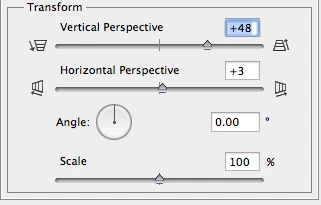
The "vertical perspective" slider works as expected: sliding to the right makes the bottom of the picture bigger.
Similarly, on the "horizontal perspective" slider, sliding to the right makes the right part of the picture bigger. However, the icon suggests the opposite: that the left is going to get bigger. Play with it for a second and you'll immediately see what I mean. They've just been accidentally switched in the UI, and need to be switched back.
Of course, the functionality is all there, but this still trips me up almost every time. Seeing this in 13.0.3. Please fix.
 AdChoices