


teomorell
Participating Frequently
January 7, 2016

P: Liquify not working using 10 bit/channel display path

  • January 7, 2016
  • 9 replies
  • 423 views

Hi,
I am using PS CC 2015.1.1 (latest version) on an Eizo ColorEdge monitor with a FirePro W8100 (latet driver 15.201.2401).
When configured to use 10 bit, I get the following in the Liquify filter:
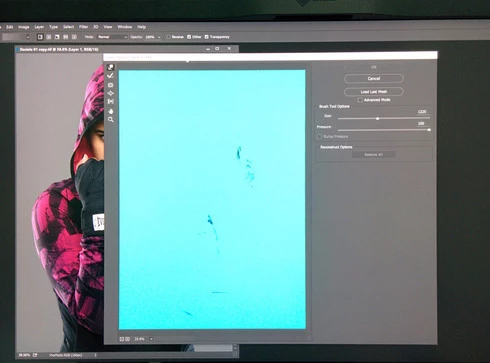

If I turn off 10 bit support, it works just fine.

These are supposed to be professional products but they are full of bugs. I just created this other case related to color banding in 10 bit.

Teo

This topic has been closed for replies.

9 replies

alanber
Known Participant
December 18, 2016
I have the same problem with a new AMD Radeon Pro WX 7100 set to 10 bits.  Any updates on this?
Legend
April 4, 2016
The issue with the current graphics drivers on current versions of Windows: https://helpx.adobe.com/photoshop/kb/photoshop-cc-gpu-card-faq.html#topic-4 We're working with our partners to try and address.
Inspiring
April 4, 2016
Too sad. I even tried older versions of Photoshop (CC 2015.0.0, CC 2014.0.0 and CS6) and all behave the same.
teomorell
teomorellAuthor
Participating Frequently
April 4, 2016
Ralf,
Not in my case. I created an image 500x500 pixels and still got the same problem. The liquify filter shows the image as plain "blue" as in the original post image.
Inspiring
April 4, 2016
I have a new observation: The problem occurs only if the image is bigger as the monitor resolution. Image format, color space and bit depth are irrelevant (besides 10bit enabled in FirePro settings).

Can you check this?
Inspiring
March 26, 2016
I created an issue in the Amd support forum also. Please comment that you have the problem also there: https://community.amd.com/message/271...
teomorell
teomorellAuthor
Participating Frequently
March 26, 2016
What really bothers me is the lack of acknowledgment from Adobe (or at least I have not seen it) about this, and we cannot be the only two people experiencing this issue.
Inspiring
March 26, 2016
I have the same issue with my FirePro W5100. I even tried the new 16.3 beta driver but this changed nothing 😞
teomorell
teomorellAuthor
Participating Frequently
January 15, 2016
Is there an official acknowledgment from Adobe about this issue?