
Participant
September 16, 2023

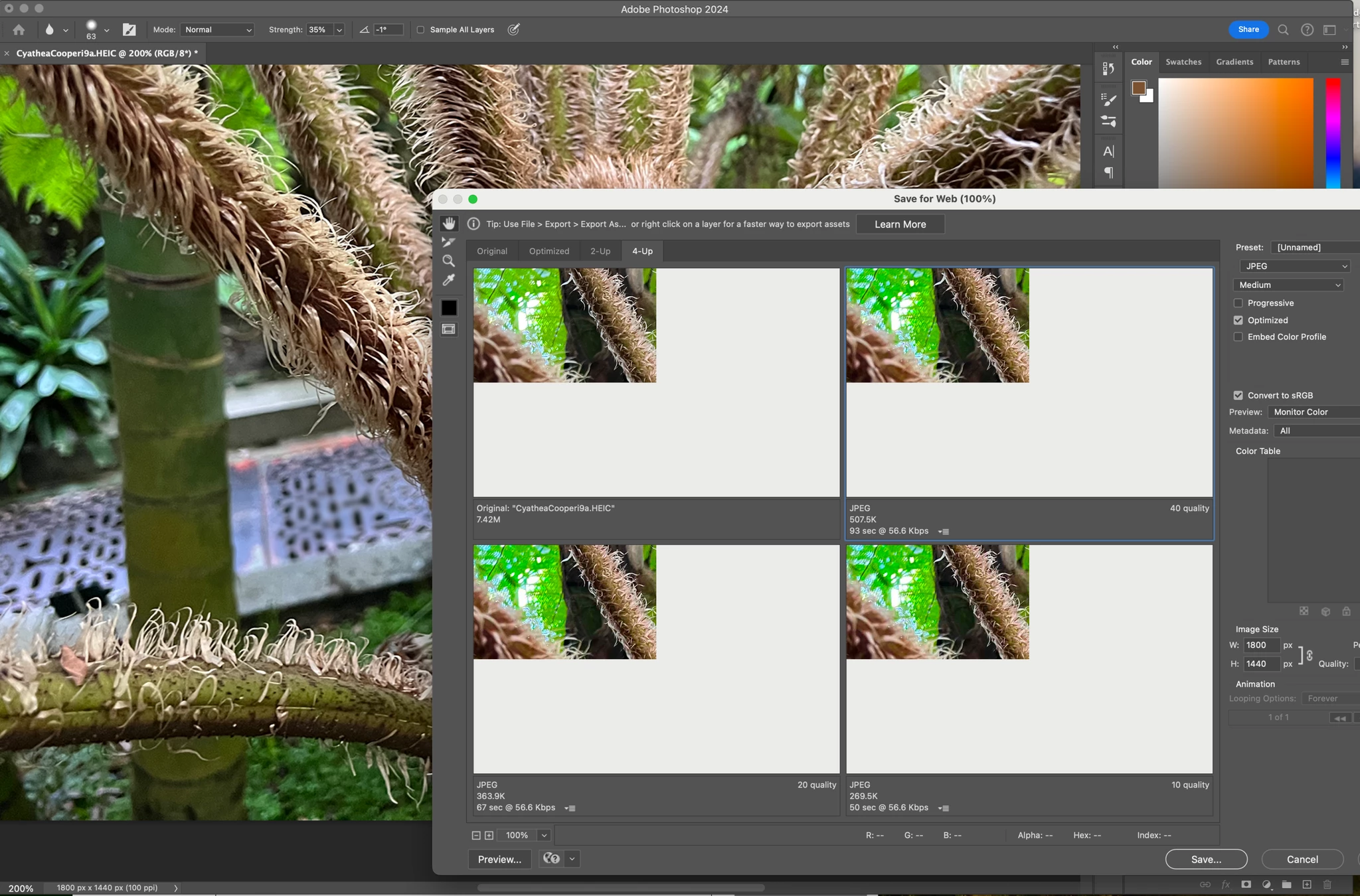
P: (macOS Sonoma) Photoshop 2023/2024 Save for Web shows incomplete preview

  • September 16, 2023
  • 184 replies
  • 38272 views

Have just updated to Photoshop 2024 and my save to web panel is now not displaying correctly - see screengrab.  How can I adjust it to have the full image fill the four windows?  cheers, Bob


184 replies

Participant
October 11, 2023

A slight workaround... I have a Dell monitor connected to my M2 and noticed the save for web feauture works properly when the window is dragged across from my laptop to the other screen.


Also by changing the zoom percentage helps navigate - somewhat.

Participant
October 11, 2023

Having the same issue!!! So frustrating and it has hindered my work process and I sometimes don't need all slices! Please fix Adobe! 🙂 


Known Participant
October 10, 2023

Exact same issue. MacBook Pro, 2023 16 inch, Sonoma

Participant
October 10, 2023

I have a second monitor and it's still not solving the issue. I have tried everything. It is impossible to select slices. My workflow is completely disrupted by this.

Participant
October 10, 2023

omg i do have a second monitor just didnt think to try this, thank you!!!!! fingers crossed it works for me : )

Participating Frequently
October 10, 2023

Earlier I reported only having the issue on my Sonoma M1 MacBook Air and not on my Sonoma M2 Pro Mac Mini - just want to add with the recent comments this is likely due to the Mini being used with external monitors.

Dave Z #225
Participating Frequently
October 10, 2023

I just confirmed that works. Drag to the second monitor, and it's visible. Drag back to the first, and it's gone again.

Dave Z #225
Participating Frequently
October 10, 2023

For the moment, try File > Export which gets you partway there. 

Or ... someone had success using a second monitor. I just tried that and it amazingly works! I dragged the Save for Web dialogue over to the second monitor and suddenly it's working. I drag it back to primary monitor and it's not.

If you don't have a second monitor, you can use any TV set that takes HDMI cables.

Participant
October 10, 2023

I am on the verge of mf tears over this bug, adobe pls im begging u i need this fixed like last week 

Participant
October 10, 2023

Same here. Since my mac updated to Sonoma 14.0 I am seeing this bug. It was working fine before and I have the latest PS 2024.