
Participant
September 16, 2023

P: (macOS Sonoma) Photoshop 2023/2024 Save for Web shows incomplete preview

  • September 16, 2023
  • 184 replies
  • 38272 views

Have just updated to Photoshop 2024 and my save to web panel is now not displaying correctly - see screengrab.  How can I adjust it to have the full image fill the four windows?  cheers, Bob
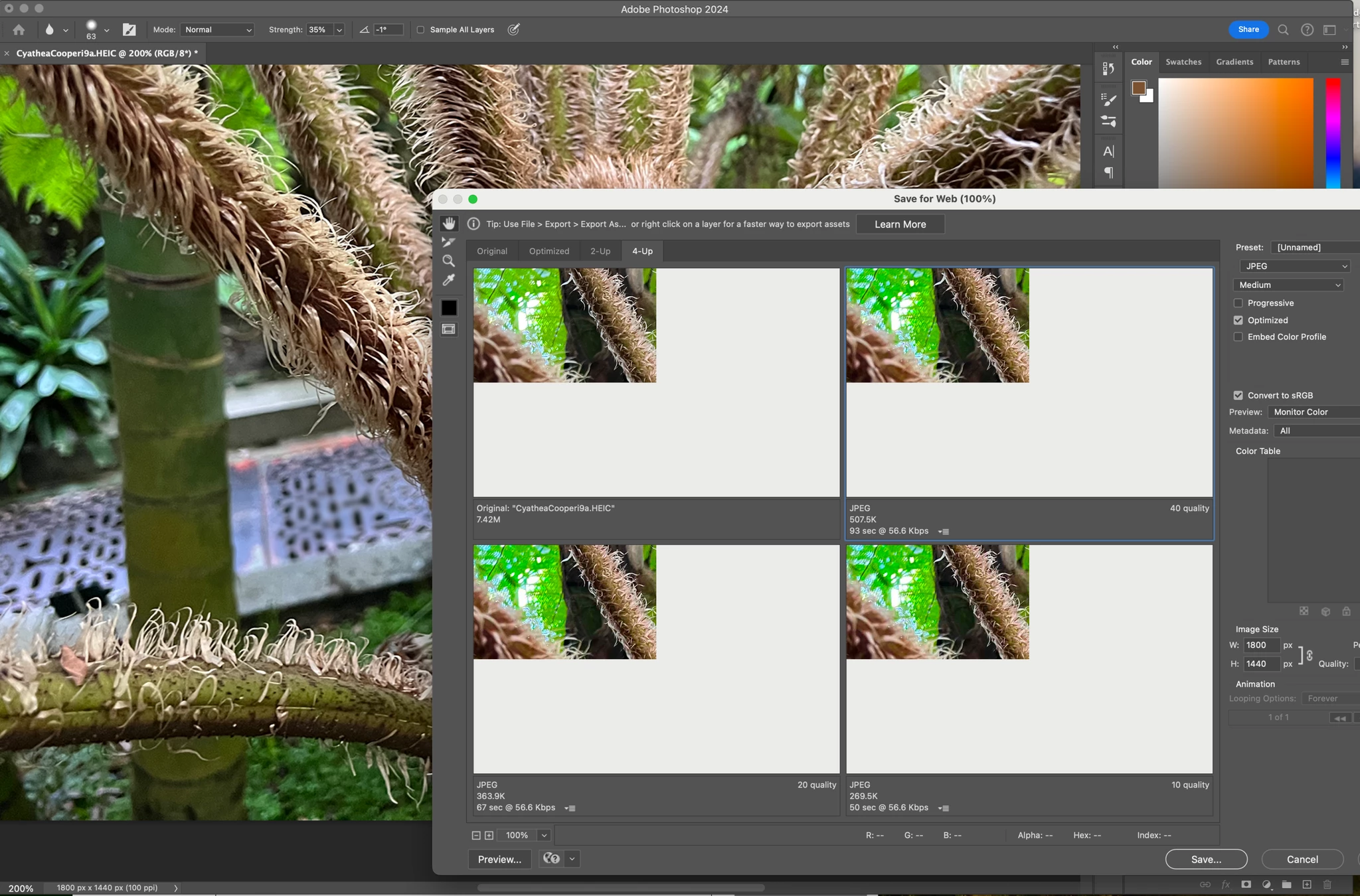


184 replies

Known Participant
October 15, 2023

Same here on Sonoma.

Participating Frequently
October 15, 2023

If you don't like the 4-key combo for Save for Web, just change it in Photoshop settings (once this is fixed). 

Participating Frequently
October 15, 2023

Agree it's very Apple of Adobe to disregard how people are using their product, and decide for us we need to do it differently.

I'm perfectly happy to see them get rid of Save For Web, if the give us something that does the same things but only requires a 2 key combo to invoke instead of 4.

I have gone through all the options in Photoshop, there is nothing else with the same features.

Participant
October 14, 2023

I'm starting to think adobe doesn't care about this feature anymore, it's been on a discontinued state for quite a bit now... which is a big shame, I use that everyday, multiple times a day, I'd say other than saving the psd, that the only other way I save stuff.

Participant
October 14, 2023

I am a web designer and recently encountered the same problem.
I would like to ask Adobe to intervene promptly.
System in use: iMac Pro, MacOS 14.0 'Sonoma' - Software: SuiCreative Cloud, Adobe Photoshop, release 25.0.0
Thank you
Davide

Participating Frequently
October 14, 2023

Yep. Same issue here! MacOS Sonoma, Macbook Pro M1 Max chip. Issue persists both on the latest app and the beta release.

Lopetz
Participating Frequently
October 14, 2023

Yes, same here. M2 Sonoma, Photoshop 2024

Participant
October 14, 2023

Same issue here with MacOS Sonoma on a MacMini M1. Using PS2023/2024 with Portraiture 3 or 4 (plugin).

Weird colors when loading, then almost empty screen as above.

hormandillo
Participant
October 13, 2023

I just upgraded to macOS Sonoma and I'm having this problem. Please help, thank you.

Derek Cross
Community Expert
Community Expert
October 13, 2023

There may be compatibility issues with Photoshop and Sonoma, it's best not to upgrade until these issues have been sorted. Try File > Export > Export As to see if that works.

Known Participant
October 13, 2023

Tipperdon, a click on the Upvote link was not enough. I just want to say "AMEN!" When communication is so easy that we're constantly spammed, then we KNOW it's not hard to inform us of snags and glitches that are known to them.  The assumption is that they don't owe us anything for the years of supporting them.