


Inspiring
December 4, 2014

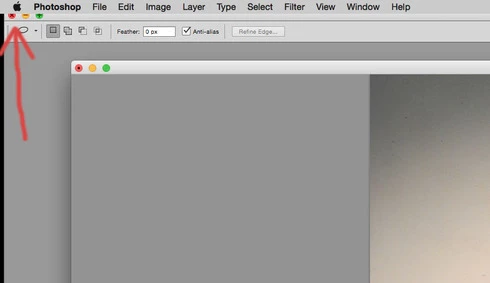
P: Minimize buttons disappear under upper menu bar

  • December 4, 2014
  • 15 replies
  • 800 views

In CS6 my minimize buttons sometimes move under the upper menu bar. If they go too far under, I can't get them back. I've tried pressing F, but that does not make them reappear. I've tried checking/unchecking the various interface options under "preferences" and also uninstalling and reinstalling the app. So far, the only way I can fix the problem is to reset all of the defaults. I've noticed this only happens on my Mac using Mt Lion and/or Yosemite. I have another Mac using snow leopard, but on that machine it's not possible for the minimize buttons to go under the upper menu bar.
This topic has been closed for replies.

15 replies

Legend
December 4, 2014
It looks like an offset is made when the second monitor is attached. So - if the top of the window is touching the top menu bar it gets shifted up under the menu. If you leave a gap at the top that's similar in height to the top bar, it won't go up under the menu.

If you ever get an a bad state with both monitors attached - a simpler way to get it to bounce back down to reposition it is to change the arrangement to side by side for a moment, then go back to your above/below arrangement.
Inspiring
December 4, 2014
The monitors are mirrored. When I disconnected one of them, the problem was solved! With only one monitor, the window can't move under the upper menu bar.
Any thoughts about how I can connect two monitors and avoid this from happening?
Legend
December 4, 2014
Are they arranged one over the other?

If you disconnect the second monitor, does the window recenter itself on the main monitor?
Inspiring
December 4, 2014
As a matter of fact, I do have two monitors hooked up to this computer.
Legend
December 4, 2014
Hmm, I'm not able to slide that up under the menu on my system. Are you using multiple monitors? If so, how are they arranged? Any system utilities?