


Participating Frequently
July 12, 2025

P: Misalignment in ColrV0/ColrV1 variable fonts

  • July 12, 2025
  • 7 replies
  • 695 views

Hi there,

First off, thanks for implementing ColrV0 and ColrV1 color font support in Photoshop. On using them however, I did notice a visual bug which might have overlap with this issue in InDesign. In variable color fonts using the ColrV0 and V1 spec I notice misalignments in various layers throughout the glyphs. Static versions of the same fonts render fine and also do so in Illustrator and other apps.
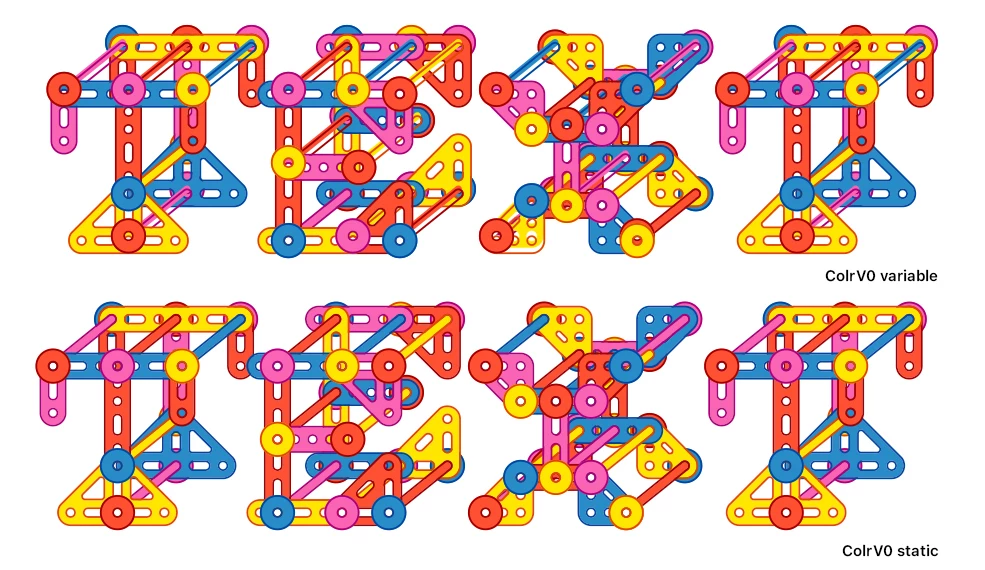
As you can see in this ColrV0 example, in the top variable version, all the "circle" elements are misaligned compared to the version below. You also sometimes see colored elements unaligned with their outline.
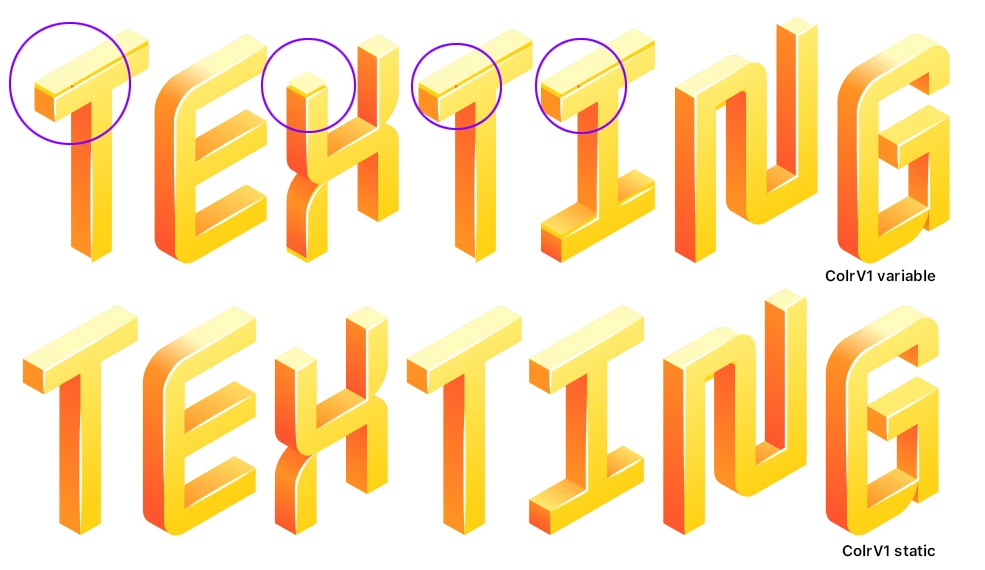
As you can see in this ColrV1 example (Nabla), in the top variable version the tops of the letters are unaligned.
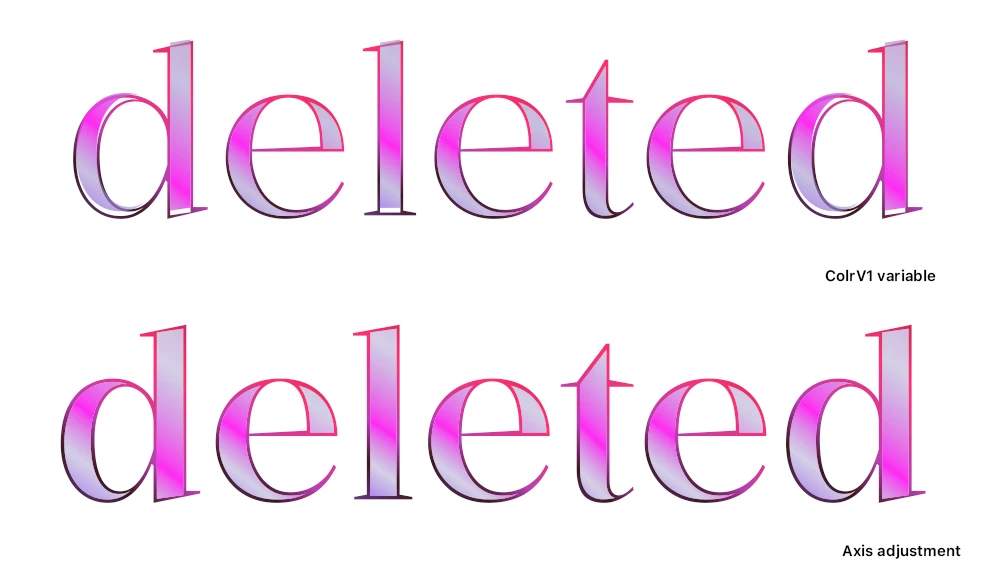

Another example: In this font (Kalnia Glaze) it only occurs in some letters (d/l, and I did not have the static variant, but it seemed to correct itself based on the variable axis position. The same happens with part of the axis in Nabla).


Tested in Photoshop 26.8.1, MacOS 15.5

7 replies

Adobe Employee
July 25, 2025

@Typearture 


Thank you for the test file and sytem info. I now can reproduce the issue and will investigate it.

Participating Frequently
July 25, 2025

Thanks for looking into it! I cleaned my cache and reinstalled Photoshop. The issue still persists, but is highly in how/where it pops up. There is no difference between hardware acceleration on/off or types of anti-aliasing.


I have gathered some examples, and it seems to be mostly visible after a resize/non-rounded font sizes. In the file are examples for all fonts above with also flattened examples on how they look on my end. I also added a layer noting some visual errors.

File link


Below is also the system info

File link

Adobe Employee
July 24, 2025

@Typearture 


Thank you for the additional info. So far, I was not able to reproduce the issue. What point sizes you see the issue?

Is it possible for you to post a test file?

Also, can you zip up and post the contents of System Info dialog obtained by Help > System Info... ?


Thanks again,

Taki

Claire H.
Community Manager
Community Manager
July 24, 2025

Updating Status

Participating Frequently
July 24, 2025

Cheers for the reply, I found the issues in the following COLRv1 fonts, which I had linked above (aside from personal projects).
Nabla Bug happens at any axis Extrusion value, although the offset/visual bug changes. Around Extrusion value 100 the unalignment is as my screenshot above.
Kalnia Glaze Bug happens at Weight axis 440 / any width axis, in letter, /b /d /h and /l, seems to be stem-component related.

Foldit Bug happens at Weight axis 800-900 (at the start glyphs are squeezed down while from Weight axis value 890 the glyphs become disconnected).

Rendering in Illustrator is correct for all fonts.

Claire H.
Community Manager
Community Manager
July 24, 2025

Hi @Typearture, Thanks for sending this information! We really appreciate you taking the time to investigate this on your end. The team is looking into the issue and will reach out if we need more information. Thanks! ^CH

Adobe Employee
July 24, 2025

@Typearture 

Please also let us know the style or axis values of the variable fonts you see this issue. Thanks.

Srishti Bali
Legend
July 24, 2025

Hi @Typearture 


Thanks for flagging this, and we really appreciate your detailed observation! To help us investigate this further, could you please share the following details:

  • Which specific COLRv0/V1 variable fonts are showing the misalignment?

  • Where did you get these fonts from? If possible, could you share a download link so we can test them on our end?


This will help us replicate the issue accurately and pass it along to the right team for further investigation.


Looking forward to your response!


Regards,

Srishti