


Known Participant
January 3, 2021

P: Missing "Drawing Mode" and "Use native operating system GPU acceleration" options

  • January 3, 2021
  • 4 replies
  • 3287 views

1. Pertinent System Specs  (Platform, RAM, HD Space, Monitor resolution, Video Card, etc)

MacBook Pro 2018 with 4 thunderbolts

500GB Hard Disk

Intel Core i5 Quad Core

8gb RAM

Integrated Graphics: Intel Iris Plus Graphics 655

Egpu : Razor Core X with AMD Radeon RX 580


2. OS version number*

Mac OS Big Sur 11.1


3. Photoshop/Camera Raw version number
Photoshop V22.1


4. A brief description of the problem.


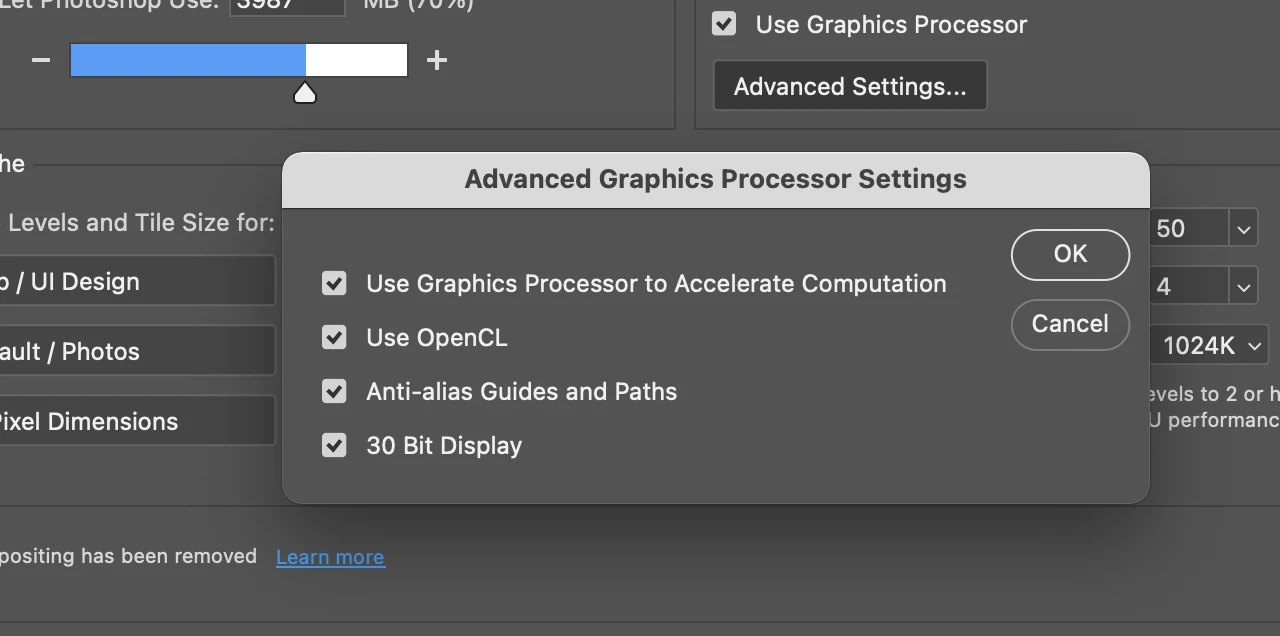
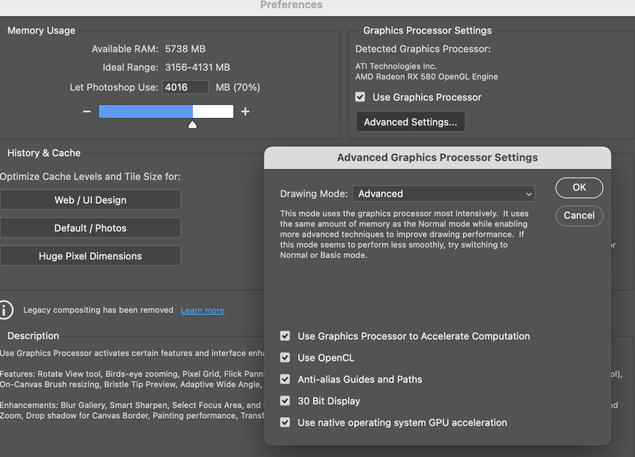
"Drawing Mode" and "Use native operating system GPU acceleration" options are missing in Performance->Advanced Settings in Photoshop V22.1 . These options were present in 21.2.4 and went missing in V22.1 after upgrade. Please see below screenshot


V 22.1
 

V 21.2.4:


5.Step-by-step instructions that will reproduce the issue. 


This problem can be replicated with or without external GPU.


In Macos Go to Performance->Advanced Settings

This topic has been closed for replies.

4 replies

Mark C. Dahm
Community Manager
Community Manager
January 20, 2021

Thanks @deoxygen7 for the note; try unchecking the 'use native operating system...' preference in Performance> Advanced to see if the behavior changes.

36758666Author
Known Participant
January 14, 2021

Thank you. I see the Missing Drawing Mode options in the Version 22.1.1. Its fixed. However, I encoured a new bug with liquify tool in the Version 22.1.1.  I created a seperate post.

https://feedback.photoshop.com/conversations/photoshop/liquify-tool-screentearingrendering-issue-when-switching-between-pucker-tool-and-bloat-tool-in-v-2211-january-release/6000c0f9a06270303c0b6687

Mohit Goyal
Community Manager
Community Manager
January 12, 2021

Hi there,

We're happy to announce the release of Photoshop 22.1.1 which includes the fix for this issue. Drawing Mode option is restored with this release. Update Photoshop to 22.1.1 version via the Creative Cloud Desktop app and let us know the outcome.

Thanks,

Mohit 

36758666Author
Known Participant
January 4, 2021

Administrator - Please  look into this problem. I just invested a lot of money in egpu to improve phtoshop performance and latest photoshop is missing out on options to take advantage of my egpu.