


Known Participant
December 15, 2014

P: Moving layer lag issue when using many layer comps

  • December 15, 2014
  • 17 replies
  • 1058 views

Video:
https://www.youtube.com/watch?v=EQPtB...


I have a 218 MB PSD file that is causing me major headaches. Any time I start up the file, dragging a single layer goes at about 2 frames per second. However, if I delete one layer or simply cut and paste a layer, the lag is fixed.

From the video:
- Deleting a hidden layer fixes the lag
- Removing one background layer fixes the lag
- Cutting and pasting any background layer onto a new layer fixes the lag...

Saving and returning to the doc causes it to lag again.

Anyone know what's going on?

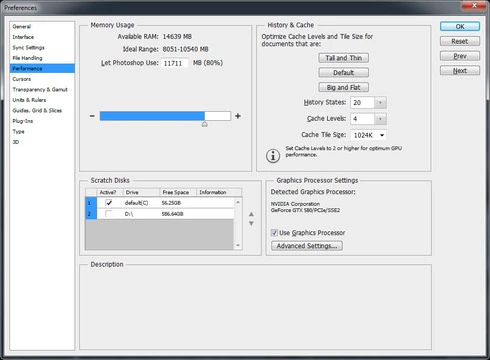
Photoshop Preferences:

Other Notes:
- Happens in both 32 bit and 64 bit versions
- I have the same issue with Photoshop CC 2014.

This topic has been closed for replies.

17 replies

JoeHoranAuthor
Known Participant
December 15, 2014
Got it. So then it is a known issue in Photoshop CC?

These are the options on each of those layer comps (only updating visibility):
Inspiring
December 15, 2014
Yeah, but it tells us that the problem is something we already know about.

The combination of a lot of layers and many layer comps is going to be slow whenever you do something that has to update the layer comps (like moving layers).
JoeHoranAuthor
Known Participant
December 15, 2014
That helped as well. I deleted each layer comp one-by-one and once I was down to 2 layer comps the lag was gone.

I hope this isn't the solution though as using those layer comps are crucial to my workflow.
Inspiring
December 15, 2014
OK, the layers + comps are probably what is slowing it down.
Try removing all the comps and see if it speeds up.
JoeHoranAuthor
Known Participant
December 15, 2014
- Windows 7 x64
- GTX 580 with latest drivers from nvidia

- 914 layers (ungrouped all layers and used this script)
- 27 Layer comps
JoeHoranAuthor
Known Participant
December 15, 2014
- Windows 7 x64
- GTX 580 with latest drivers from nvidia

- 914 layers (ungrouped all layers and used this script)
- 27 Layer comps
Inspiring
December 15, 2014
What OS version are you using?
Have you updated your video card driver from the GPU maker's website?

How many layers are in the document?
How many layer comps do you have in that document?