


Participating Frequently
February 26, 2020

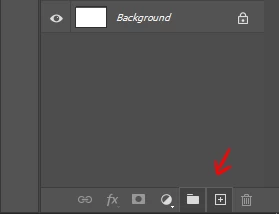
P: "New Layer" and "New Group" buttons in the Layers panel stay down after clicking on it

  • February 26, 2020
  • 56 replies
  • 3408 views

Hello,

since the last update, almost every time I click on the New Layer and/or New Group buttons in the Layers panel, the buttons become stuck and unusable. I have to restart Photoshop to reset their state.
Not game breaking but definitely annoying.


Regards
This topic has been closed for replies.

56 replies

David Mohr
Participating Frequently
March 4, 2020
Howdy Julien,

Thank you for trying to track this down.  Unfortunately, that doesn't trigger anything on my machine.  But it does open a new line of research.  Can you trigger this bug reliably on your machine now?  Were you using a specific Workspace?  If so, which one?  Are you using GPU?  If you turn it off, does the problem persist?  OTHER PEOPLE, are you seeing the same thing?  Perhaps my machine is the outlier.

Thanks,
David
Participating Frequently
March 4, 2020
Hi David,
I've finally caught the bug in the act. It happens when a scrollbar is present in the layers window, and you click and drag a layer over the buttons:


Edit : you can sometimes fix an already bugged button by doing the same move.
Inspiring
February 29, 2020
It is the same for me. Just doing basic stuff, creating layers and trying to group them. I havn't had the new layer stuck, but the new group button. I have to restart Photoshop to get it working again.
(Win 10 Norwegian, latest Photoshop, English)

Ole 
RosaPerry
Inspiring
February 29, 2020
Hi David,

I was doing compositing work. This was my third piece of compositing work since updating to 21.01 and the issues happened every time.

One piece of compositing work can take me up to 5 hours to do. I start out with cutting out my subjects with a pen tool. Then I add layers, placing my subjects on different layers, I add more layers, using the brush tool for artwork, adding textures, colour etc. I group them to keep things in order.  I use curves adjustment layers in between my added layers. This issue with the 'greyed out' buttons usually happens past midway of my workflow. I know I'm winding down my work because that's when I'm ready to finalise my piece with adding new layers for highlights and shadows. I don't use actions, plugins, filters or even adjustment layers for adding highlights and shadows, I prefer to paint them on using blend modes on new layers.

That's my usual workflow in compositing when I encounter the issue with the 'greyed out' buttons. 

I still have PS 20.0.8 installed and so I used it to finish my last compositing piece, without any dramas and since then I've just finished more compositing work in PS 20.0.8 without encountering any issues.

I hope this helps narrow down the problem.

Thanks for taking the time to look at this.
Rosa
David Mohr
Participating Frequently
February 28, 2020
Thank you for these details.  I don't yet have the cause, but this info will help.

Thanks,
David
David Mohr
Participating Frequently
February 28, 2020
Hi Rosa,

Ugh!  That's not right.  8-(  I'm sorry.

So, my question about the mouse clicks was to rule out a different cause.  Okay, ruled out.  But clearly you're running into a new problem.

What kind of work were you doing?  Compositing?  Editing?  What KIND of editing?  I'm trying to narrow down the trigger -- it isn't something I do in either my professional or personal workflows.

Thanks,
David
RosaPerry
Inspiring
February 28, 2020
David -  I'm working on a piece right at this moment. I have not used any Plugins, no issues with my PC etc. and I cannot add a Group or New Layer via the bottom of the Layers Panel as those options are 'greyed out' as you can see below. I have 4 groups and 23 layers. I now have to save my work and restart Photoshop. 

P/S I've decided to work in PS 20.0.8 with no issues. 


Rosa
RosaPerry
Inspiring
February 28, 2020
David, no, did not click the mouse several times. When I realised that my new layer wasn't added, I thought it must have been something I'd done. So I went to click add a new layer and saw the Create New Layer button greyed out. As mentioned prior, I already had something like 46 layers in my document. So it's not as if Create New Layer button hadn't worked before in the same document.

I stress, that this only happened since 21.1 update. I don't believe it's a workflow issue as I've been doing this type of work for 5 years and in all my experience with Photoshop, I've never encountered this issue before. 

I have a decent machine that was built for PS. I've encountered another couple of bugs which I've reported beside this one since the 21.1 update. 
Rosa
David Mohr
Participating Frequently
February 27, 2020
Wow, so both platforms.  Not good.  Flay, did you have Chrome open as well? 

Otherwise, perhaps this is a speed or workflow issue -- did you click the mouse several different times rapidly or move your mouse around and click or similar actions that might "stress" the UI?

Thanks,
David
RosaPerry
Inspiring
February 27, 2020
Hi David,

Yes, I'm on English Windows 10.

This has happened to me twice since 21.1. update. 
I had Google Chrome open as well as my mail app, Outlook.
I wasn't using any plugins at the time.
I wasn't downloading any files.
External hard drive attached which is fine and no issues with.
No issues with my internet connection.

I had only created 2 pieces of artwork since the update.

I can remember exactly what happened with my last piece. 

The Create New Layer button became unresponsive towards the end of a photo-manipulation artwork which had a total of 43 layers. I needed to add a last layer for some brushwork. The document size was only 17.9M/433.2M 

I had to save my work and restart Photoshop and the button became responsive.

The previous time this happened would have been a similar scenario. 
Rosa