


Franck Payen
Inspiring
October 28, 2018

P: Open panels (Libraries, etc) directly from startup screen

  • October 28, 2018
  • 4 replies
  • 289 views

I can't find a way to open the library panel directly from the startup screen.

This was possible in Ps CC2018, by going to the windows menu > libraries
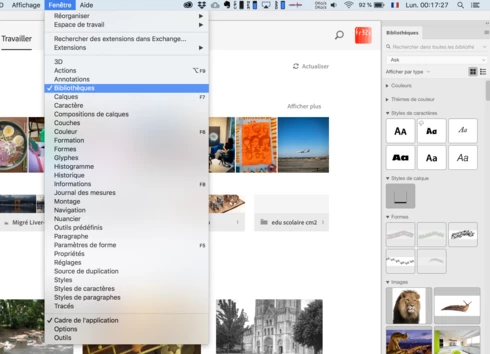


Now, I can, of course, go to any other CC app (including Bridge), go to the library panel there and open it, but since this panel is now my central axis, i feel it as a (small) waste of time...

This is on Mac OS

This topic has been closed for replies.

4 replies

Legend
January 18, 2022

Fixed in 21.0 or later

Inspiring
November 14, 2018


From the home screen without any documents open, panels from the Window menu will not show up when selected. I work with several standard sizes that I have saved as actions (so that guides can also be placed, as opposed to a preset template), and have in the past and always before been able to open the Actions panel without any documents open in order to start a new document. However, the actions panel will not open from the home screen. I went through and tried several other panels (Timeline, Libraries, Tool Presets, etc) and none open either.
Franck Payen
Inspiring
October 31, 2018
Yep, I was driven to the same conclusion by another user having issues with non-docked panels in front of the home window 🙂

Good luck team.
Legend
October 29, 2018
Engineering is looking at a change to display docked panels when the Home screen is shown. Note: you can hit Esc to show the Libraries panel if the home screen is up.