


Inspiring
February 24, 2017

P: Pasting a file instead of dragging it in

  • February 24, 2017
  • 10 replies
  • 289 views

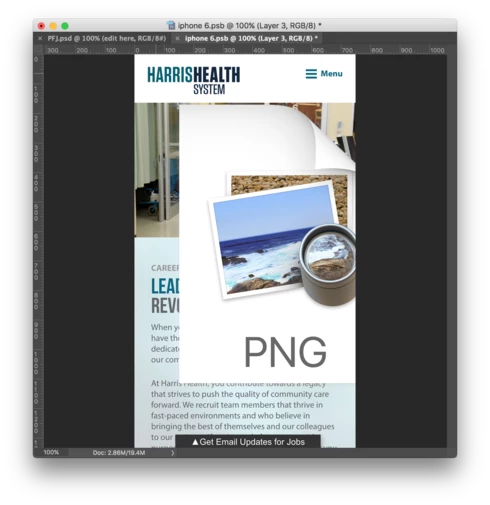
Why would I want this to happen when I paste a file? On a Mac, I Cmd+C a file from my desktop, and Cmd+V it into my document, and this preview icon shows up instead of the actual image. We must get this changed to paste the actual graphic. Seriously...what could the use case EVER BE for this icon to show up?
This topic has been closed for replies.

10 replies

Legend
October 19, 2017
This issue should be work the way you expect in the latest release of Photoshop CC: https://blogs.adobe.com/photoshop/2017/10/get-the-goods-announcing-updates-to-photoshop-cc-dimension...
Inspiring
August 22, 2017
That works fine and that is what I have been doing for years because copy pasting doesn't work, but I recently switched from a desktop to a laptop (which is what a lot of designers are using) and in there it is a lot harder to drag and drop (try dragging and dropping a file from your desktop with a touchpad), so copy pasting would be a breeze.

And again, it works in all native mac apps, it works in XD and Sketch, it would be great if PS had this too.
Inspiring
August 22, 2017
This works in all native mac apps like Mail and even in Adobe's own XD. The reason this is important is that dragging and dropping, especially from the desktop, is far harder on macbooks with a touchpad than it is on desktops.
c.pfaffenbichler
Community Expert
Community Expert
August 22, 2017
What happens if you drag the image into the psd window? 
Inspiring
August 21, 2017


In any app on the mac (including your own XD or Sketch) if I copy an image file (so CMD + C on image.jpg) I can then paste it in my artboard. If I do that in Photoshop however, all I am getting is a large resolution preview of the icon.

Legend
February 27, 2017
Thanks. I'll check with engineering to see if this is something we can hook up.
Inspiring
February 25, 2017
As mentioned in above comments, it works in Sketch
Legend
February 25, 2017
What other applications have you seen where this is even possible?

The Finder has access to the File Name or the File Icon for copy/paste functionality - nothing from the internal file without opening it.

For example,  If I click on an Excel file and cmd C and cmd P into an open Excel file, only the file name is pasted into the active cell.

Further, using your same steps and paste into the OS app "Preview" has the same behavior as Photoshop.

I would say this is "As Designed" and is a limitation of the possible OS/app interaction.
Inspiring
February 25, 2017
Well that's sidestepping the issue while overcomplicating the workflow. Why open a new tab in PS when I have no need to edit the screenshot? 2 steps instead of 1. The issue I'm describing is that copy/pasting the image into the document this way does something completely useless at this time. Surely this could be considered a bug, what could the need be for dropping in a preview icon? Meanwhile, this method works in other design software like Sketch. It also makes more sense than dragging and dropping in the context of a smaller laptop display with Photoshop taking up the entire screen.
Earth Oliver
Legend
February 25, 2017
Pro Tip: Open the file on your desktop in PS instead of copying.

Never in 20+ years of using Ps have i heard of someone trying to copy/paste the way you're describing.