
steveharrington1974
Known Participant
April 22, 2025

P: Photoshop 2025 v26.6 Bug - black document window

  • April 22, 2025
  • 179 replies
  • 37018 views

Photoshop 2025 v26.5 was working absolutely fine, then I made the mistake of updating to the latest patch, version 26.6.0 on my M4 Mac Mini.


After updating to 26.6, the actual document window is solid black - even if I open a photo or previous document...
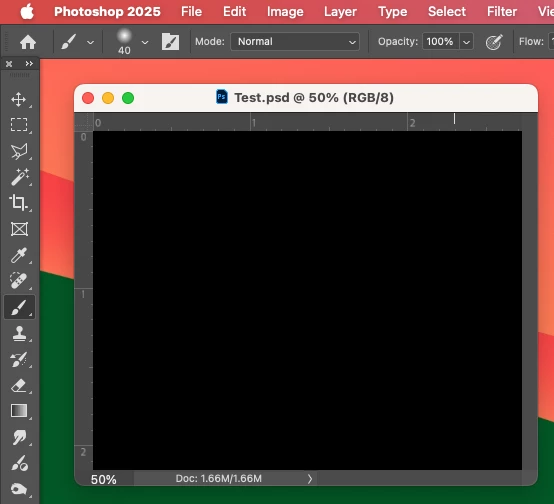


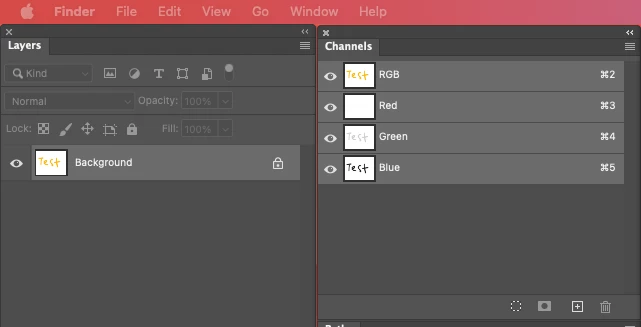
Even though the Layers and Channels palette preview thumbnails are showing what's in the document...


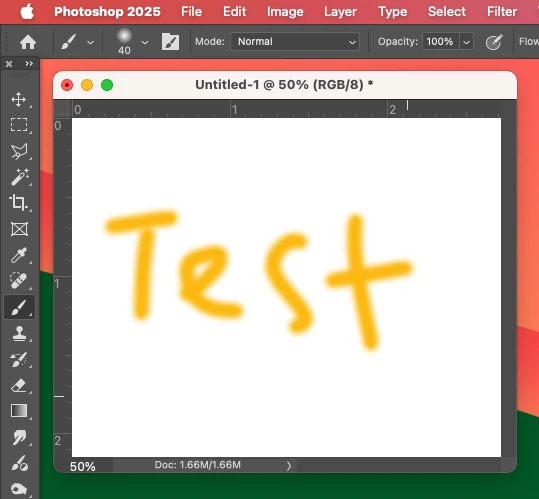
After digging around in Preferences, I tried turning off the "Use Graphics Processing" option and relaunching Photoshop afterwards, and it's working fine again...


I'm just wondering if this is a bug related to the M4 Mac Mini graphics driver compatibility with the version 26.6.0 release? And, if so, when can we expect a fix from Adobe. 


I've discovered the workaround for now, but obviously turning off the Graphics Processing setting will affect perfomance. Like I say, with this option switched on previously to the latest 26.6.0 release, it was working fine so it must be a new bug with 26.6.


I'm never updating this software ever again!!

179 replies

Inspiring
April 28, 2025

Deleting ~/Library/Preferences/Adobe Photoshop 2025 Settings/MachinePrefs.psp file worked for me too.
After deleting the file, I upgraded to v26.6.0 and RGP files work again. No more black screen. And after quiting Photoshop, there is a new MachinePrefs.psp file.

Known Participant
April 28, 2025

I am pleased to report that Omdoudou's solution worked for my Intel laptop and iMac! I have also checked it out on Apple Silicon and it works there as well.


1) Open ~/Library/Preferences/Adobe Photoshop 2025 Settings

2) Delete MachinePrefs.psp

3) Launch Photoshop


A new MachinePrefs.psp file will be generated on first launch.


Bingo. No more black canvas in RGB.

Participant
April 28, 2025

I am having same problem. Updated to 26.6 and all I see is black.
6 month old M4 16" MacBook Pro running Sequoia 15.4.1. Enabling or disabling GPU makes no difference. I'm not going to switch to CMYK mode - I have about 80 images I have to finish - I'm reverting back to 26.5

martinr48087970
Participant
April 28, 2025

Intel iMac 2019, same problem with black document in RGB but not CMYK. Changing GPU setting had no effect.

Known Participant
April 28, 2025

The preferences "fix" might explain why the Adobe folks had such a hard time duplicating the bug. Their test systems may not have had that particular pref file in the first place.

Participant
April 28, 2025
Regardless....makes you question how much beta testing was done.

...............................................................................
Dimitri Androutsos, Ph.D., P.Eng.
Associate Dean, Undergraduate Programs & Student Affairs
Faculty of Engineering and Architectural Science
*Toronto Metropolitan University *
350 Victoria St., Toronto, ON, M5B 2K3, Canada
E: dimitri@torontomu.ca
P: +1-416-979-5000 x552621
F: +1-416-979-5280
W: www.torontomu.ca/ECBE/dimitri/
<>
X: @EngProfD <>
Participant
April 27, 2025

Same issue with RGB files opening as black images since 26.6.0 .

Inspiring
April 27, 2025

Interesting discovery @Omdoudou My thought was that by deleteing the MachinePrefs.psp file that when it was recreated it might go back to a default state of having Graphic Processing OFF. However, when I deleted that file and went back in to the Preferences I had Graphic Processing checked so oddly this seems to be fixed. THANKS for doing the hard work to track it to the ONE file! Nice to have Graphic Processing back on without having to roll back to previous version!

Omdoudou
Participating Frequently
April 27, 2025

Yesterday : Black Windows here with PS 2025 and PS Beta, resetting preferences made the trick (i moved folders "Photoshop 2025 settings" and "Photoshop Beta settings" out of my folder "Preferences" in my "Library")
Now I'm going to put back preferences in place, one after one, to see which was the culprit... 🤗

Today : i put back the files ten by ten to find the culprit
the bad file in folders "Photoshop 2025 settings" and "Photoshop Beta settings" is a file whose name is "MachinePrefs.psp"
I deleted it in both folders and "Voila!", black windows vanished...
All the other files were OK.
Hope this can help !

Participant
April 27, 2025

My Adobe CC 2025 will not  open my photos. I get black screens (but the photos DO show up in Layers). This has occurred just in the last couple of days. I have not chjanged preferences or anuything else.


I can open my PhotoShop files in Adobe CC 2024, but this has become inconvenient. 


Is this a known problem, and will it be corrected?


Thanks.

kglad
Community Expert
Community Expert
April 27, 2025

in the future, to find the best place to post your message, use the list here, https://community.adobe.com/

p.s. i don't think the adobe website, and forums in particular, are easy to navigate, so don't spend a lot of time searching that forum list. do your best and we'll move the post (like this one has already been moved) if it helps you get responses.


<"moved from cc desktop bugs">
Inspiring
April 27, 2025

Maybe this happens only while upgrade Photoshop from earlier version to 26.6.0 (and Photoshop Beta to version after 26.6.0 build 3038).