
steveharrington1974
Known Participant
April 22, 2025

P: Photoshop 2025 v26.6 Bug - black document window

  • April 22, 2025
  • 179 replies
  • 37119 views

Photoshop 2025 v26.5 was working absolutely fine, then I made the mistake of updating to the latest patch, version 26.6.0 on my M4 Mac Mini.


After updating to 26.6, the actual document window is solid black - even if I open a photo or previous document...
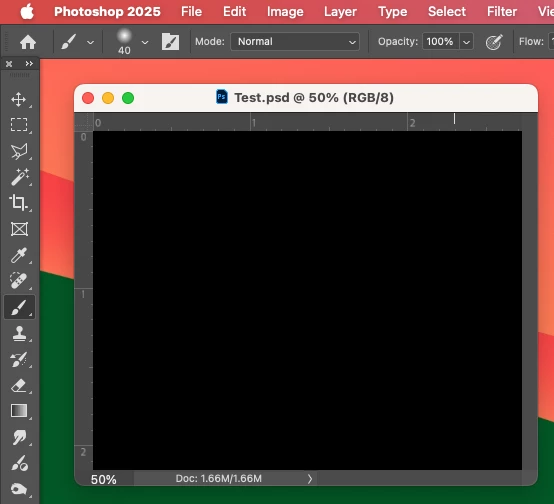


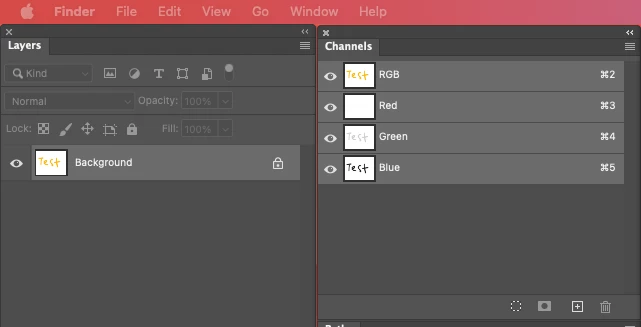
Even though the Layers and Channels palette preview thumbnails are showing what's in the document...


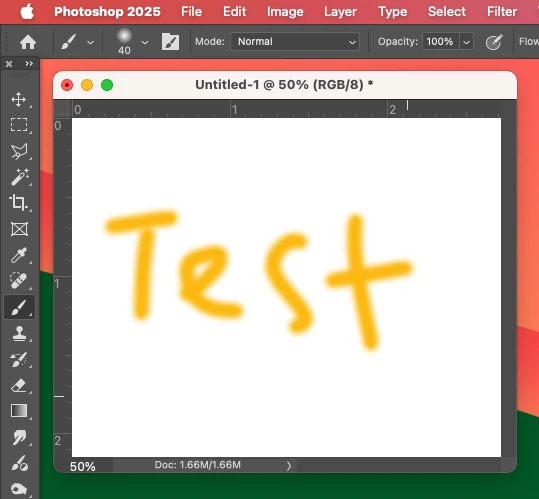
After digging around in Preferences, I tried turning off the "Use Graphics Processing" option and relaunching Photoshop afterwards, and it's working fine again...


I'm just wondering if this is a bug related to the M4 Mac Mini graphics driver compatibility with the version 26.6.0 release? And, if so, when can we expect a fix from Adobe. 


I've discovered the workaround for now, but obviously turning off the Graphics Processing setting will affect perfomance. Like I say, with this option switched on previously to the latest 26.6.0 release, it was working fine so it must be a new bug with 26.6.


I'm never updating this software ever again!!

179 replies

Participant
May 8, 2025

Hoy actualiacé photoshop beta en desktop y todos los archivos que abro o archivos nuevos salen negros. Es un error de la actualización creo porque antes de eso estaba todo bien. He estado investigando y cuando activo solo 1 canal, la imagen se puede ver pero cuando se activan todos sale negro. Adjunto imágenes donde se puede ver el error.

Gudygg
Inspiring
May 8, 2025

Buen día.
Acabo de actualizar photoshop beta pero las imagenes me salen todas en negro.
Como se arregla este problema.

Gracias

Participating Frequently
May 8, 2025

Opened PS beta 26.8.0 on new iMac and newer model Macbook Pro and tried to open an image in each. Both programs only showed a black screen. Reinstalled previous version and all is OK.

Pixel Relish
Participating Frequently
May 8, 2025

Didn't have this issues with 26.5, however did with the update from 26.7 to 26.8. Removing the MachinePref.psp file did NOT resolve the issue. Have multiple deadlines and don't have time to experiment further (everything was working fine yesterday 6PM PDT), so uninstalled 26.8 then reinstalled 26.7, which continues to work as expected.

tlghnbsglmz
Participant
May 8, 2025

all my rgb files in phptoshop layer intp black, wıth new uptade 

Peru Bob
Community Expert
Community Expert
May 8, 2025

Moved from the CC Desktop forum to the Photoshop forum.

steveharrington1974
Known Participant
May 8, 2025

> Hey Steve, I just followed your advice and it is working for me again as well. Did you observe any disadvantages with turning the Graphics Processing off? 


Not really, but then I've got 48 GB RAM to play with. Scrolling large files seems a little bit slower though.

Participant
May 8, 2025

Thanks I will have a look

Participant
May 8, 2025
En mi caso sigue con el mismo problema despues de desactivar el procesador grafico. 
 
Lo estoy resolviendo utilizando una version anterior, de octubre 2024, y funciona sin problemas.
Por lo que creo que es un problema generado por la ultima actualizacion, del 22/04/2025.
 
Espero que en la proxima actualización resuelvan este problema.
 
Gracias,
 
Participant
May 8, 2025

Photoshop shows a black page when I open a PSD file. What can I do?

kglad
Community Expert
Community Expert
May 8, 2025

reset your preferences

Participant
May 8, 2025

same for me. Cannot find these anywhere...