


lizlbauer
Participating Frequently
January 5, 2023

P: Photoshop 24.1.0 properties panel bug

  • January 5, 2023
  • 17 replies
  • 882 views

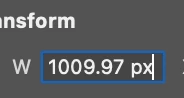
can't manually set width or height in properties panel. when i start typing in field the text cursor is kicked to end of field and resets the numbers. i tried deleting my preferences and restarting photoshop, but still wasn’t able to manually enter size in properties panel.


running photoshop 24.1.0 on MacBook Pro M1 Max Monterey 12.6.2


This topic has been closed for replies.

17 replies

CShubert
Community Manager
Community Manager
January 6, 2023

Thank you for the update @lizlbauer 


Let's make sure we're in a default state and there are no stale settings somewhere: 

Restore your preferences using this manual method:  

https://helpx.adobe.com/photoshop/using/preferences.html#Manually 

Does it work correctly? 

If that doesn't solve it, you can quit Photoshop and put the Settings folder back. 


It may help if we could see your Photoshop System Info. Launch Photoshop, and select Help >System Info...and copy/paste the text in a reply.  


Thank you,

Cory

lizlbauer
lizlbauerAuthor
Participating Frequently
January 6, 2023

issue is specific to properties panel. it happens with any type of object, image, text, shape etc. anytime i try manually editing width, height, x, y

lizlbauer
lizlbauerAuthor
Participating Frequently
January 6, 2023

this issue happens on an file size big or small. if i try to manually change the value of a shape object width or height, the value won't enter. the type cursor jumps to the end of the field. the shape stays the same size. using regular transform works, but i cannot get the shapes to be exact sizes. i used to be able to manually set the shape size in the properties panel.  this happens in the width, height, x, y fields


Kevin Stohlmeyer
Community Expert
Community Expert
January 6, 2023

Is the issue specific to the Properties panel or does the same behavior occur in the Options bar, other panels (ex. Clone Source)?

lizlbauer
lizlbauerAuthor
Participating Frequently
January 6, 2023

as soon as i start typing the cursor jumps to the end. it doesn't seem to matter how many numbers i type. i even tried copy and pasting a number and that didn't work either.

CShubert
Community Manager
Community Manager
January 5, 2023

Hi @lizlbauer happy to help, but we need some more info.  What is the origianl file size, layers etc? Could you share a workflow you are trying to do with a screenshot of your full panels?


Thank you,

Cory

TheDigitalDog
Inspiring
January 5, 2023

Does it matter if you type fewer numeric values? 

Author “Color Management for Photographers" & "Photoshop CC Color Management/pluralsight"