



Released
P: Photoshop 26.10 Incorrect alpha blending on canvas for gamma 1.00 at different zoom levels
Issue:
- Photoshop version: 26.10.0 20250811.r.7 x64 (final, Release)
- OS: Windows 11 64-bit (10.0.26100.4946), 4070 RTX (mobile), i7-13700h, Windows HDR enabled
Steps to reproduce:
- Create a new 1000 x 1000 px document., RGB, 8 bit.
- In [Edit > Color Settings...] enable "Blend RGB colors using gamma 1.00".
- Enable [Settings > Technology Previews > Precise color management for HDR display], but
it seems to be irrelevant (that's the only other setting I changed since Photoshop installation). - Create 200 x 200 px, #00f blue raster square with 50% opacity ("Normal" blend).
- Ctrl + J to duplicate this layer.
- Group them.
- Fill bg to say #eee.
- Notice that the color they have is #6767f8 (correct I assume).
- Move the group with the Move Tool (V) and notice the color changed to #7f7ffb.
- Use zoom/pan (Z) and notice it flickered back to #6767f8.
- It's even possible to duplicate this group and fix both copies by the zoom tool
and then drag only one of these groups with Move Tool (V) and screenshot this
and clearly see the bug being screenshottable only on the group that was just dragged.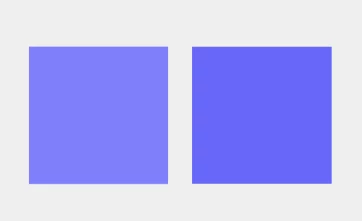
Expected result:
Blending works consistently and produces always only #6767f8 blend.
Actual result:
Wrong blending only when gamma is 1.00.
It works with default settings for [Edit > Color Settings...].
 AdChoices