HubertusausBerlin
Inspiring
May 3, 2026

P: Photoshop 27.6 – RAM error with Remove Tool, Windows Ink, and assigned Wacom pen side switches

  • May 3, 2026
  • 7 replies
  • 251 views

Hi everyone,


I would like to report this explicitly as a bug report, and I kindly ask that it not be moved to the Questions section again. The behavior is reproducible in my setup and appears to involve the interaction between Photoshop 27.6, Windows Ink, the Remove Tool, and assigned Wacom pen side switches.


Short description


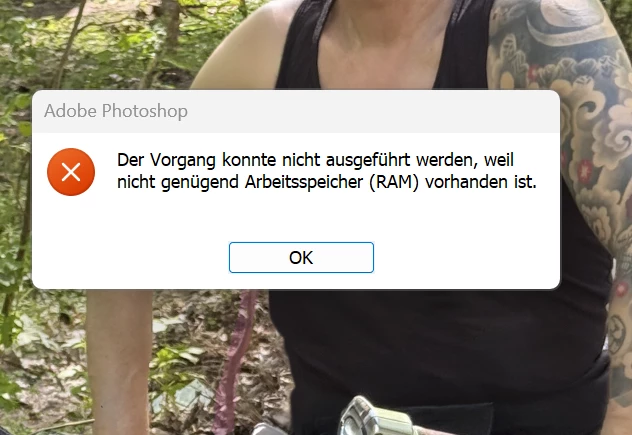
In Photoshop 27.6, using the Remove Tool repeatedly causes a massive memory increase. Photoshop then becomes unresponsive for a while and eventually shows the error message:


“The operation could not be completed because there is not enough RAM.”


In my tests, this happens when using the Wacom pen, but not when performing the same Remove Tool actions with the mouse.


Key finding

I ran several comparison tests with the same file while monitoring Windows Task Manager.


Test 1 – Remove Tool with mouse input

  • Photoshop 27.6
  • Windows Ink enabled
  • Remove Tool
  • input with the mouse
  • 46 Remove Tool strokes
  • no freeze
  • no RAM error

Memory usage increases somewhat, but remains controlled.


Test 2 – Remove Tool with Wacom Pro Pen 3, side switches assigned

  • Photoshop 27.6
  • Windows Ink enabled
  • Remove Tool
  • input with Wacom Pro Pen 3
  • pen side switches assigned
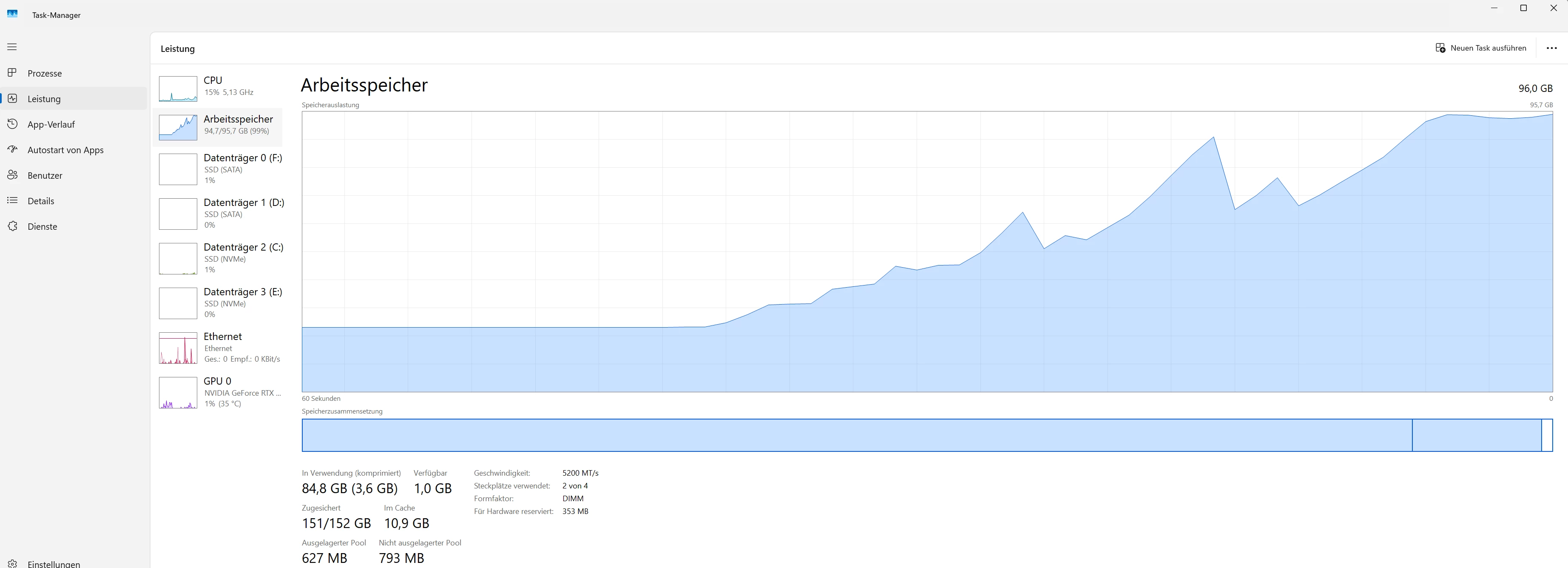
  • after about 12–14 Remove Tool strokes, the error occurs

At that point, memory increases massively:

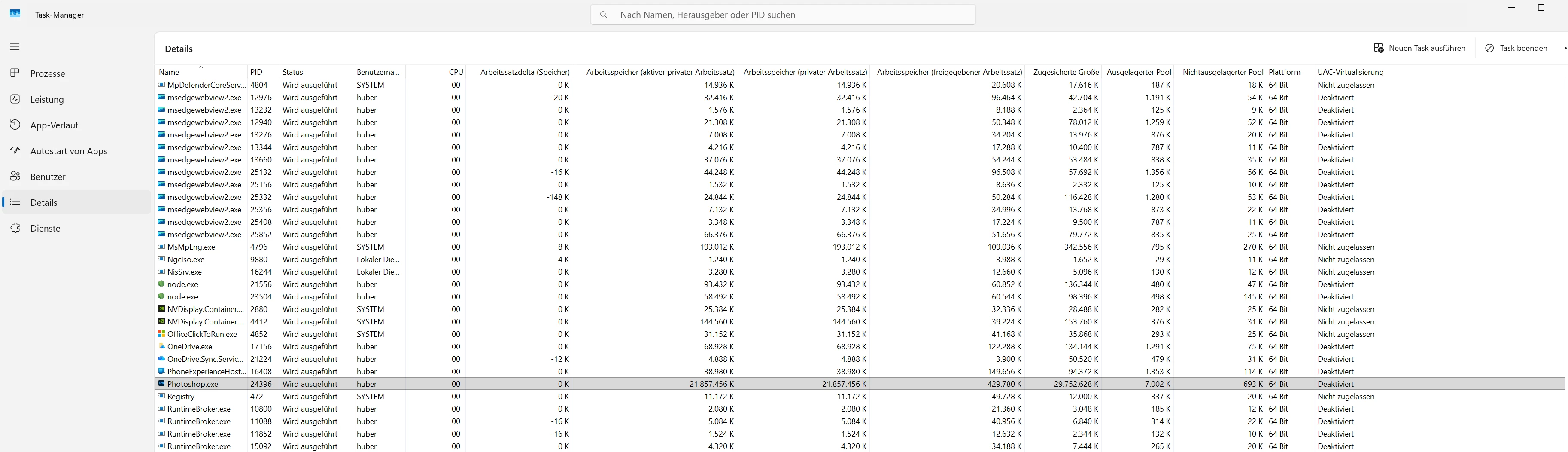
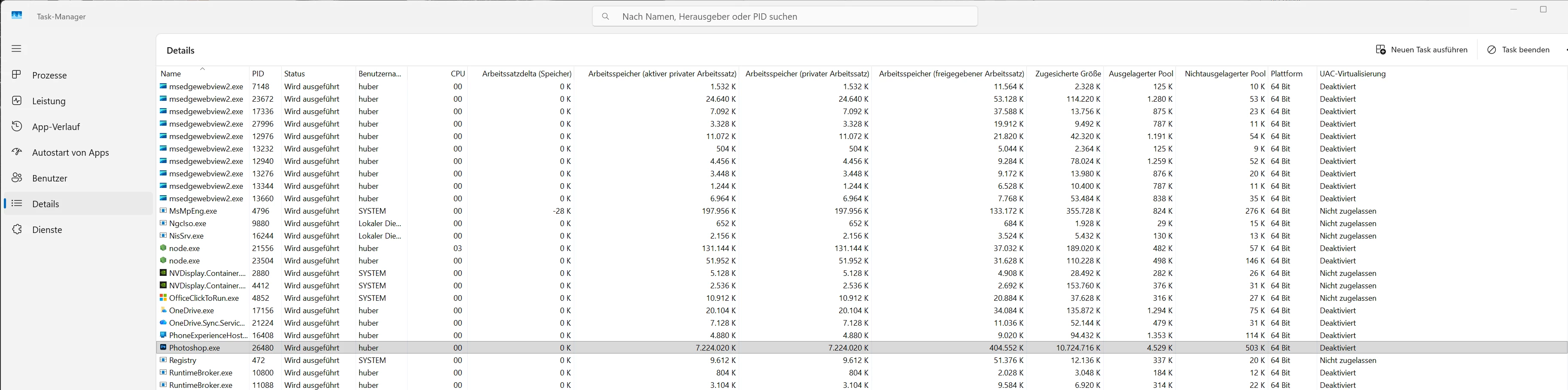
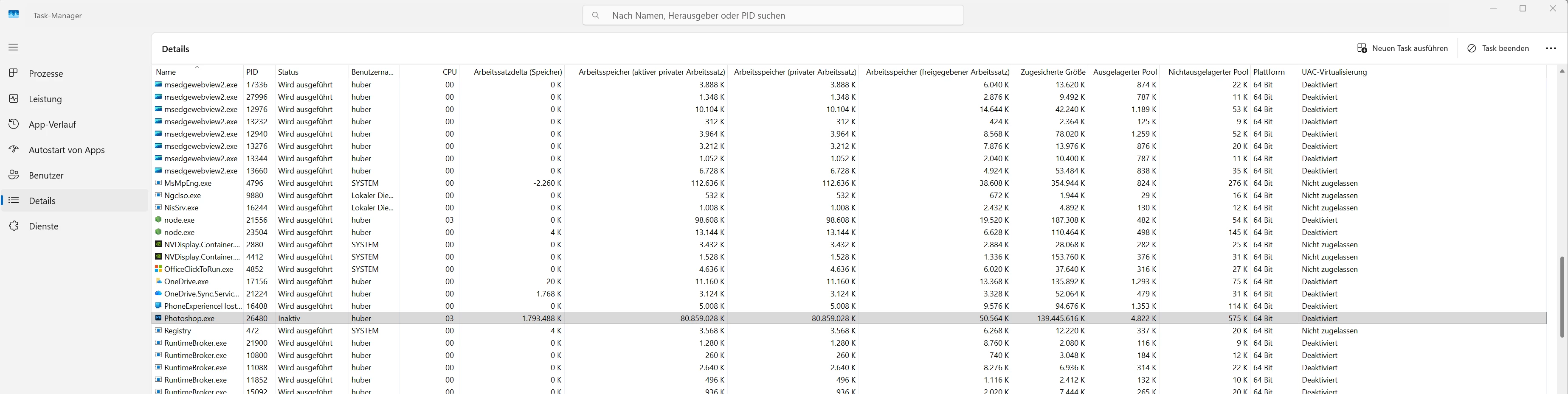
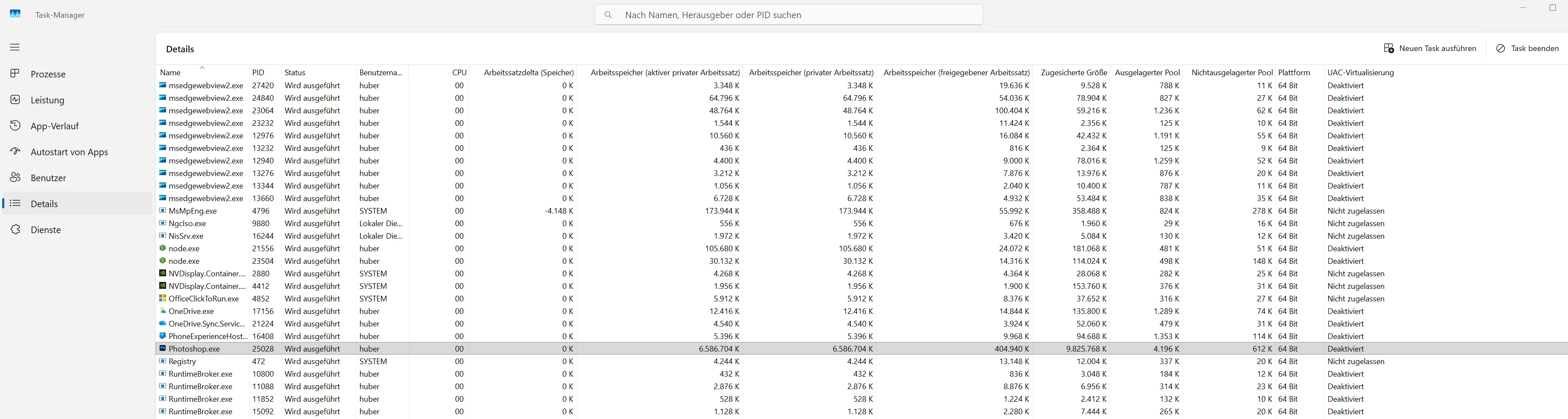
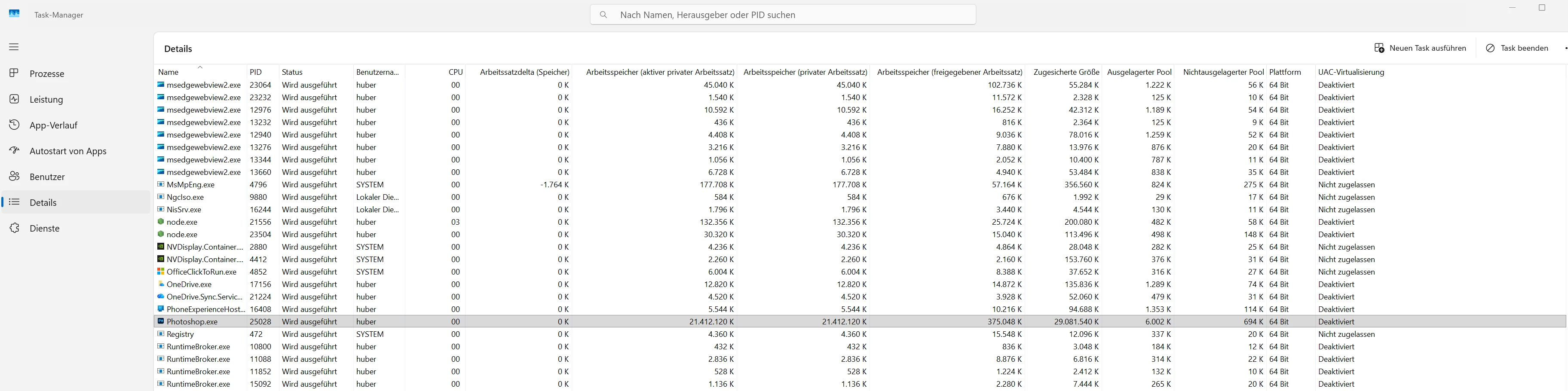
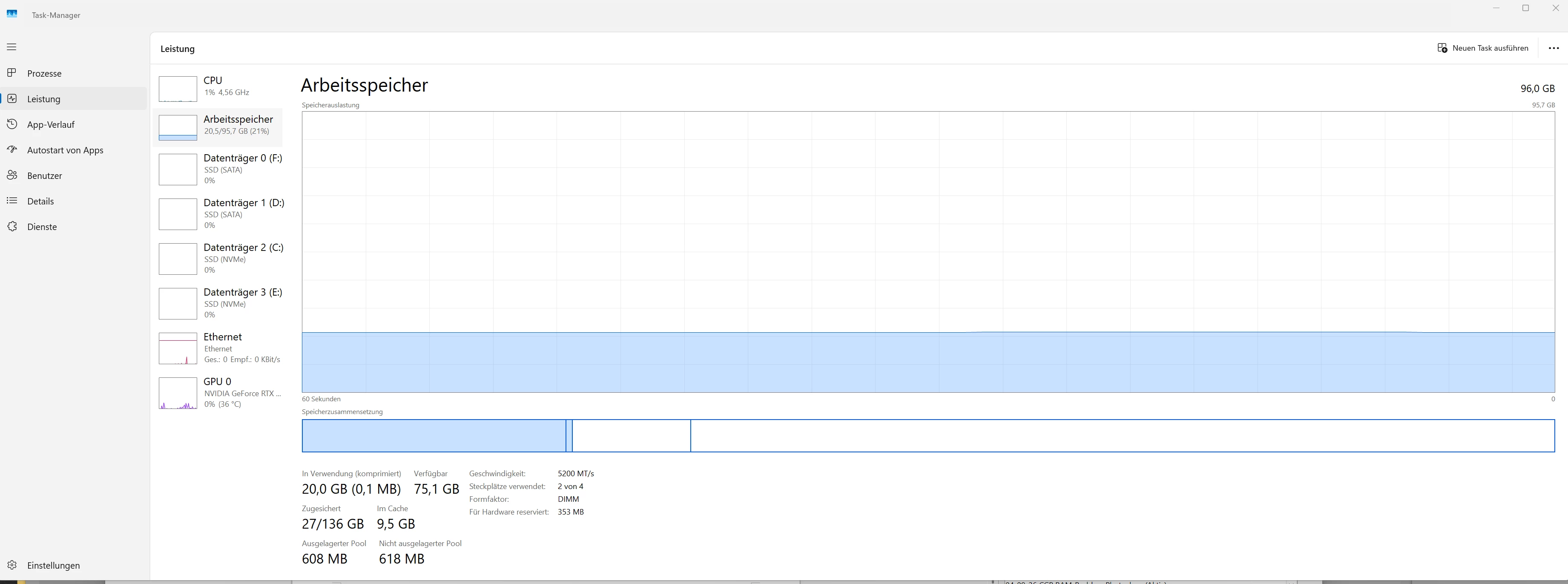
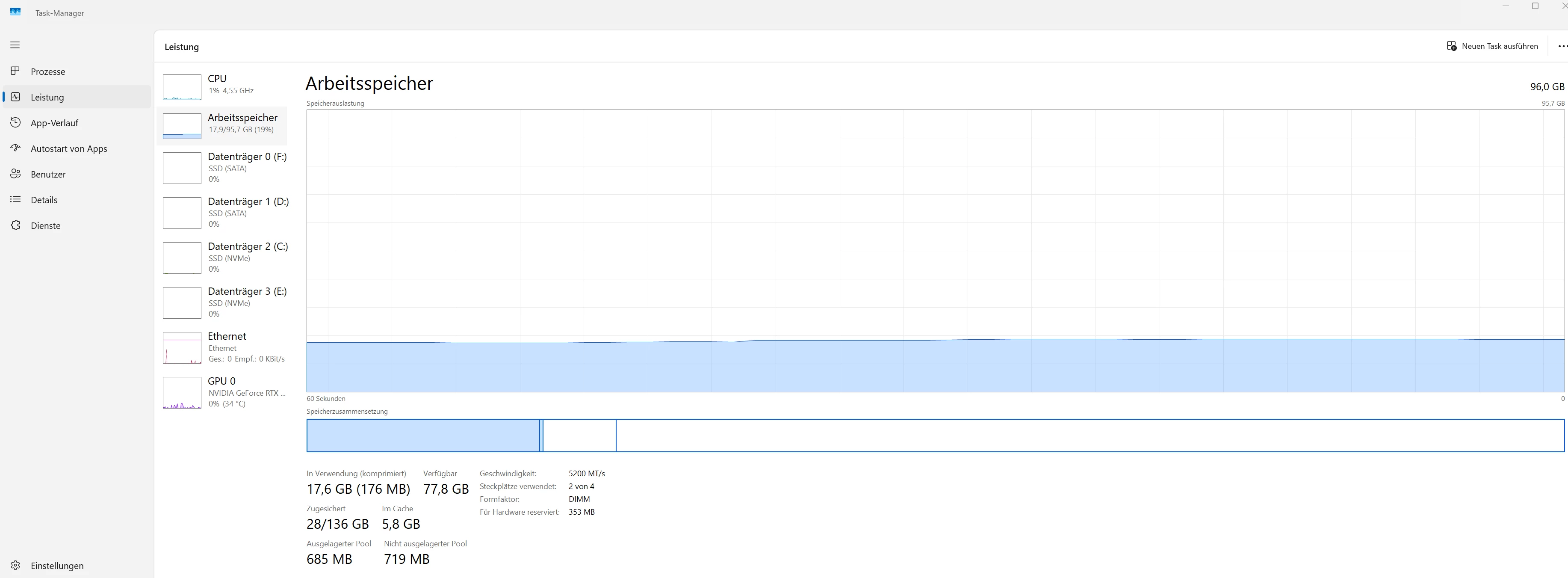
  • Windows Task Manager: Committed rises to about 151–153 GB
  • Commit limit is about 152–164 GB
  • Photoshop reaches a committed size of about 139–153 GB in Task Manager Details
  • Photoshop becomes unresponsive / inactive
  • then the RAM error appears


Test 3 – Remove Tool with Wacom Pro Pen 3, side switches disabled

  • Photoshop 27.6
  • Windows Ink enabled
  • Remove Tool
  • input with Wacom Pro Pen 3
  • pen side switches disabled
  • 56 Remove Tool strokes
  • no freeze
  • no RAM error
  • memory remains much lower


This strongly suggests that the issue is not triggered by the Remove Tool alone, but by the combination of:


Photoshop 27.6 + Windows Ink + Remove Tool + Wacom pen with assigned side switches


Why this does not look like normal RAM shortage


My system has:

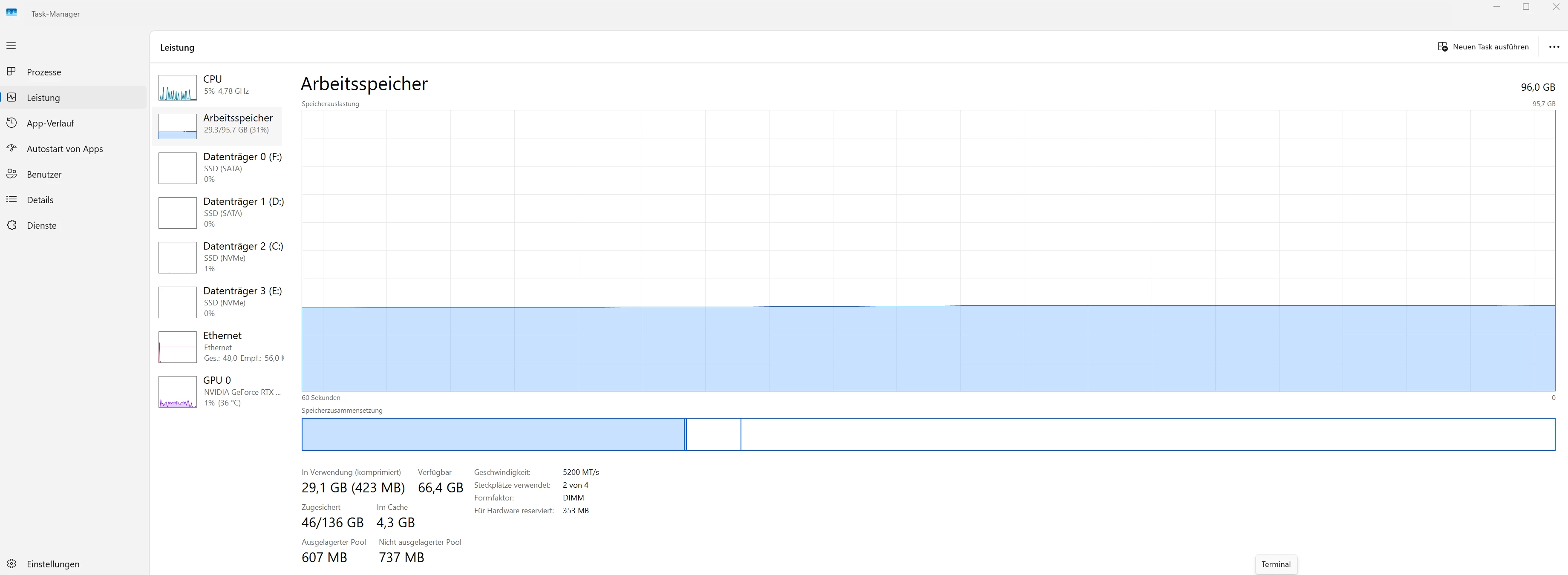
  • 96 GB RAM
  • plenty of free scratch disk space
  • NVIDIA RTX 4090
  • current NVIDIA Studio Driver
  • Wacom Intuos Pro PTK-670 / PTK-870
  • current Wacom driver 6.4.13-4
  • Wacom Pro Pen 3
  • Windows 11 25H2


Before the error occurs, there is enough memory available. The problem is that Photoshop suddenly requests an extreme amount of committed memory while using the Remove Tool with the pen. To me, this looks more like a memory leak or memory runaway than a normal lack of RAM.


Mouse vs pen comparison


The critical difference is:

  • Mouse input: 46 Remove Tool strokes without error
  • Pen input with assigned side switches: error after about 12–14 strokes
  • Pen input with side switches disabled: 56 Remove Tool strokes without error

So the assigned Wacom pen side switches appear to be a relevant trigger when using Windows Ink.


Practical impact


Disabling the pen side switches is unfortunately not a usable long-term workaround for me. I rely on the pen side switches in Photoshop for context menus, layer-related actions, and normal workflow operations.

Using the mouse is also only a workaround. For retouching work, using the Remove Tool with the pen is much more natural and productive.


Additional context


Up to Photoshop 27.3.1, I was able to work with WinTab, and these issues did not occur there. In newer Photoshop versions, WinTab is no longer usable in my setup, so in Photoshop 27.6 I have to use Windows Ink.


The separate WinTab freeze is a different issue. This report is specifically about the RAM / memory error with the Remove Tool under Windows Ink.


Already tested

  • Photoshop 27.6
  • Windows Ink enabled
  • Remove Tool Processing set to More Stable
  • mouse input compared with pen input
  • pen with assigned side switches compared with pen with side switches disabled
  • Task Manager memory values documented
  • enough RAM / VRAM / scratch disk space available
  • GPU compatibility check without issues
  • current driver environment


Conclusion


From my point of view, this is a reproducible bug in Photoshop 27.6:


When using the Remove Tool under Windows Ink with a Wacom pen that has assigned side switches, Photoshop causes a massive memory increase until it eventually fails with a RAM error.


Please treat this as a bug report and forward it to the appropriate development team.


Thx al lot! Hubertus 📺🫎


Screenshots


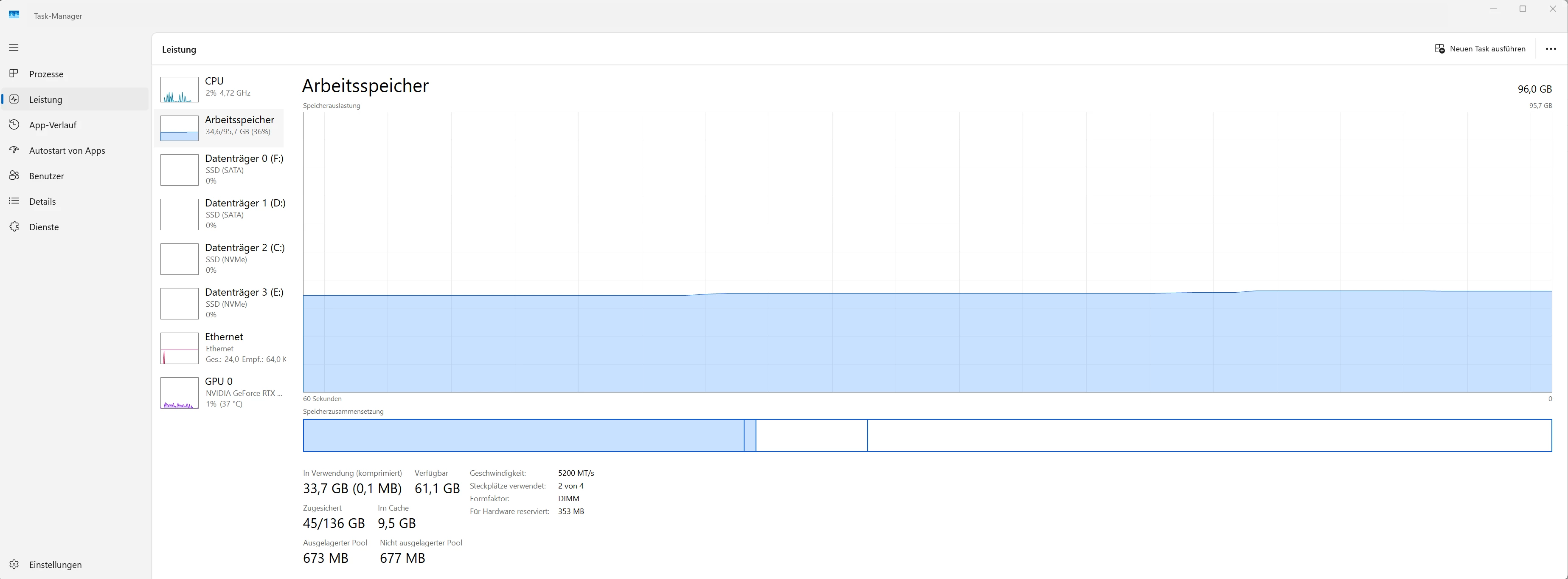
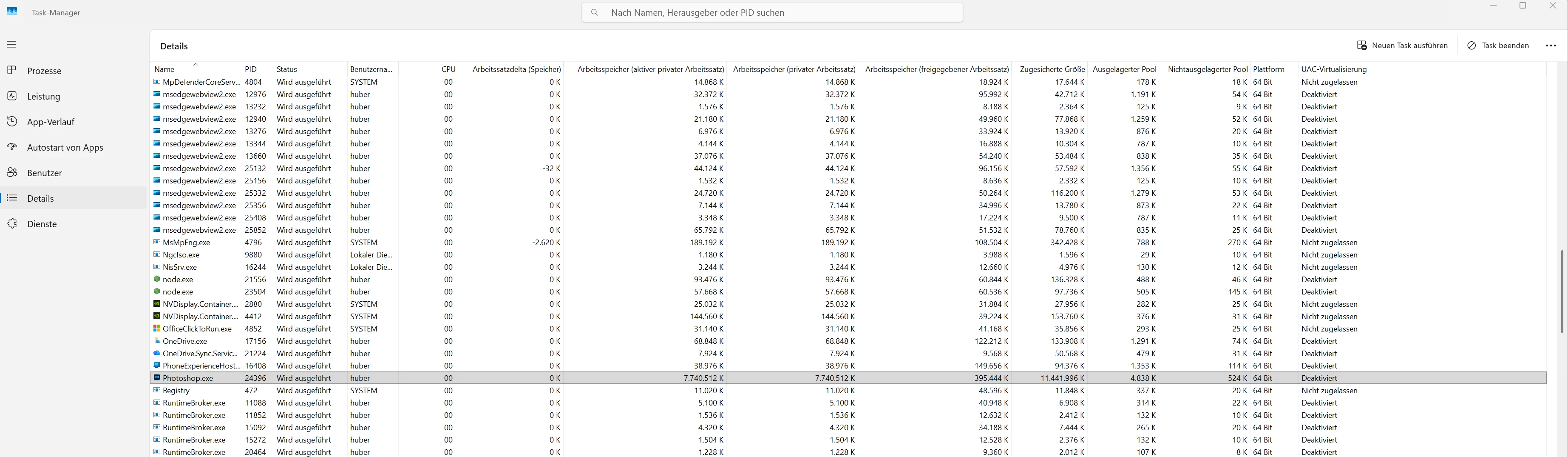
I am attaching screenshots from Windows Task Manager showing the difference between the tests:

  • initial values
  • after many Remove Tool strokes with the mouse
  • after only a few Remove Tool strokes with pen input and assigned side switches
  • after many Remove Tool strokes with pen input and disabled side switches


Test 1:  Mouse input: Start + 46 Remove Tool strokes without error  (46 strokes without error)
 

start
46 strokes
start
46 strokes


→ Test 2 – Remove Tool with Wacom Pro Pen 3, side switches assigned (after 14 strokes ERROR!)
 

start
14 strokes
start
14 strokes


→ Test 3 – Remove Tool with Wacom Pro Pen 3, side switches disabled  (56 strokes without error)
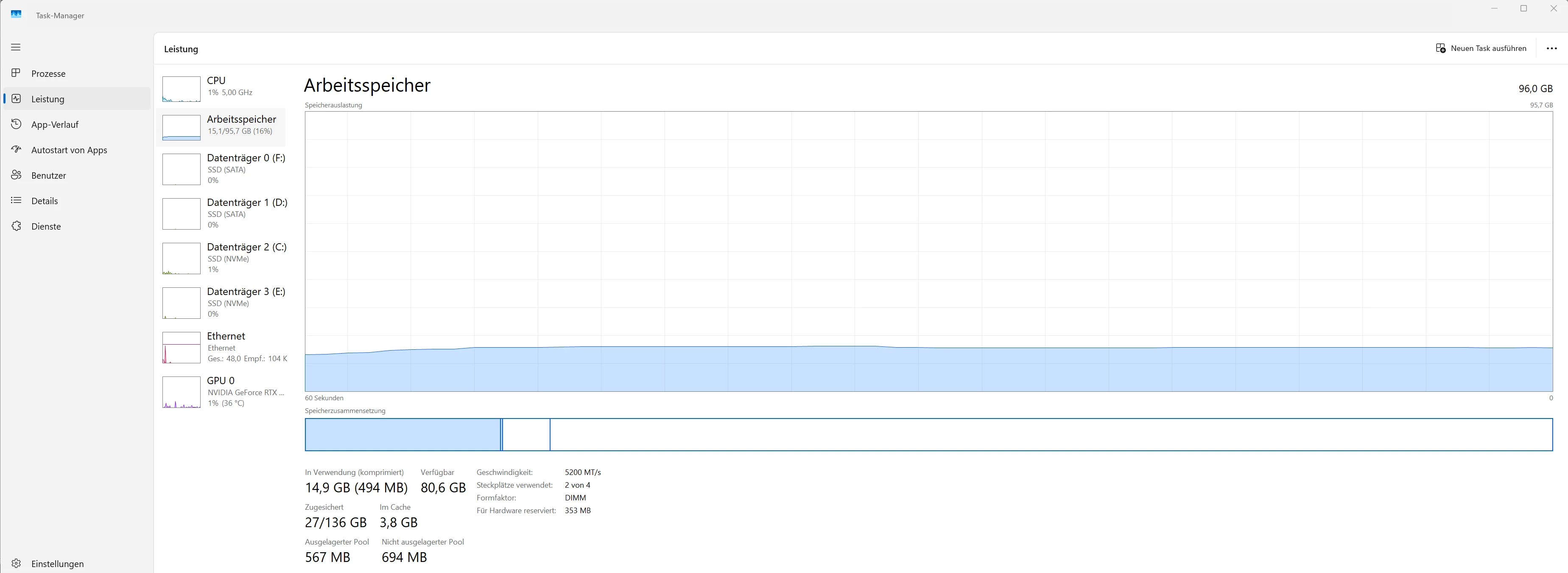
 

start
56 strokes
start
56 strokes


    7 replies

    Sameer K
    Community Manager
    Community Manager
    May 19, 2026

    The team is investigating this. Thanks for the detailed post and continued collaboration. 

    Best, 

    Sameer K

    Anshul_Saini
    Community Manager
    Community Manager
    May 17, 2026

    Hi ​@Aaah-Doh!-be ​@HubertusausBerlin,

    Thank you for reporting this issue. We'd appreciate your help testing one more thing:

    If you have access to the Photoshop (Beta) app (available via Creative Cloud under the Beta apps section), please install it and download the Remove Tool advanced components from Get add-ons.

    After that, could you try the following:

    • Go to Edit > Preferences > Image Processing
    • Test with both Faster and Stable
    • Restart Photoshop
    • Open the same file in Photoshop (Beta)
    • Let us know if the RAM error still occurs

    The Beta version uses a slightly enhanced pipeline than the version in 27.6.

    We'll share your findings directly with the product engineering team. Thanks for helping us track this down!

    Best,
    Anshul Saini

    HubertusausBerlin
    Inspiring
    May 17, 2026

    @Anshul_Saini 


    Thank you very much for your efforts!  🤓


    I tested this in Photoshop (Beta) with the Remove Tool advanced components installed.


    Important: This was a fresh Photoshop Beta setup. I did not migrate my normal Photoshop settings/workspaces/presets.


    Test setup

    • Photoshop Beta (27.8)
    • Windows Ink enabled
    • Wacom Pro Pen 3
    • normal pen side switch assignments
    • same test file as before
    • Task Manager open to monitor memory usage
    • Remove Tool advanced components installed
     

    Test 1 – Remove Tool Processing: Stable

    I tested with Remove Tool Processing = Stable.

    • 0 strokes: memory usage normal
    • 12 strokes: memory usage increased, but stayed controlled
    • 40 strokes: still stable
    • 60 strokes: still stable
    • no freeze
    • no RAM error

    Result: Stable seems much improved in the Beta.
    The Remove Tool still increases memory usage, but it remains within a reasonable range and does not run into the massive memory spike I saw in Photoshop 27.6.


    start
    40 strokes
    60 strokes


    Test 2 – Remove Tool Processing: Faster

    I then restarted Photoshop Beta and tested with Remove Tool Processing = Faster.

    • 0 strokes: memory usage normal
    • around 15 strokes: memory usage started rising rapidly
    • RAM error occurred again
    • after switching to the desktop, returning to Photoshop, and changing to another tool, memory usage dropped again

    Result: The RAM error still occurs with Faster.


    start
    15 strokes -  RAM error
    after error - switching to desktop and back + another tool


    Test 3 – Counter-check with Stable again


    I restarted / retested with Stable again to confirm the result.

    I also tested inside a duplicated image layer converted to a Smart Object.

    • 40 Remove Tool strokes inside the Smart Object: stable
    • closed the document: memory usage stayed roughly at the elevated level
    • reopened the same file and repeated the test: again stable
    • another 40 Remove Tool strokes: still stable
    • closed the document again: memory usage remained roughly at the elevated level
    • opened a new empty document with another tool selected: memory usage dropped back down
    • selecting the Remove Tool in the empty document caused a small memory increase
    • deselecting the Remove Tool caused that small increase to drop again

    So with Stable, the Beta does not show the previous massive runaway behavior in my tests. However, some memory remains allocated after closing the document until another document/tool state seems to reset it.


    after 40 strokes (in smart object)
    closed the document: memory usage stayed roughly at the elevated level
    the same picture opend again, another 40 Remove Tool strokes: still stable
    closed the document again: memory usage remained roughly at the elevated level
    opened a new empty document with another tool selected: memory usage dropped back down
    selecting the Remove Tool in the empty document caused a small memory increase
    deselecting the Remove Tool caused that small increase to drop again


    Summary


    For the Remove Tool RAM issue:

    • Photoshop 27.6 / Stable: RAM error reproducible in my setup
    • Photoshop Beta / Stable: no RAM error in my tests so far
    • Photoshop Beta / Faster: RAM error still occurs

    So the enhanced Remove Tool pipeline in the Beta seems to improve the issue significantly when using Stable, but Faster still appears problematic.

    I can attach the Task Manager screenshots showing the memory behavior during these tests.


    One additional observation:


    With Remove Tool Processing set to Stable in Photoshop Beta, memory usage increased moderately during testing and stayed stable. However, after closing the document, memory usage did not immediately return to the original baseline. When I reopened the same file and continued testing, memory usage increased somewhat further but remained stable.


    Only after opening a new empty document with another tool selected did memory usage drop back close to the initial level.


    This may indicate that some Remove Tool / image processing memory is kept in an internal tool or pipeline cache and is not released immediately when the document is closed. In Stable this remains controlled in my tests, while in Faster it still runs into the RAM error.


    Small note regarding WinTab:


    I did not do a full Remove Tool test with WinTab in Photoshop Beta, because WinTab is still not usable in my setup due to the separate brush size slider freeze issue.


    I only briefly checked WinTab in this Photoshop Beta (27.8):
    with PSUserConfig.txt / UseSystemStylus 0 and Windows Ink disabled in Wacom Center, the brush size slider works a few times, then Photoshop freezes again. After switching to the desktop and back, it temporarily works again until the next freeze.


    So for this Remove Tool / RAM test, I focused on Windows Ink, because that is currently the only usable input mode for me in current Photoshop versions.

    Participating Frequently
    May 18, 2026

    Thank you for this extensive testing Hubertu Aus Berlin! Much appreciated. 🙏👍

    Participating Frequently
    May 6, 2026

    This bug has existed for years:


    HubertusausBerlin
    Inspiring
    May 7, 2026

    @Aaah-Doh!-be (and in CC ​@Sameer K )


    Thank you for the link. That is very interesting, and unfortunately also a bit discouraging.


    If I understand the older thread correctly, the general Remove Tool / RAM issue seems to have existed since Photoshop 24.6 / July 2023 and apparently has never been fully resolved.


    However, it does not look to me as if the specific connection with Windows Ink / Wacom pen input / assigned pen side switches was clearly isolated there.


    In my case, the problem only became clearly visible after I had to move away from WinTab in newer Photoshop versions and use Windows Ink instead. With Photoshop 27.3.1 + WinTab, I never had this RAM error with the Remove Tool. At least I never saw the RAM error message, and Photoshop remained usable.


    My current tests in Photoshop 27.6 point to a more specific trigger:

    • Remove Tool with mouse input: many strokes without RAM error
    • Remove Tool with Wacom pen + assigned side switches: massive memory increase and RAM error after only a few strokes
    • Remove Tool with Wacom pen + disabled side switches: many strokes without RAM error


    So at the moment I would interpret it like this:


    The underlying Remove Tool / RAM issue seems to be older and broader.
    But in Photoshop 27.6, I can reproduce a specific variant that is triggered or strongly amplified by Windows Ink / Wacom pen input / assigned pen side switches.


    To me, this does not make it less of a Photoshop bug — rather the opposite. It looks as if an older Remove Tool memory problem can escalate much faster through certain input paths.

    Participating Frequently
    May 10, 2026

    @HubertusausBerlin 

    Regarding WinTab vs Windows Ink (WI), I asked Gemini if WI has been improved for graphics tablet users recently (and BTW I am using it enabled in my Wacom settings), and the answer was:


    Yes, Windows Ink has received significant updates and refinements, particularly within Windows 11 (2024–2026 updates), aimed at improving the experience for graphics tablet users and reducing the latency issues that plagued earlier versions. 


    Here are the key improvements and recent changes for graphics tablet users:


    Major Improvements (2024–2026) 


    • Reduced Latency: Microsoft has significantly updated the ink stack, resulting in up to 85% lower latency, allowing ink to render instantly and feel closer to drawing on paper.
    • "Write Anywhere" Feature: Recent Windows 11 updates allow users to write directly into text fields across the OS, including browser address bars and specialized apps, using their stylus.
    • Improved Palm Rejection: Enhanced algorithms have improved palm rejection when using a pen, allowing for more natural hand positioning without accidental marks.
    • Better Gesture Controls: A "scratch-out" gesture has been added to delete text, improving the flow of handwriting-to-text conversion.
    • Refreshed Ink Tools: The Draw tab in Microsoft 365 apps (OneNote, Word, PowerPoint) has been updated with more color and size options, aligning the behavior of tools across applications.
    • Increased Support for ARM: As of early 2025, major tablet manufacturers (Wacom, XP-Pen, Senselabs) have released drivers that work with Windows 11 ARM computers. [1, 2, 3, 4, 5, 6]


    Key Settings to Know for Artists

    1. Disable "Press and Hold": To avoid the annoying right-click circle while drawing, ensure "Press and hold to perform a right-click equivalent" is disabled in Windows Settings.
    2. Disable Visual Effects: Turn off "Show visual effects" in Pen and Windows Ink settings to reduce lag and interference with color pickers.
    3. Ignore Touch: You can enable "Ignore touch input when I'm using my pen" to prevent accidental touches. 


    Current State of Windows Ink vs. Wintab

    1. Despite improvements, many artists still rely on older "Wintab" drivers for absolute stability in certain professional applications (e.g., Krita, older Photoshop versions).
    2. If you have lagging lines or random jagged lines: It is often recommended to disable "Windows Ink" in your tablet driver settings (Wacom Center, etc.) for that specific application.
    3. If you need pressure sensitivity in modern Windows Apps: Keep Windows Ink on. 


    Known Participant
    May 5, 2026

    DId you test it with disable windows ink ?
     I have a similar setup than yours (PTK470, also a Cintiq), but since a long time I never enable windows ink, even in windows 11 pro setting I change the setting of ink …. the main reason is wacom windows ink always create bugs….

    benoit Kapture foto
    HubertusausBerlin
    Inspiring
    May 5, 2026

    @Kapture benoit 


    Yes, that would normally be my preferred setup as well. Unfortunately, in Photoshop 27.6 I cannot really disable Windows Ink, because WinTab no longer works properly for me since Photoshop 27.4 / 27.6. Photoshop freezes as soon as I move something like the brush size slider.


    I created a separate bug report for that here:
    https://community.adobe.com/bug-reports-711/bug-report-photoshop-27-6-wintab-still-broken-photoshop-freezes-when-adjusting-the-brush-size-slider-1559478


    But I can confirm this: In Photoshop 27.3.1 with WinTab and Windows Ink disabled, I never had this RAM error with the Remove Tool.

    Known Participant
    May 5, 2026

    @HubertusausBerlin 

    out of curiosity did you tried the :  PSUserConfig.text ?

    Also: your scratch disk: is it another SSD Drive then [ C ] .  I always use another internal SSD drive, I don’t use [c drive] for scratch disk...

    Hopefully the problem is not on your end and Adobe will fix it pretty soon…. To many bugs...

    benoit Kapture foto
    Participating Frequently
    May 5, 2026

    Ok, reporting back here again. I managed to get the bug to go away recently by checking my settings in:

    1. The WACOM center
    2. Control Panel → Wacom Tablet Properties

    I initially found Photoshop listed more than once under each category in the Wacom Center.


    Wacom Center


    I removed the generic boxes labelled Photoshop under each category, leaving the blue Ps logo. Then the Remove Tool worked without a problem.

    But the Error recurred. I have just double checked the Wacom Center and found another generic 4-box Photoshop entry, removed it, and again, I can use the Remove Tool both with the graphics pad connected via USB or BT, no problem, memory usage stable.

    Not sure if I just missed that generic Photoshop entry in the Wacom Center, or whether it was automatically added back by Wacom or Photoshop. I will monitor this.

    Please confirm that I am correct, bug reporter.

    HubertusausBerlin
    Inspiring
    May 5, 2026

    @Aaah-Doh!-be 


    Thanks for the suggestion. I checked my Wacom settings again. In my case, I currently only see one Photoshop profile with the blue Ps icon. I do not see any additional generic Photoshop entries being created automatically.


    So I cannot confirm that duplicate Photoshop profiles in Wacom Center are the cause in my setup.


    What I can confirm is that the issue is still reproducible here. With mouse input, I can perform many Remove Tool strokes without an error. With Wacom pen input and assigned pen side switches, Photoshop runs into a massive memory increase after several Remove Tool strokes and eventually shows the RAM error.


    Since you and other users are reporting similar problems, sometimes even without using assigned pen side switches, it looks to me as if the side switches can be a trigger in my setup, but probably not the only possible cause. It seems more like a broader issue involving Photoshop’s Remove Tool, Wacom pen input, and Windows Ink.

    Participating Frequently
    May 6, 2026

    @HubertusausBerlin 

    @Sameer K 

    I have “Use Windows Ink” set to ON for Ps and pen. Are you the same?


    Participating Frequently
    May 5, 2026

    Yes, I echo this bug report. I thought I had fixed it by resetting all my Wacom pen settings for Ps, and installing new Wacom drivers, but the problem persists: just a few strokes of the Remove Tool and Bam!  32GB of RAM maxed out. This problem has been in Ps for at least a year.

    I’m on Win11x64, Ps 27.6, Wacom IntuosPro, NVIDIA GeForce GTX 1660 Super (GIGABYTE GTX 1660 SUPER OC 6G) Graphics Card, Nvidia Studio driver (latest)

    Not using the Wacom pen side switches.

    Sameer K
    Community Manager
    Community Manager
    May 4, 2026

    Thanks for the detailed post and for including your findings. I currently don't have the required hardware to test this. I've since shared this with the broader team to review.


    Thanks!
    Sameer K
    (Type '@' and type my name to mention me when you reply)

    HubertusausBerlin
    Inspiring
    May 4, 2026

    @Sameer K 


    Thank you very much for your reply.


    If I can provide with any further information, please let me know. 


    Hubertus